How do I "update" Webroot b4 scanning? Is it automatic?


  • September 21, 2014
  • 3 replies
  • 30 views

"Updates"?

3 replies

Ssherjj
Moderator
Forum|alt.badge.img+62
  • Moderator
  • September 21, 2014
@ wrote:
"Updates"?
Hello pilot,
 
Welcome to the Community Forum!
 
Webroot updates are done automatically from the Cloud.
One of the great things about Webroot SecureAnywhere is that it is constantly updated.. If you want to check for updates manually look for the Webroot icon in the system tray and right-click on the Webroot icon then click Check For Updates. You will get a dialog box that opens saying "You are currently using the newest SecureAnywhere software. With this version, SecureAnywhere automatically updates the software and no longer downloads threat definitions. Threat protection is now performed "in the cloud" and is always up to date." 


Please have a look at the User Guide Here
 
 
Let us know if you have more questions and we will gladly help! :D
 
Best Regards,

  • Author
  • Fresh Face
  • September 21, 2014
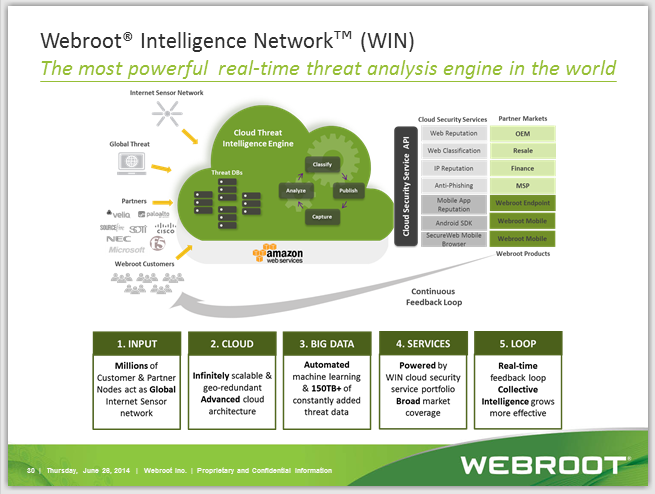
Sorry, the print on the 'user guide'  WIN diagram is so small I can't read it!  Bigger version?

Ssherjj
Moderator
Forum|alt.badge.img+62
  • Moderator
  • September 21, 2014
@ wrote:
Sorry, the print on the 'user guide'  WIN diagram is so small I can't read it!  Bigger version?
Hi pilot,
 
Yes this is really rather small can you go to this link hereabout the Webroot Intelligence Network.
 
http://youtu.be/tcKh0J-v5SM
 
http://youtu.be/mNuOpsRYRqs


Hope this helps!
 
Regards,