how do you install the program......it would not let me erase the old webroot, thus now I can't inst

  • May 20, 2016
  • 1 reply
  • 21 views

I purchased a new Webroot (Secure/Anywhere) AntiVirus One month ago and since I used it last year, also, it would not let me delete the old program so I thought since it a new program, I could install it overlap with the old one......no it does not work.....it keeps telling me that my program is an old registration.....yet it won't let me delete the old one or put in the new one.


1 reply

Baldrick
Gold VIP
  • Gold VIP
  • May 20, 2016
Hi yolandasmeltzer
 
Welcome to the Community Forums.
 
What is your 'old' Webroot program called? If it is post 2011 it is most likely Webroot SecureAnywhere in which case all you need to do to use your 'new' Webroot (Secure/Anywhere) AntiVirus is to enter the new keycode that you will have gotten into the existing installation.
 
Webroot operate a policy of continual improvement rather than going on 'calendar' releases of their software like some other do.
 
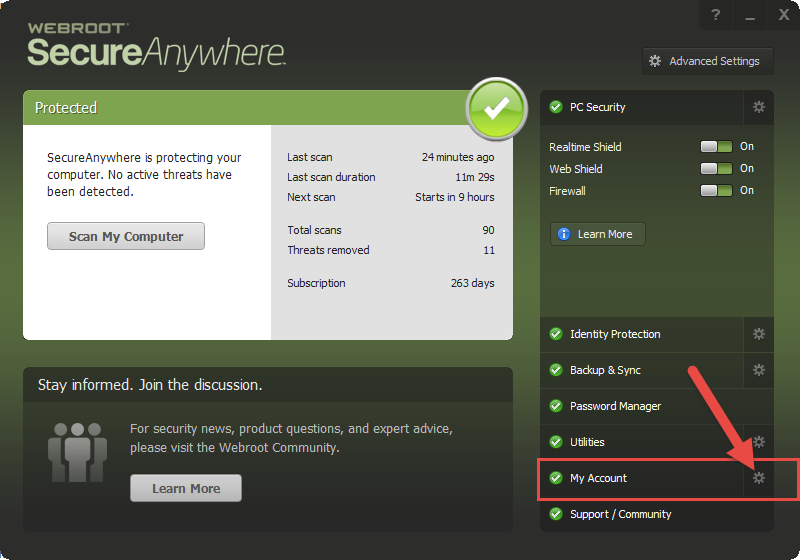
To enter a new keycode into your exisitng installation, assuming it is Webroot Secure Anywhere, is as follows:


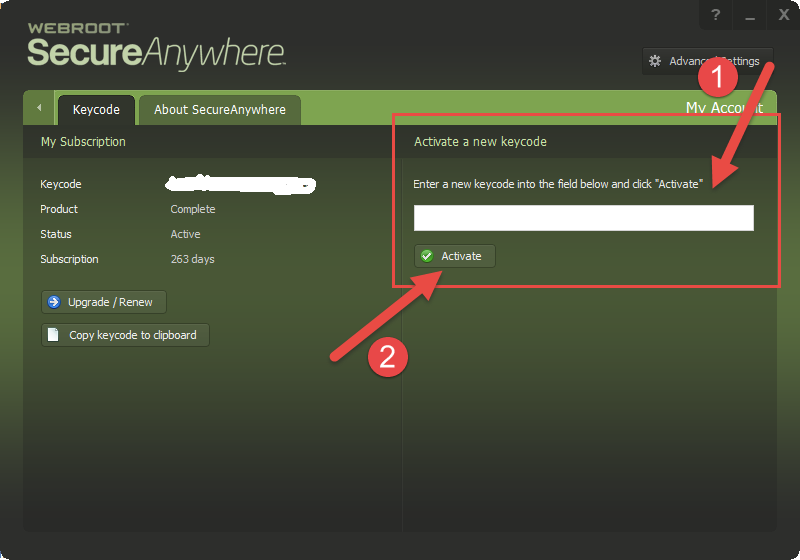
and then:


and that should do it.
 
But if I have misunderstood the probelm or the above does not work then please post back.
 
Regards, Baldrick