How do you know if you have latest version of webroot?

  • October 7, 2015
  • 3 replies
  • 1336 views

how do you know if you have version of webroot?

3 replies

Ssherjj
Moderator
Forum|alt.badge.img+62
  • Moderator
  • October 7, 2015
Hello ?
 
Welcome to the Webroot Community,
 
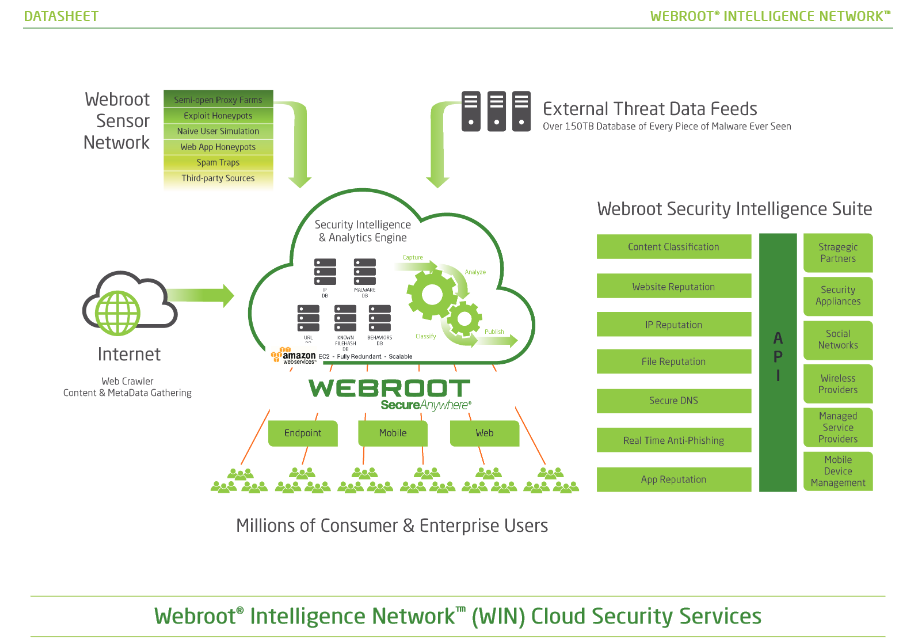
Once Webroot is installed ..you can set it and forget about it, you always have the latest version from the Cloud!
 Please read the potential Webroot has.: https://community.webroot.com/t5/Webroot-SecureAnywhere-Antivirus/Scanning-PC-suspiciously-fast/m-p/... also the Webroot WIN Cloud does all the work not your PC: http://www.brightcloud.com/platform/webroot-intelligence-network.php


Here is the PC User Guide This guide will help you out alot!

shorTcircuiT
Gold VIP
  • Gold VIP
  • October 7, 2015
Hello there!
 
To add to what Sherry has said, while there are no definition updates ever needed, as that is done in the Cloud as she demonstrated, there are occasional main program updates and tweaks.  By default, WSA installs with the option to automatically update enabled.  As long as you have not changed the default setting, you should always be fully up to date.
 
You can manually check to see if there are any main program updates by:
 
Open WSA
Click the gear tool next to My Account
Click the About SecureAnywhere tab
Click the button to check for updates.
 
That is all 🙂

Dermot7
Gold VIP
Forum|alt.badge.img+3
  • Gold VIP
  • October 7, 2015