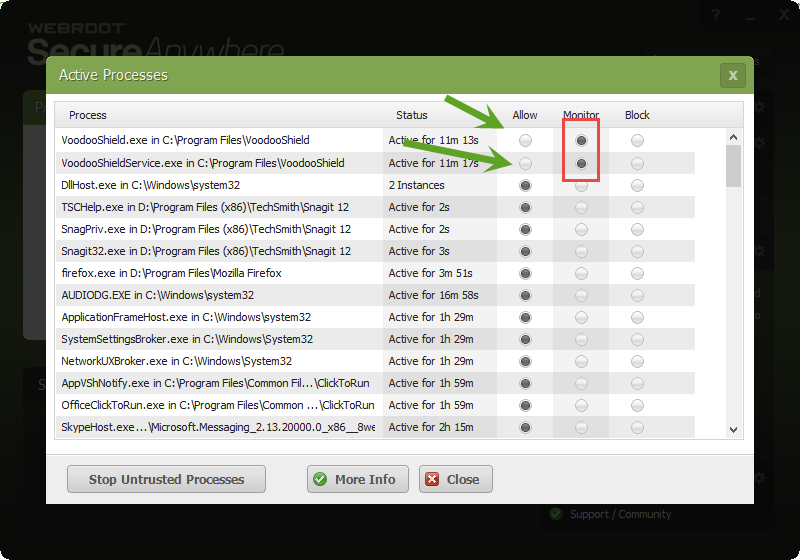
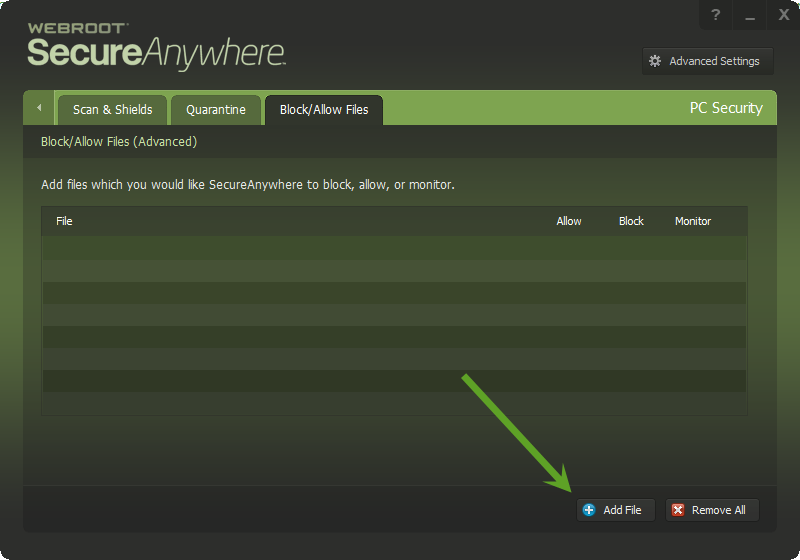
How do you set Webroot to allow a program to run when blocked by Webroot?

  • November 19, 2014
  • 4 replies
  • 537 views

Webroot is blocking the operation of a screen capture software. Can Webroot be configured to allow the program to work?


4 replies

Ssherjj
Moderator
Forum|alt.badge.img+62
  • Moderator
  • November 19, 2014
Hello Apples1933,

Welcome to the Community,

Please have a look here http://www.webroot.com/En_US/SecureAnywhere/PC/WSA_PC_Help.htm#C4_Firewall/CH4c_ManagingActiveConnections.htm
 
 EDIT
And have a look here:
 
Blocking/Allowing files
 

Let us know if this helps or not. Ok?

Best Regards,

Dermot7
Gold VIP
Forum|alt.badge.img+3
  • Gold VIP
  • November 19, 2014
Additionally, ensure Screen Capture app is set to allow in Protected Applications: http://live.webrootanywhere.com/content/610/Managing-Protected-Applications#nogo

  • February 24, 2016
I tried the instructions here to allow a program I use for monitoring my computers called "ScreenRetreiver" but there were no radio buttons after the active files listed. How do I get Webroot to recognize this program? McAfee had no problems with it but I can't get it to work since switching to Webroot. Thanks.

RetiredTripleHelix
Gold VIP
Forum|alt.badge.img+56
Hello and Welcome to the Webroot Community!
 
Have a look in these 2 places:
 
http://www.webroot.com/En_US/SecureAnywhere/PC/WSA_PC_Help.htm#C10_SystemControl/CH10b_ControllingProcesses.htm
 
http://www.webroot.com/En_US/SecureAnywhere/PC/WSA_PC_Help.htm#C5_Quarantine/CH5b_BlockingAllowingFiles.htm
 
If you continue to have issues please Submit a Support Ticket and they will get you sorted!
 
Thanks,
 
Daniel ;)