
Solved
how do you turn off tempory
how do you tempory turn it off having trouble with windows updates
Best answer by Jasper_The_Rasper
Hi and welcome to the Community doug6612.
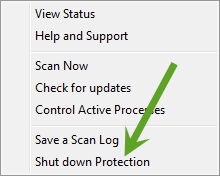
If you want to temporarily turn off the protection, look on the taskbar, at the bottom right you should see the Webroot icon beside the clock, right clock on that, scroll to the bottom and you will "Shut Down Protection" if you click on that it will shut the protection down but don't forget to enable it after you have done the updates.
If you want to temporarily turn off the protection, look on the taskbar, at the bottom right you should see the Webroot icon beside the clock, right clock on that, scroll to the bottom and you will "Shut Down Protection" if you click on that it will shut the protection down but don't forget to enable it after you have done the updates.








Login to the community
No account yet? Create an account
Enter your E-mail address. We'll send you an e-mail with instructions to reset your password.