Hi everyone!
I uninstalled Webroot from my Windows 10 system through control panel with no apparent problems. Webroot is gone from programs list but Istill have some remnants of the program.
For example, in the startup tab within task manager I have following startup item: Webroot Installer.
Also if you go to SETTINGS , click System , then click Notification & Actions and then click: Select Which Icons Appear On TheTaskbar, within that list I have an entry called WRSA.exe (which I can turn on or off in the notification area in taskbar).
How can I completely remove all entries of the Webroot from my system? Does anyone know a cleanup or uninstall tool to completely remove all left over entries? If not, is there a way to manually remove all leftover entries?
Thank you so much for your help!
- Home
- Community overview
- Webroot
- Webroot® SecureAnywhere™ - Home
- How to completely remove all entries of Webroot after Uninstallation in Windows 10
How to completely remove all entries of Webroot after Uninstallation in Windows 10

- May 25, 2016
- 40 replies
- 24055 views
40 replies
- Moderator
- May 25, 2016
Hi MOY
Welcome to Webroot Community,
Please look here at the KB article https://community.webroot.com/t5/Webroot-SecureAnywhere-Antivirus/PC-Uninstallation-Option-Missing-from-Control-Panel/ta-p/34688
Make sure you run with Administrator in command prompt.
If you continue to have this issue then please Submit a Support Ticket
Hope this helps?
Welcome to Webroot Community,
Please look here at the KB article https://community.webroot.com/t5/Webroot-SecureAnywhere-Antivirus/PC-Uninstallation-Option-Missing-from-Control-Panel/ta-p/34688
Make sure you run with Administrator in command prompt.
If you continue to have this issue then please Submit a Support Ticket
Hope this helps?
IMac 2021 27 in i5 Retina 5, iMac OS Sequoia (15.7.3), Security: iPads, ALIENWARE 15 R6, W11 Microsoft Windows Workstation, x64, Webroot® SecureAnywhere™ Internet Security Complete, Android Samsung Galaxy Ultra Note 23, Webroot Beta Tester
- Author
- Retired Webrooter
- May 25, 2016
Hi Ssherjj
Thanks for responding. Nothing happens when i run the "C:Program FilesWebrootWRSA.exe" –uninstall command, im sure the command cannot run because it's no longer there since control panel did unistall Webroot.
However, as I mentioned in my post there are still left over files. A webroot Installer that is loading at startup in Startup Tab and the WRSA.exe entry under Select Which Icons Appear On The Taskbar section.
There is no way to manually remove what's left behind from uninstallation?
Thanks agian!
Thanks for responding. Nothing happens when i run the "C:Program FilesWebrootWRSA.exe" –uninstall command, im sure the command cannot run because it's no longer there since control panel did unistall Webroot.
However, as I mentioned in my post there are still left over files. A webroot Installer that is loading at startup in Startup Tab and the WRSA.exe entry under Select Which Icons Appear On The Taskbar section.
There is no way to manually remove what's left behind from uninstallation?
Thanks agian!
- Moderator
- May 25, 2016
Hi MOY,
If Webroot uninstalled correctly from the Add/Remove panel then those items should be uninstalled. So I am not sure why you still have traces of Webroot. Would you try the command prompt in Safe Mode? Or you could reinstall Webroot and then uninstall again.
Let me ping ? and see if he can advise here. Otherwise please Submit that Support Ticket. and they will take care of this for you!
If Webroot uninstalled correctly from the Add/Remove panel then those items should be uninstalled. So I am not sure why you still have traces of Webroot. Would you try the command prompt in Safe Mode? Or you could reinstall Webroot and then uninstall again.
Let me ping ? and see if he can advise here. Otherwise please Submit that Support Ticket. and they will take care of this for you!
IMac 2021 27 in i5 Retina 5, iMac OS Sequoia (15.7.3), Security: iPads, ALIENWARE 15 R6, W11 Microsoft Windows Workstation, x64, Webroot® SecureAnywhere™ Internet Security Complete, Android Samsung Galaxy Ultra Note 23, Webroot Beta Tester
- Author
- Retired Webrooter
- May 25, 2016
Hi Ssherjj!
Thanks so much for your help!!! I'll standby while you ping TripleHelix.
THANKS A MILLION!
Thanks so much for your help!!! I'll standby while you ping TripleHelix.
THANKS A MILLION!
- Moderator
- May 25, 2016
Hi there again!
You are most welcome. It's rather late so I am not sure TripleHelix will respond by tonight. I will also ping ? because he knows alot as well. So if you can have patience, then one or both of them will assist here sometime tomorrow..;)
IMac 2021 27 in i5 Retina 5, iMac OS Sequoia (15.7.3), Security: iPads, ALIENWARE 15 R6, W11 Microsoft Windows Workstation, x64, Webroot® SecureAnywhere™ Internet Security Complete, Android Samsung Galaxy Ultra Note 23, Webroot Beta Tester
- Author
- Retired Webrooter
- May 25, 2016
Hi again Ssherjj!
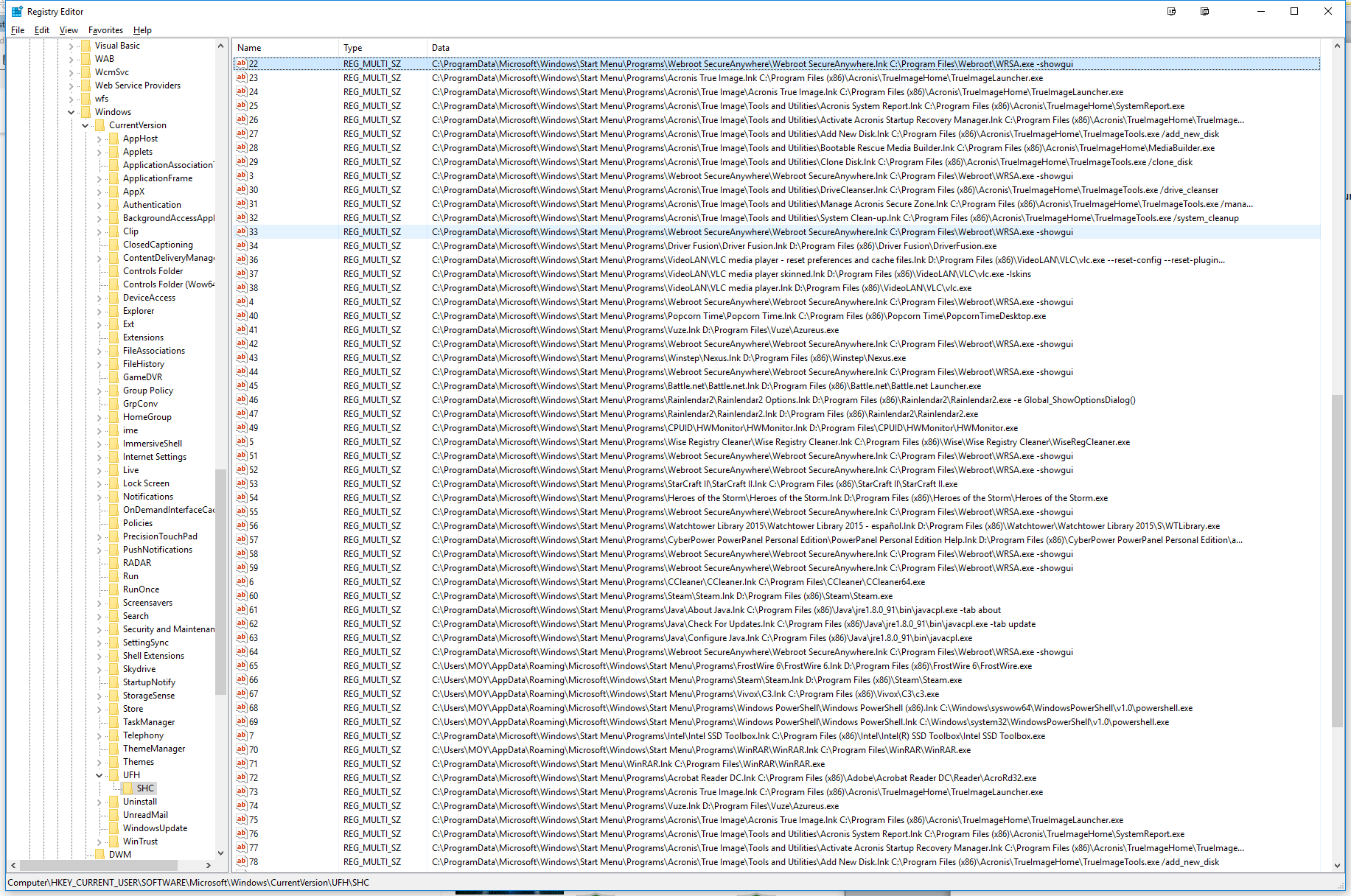
Just FYI, I did a search in the registry for WRSA.exe and found many entries at the following location:
HKEY_CURRENT_USER/SOFTWARE/Microsoft/Windows/CurrentVersion/UFH/SHC
As you can see from the screenshot below of my registry, there's two examples of what I found, if you look closely there's many more listed. Any additional help you can give tomorrow will be tremendously appreciated! :D
Just FYI, I did a search in the registry for WRSA.exe and found many entries at the following location:
HKEY_CURRENT_USER/SOFTWARE/Microsoft/Windows/CurrentVersion/UFH/SHC
As you can see from the screenshot below of my registry, there's two examples of what I found, if you look closely there's many more listed. Any additional help you can give tomorrow will be tremendously appreciated! :D
- Moderator
- May 25, 2016
Hi MOY,
Yes please wait till tomorrow and don't mess with the registry ok?
Thanks for the added information.:D
Yes please wait till tomorrow and don't mess with the registry ok?
Thanks for the added information.:D
IMac 2021 27 in i5 Retina 5, iMac OS Sequoia (15.7.3), Security: iPads, ALIENWARE 15 R6, W11 Microsoft Windows Workstation, x64, Webroot® SecureAnywhere™ Internet Security Complete, Android Samsung Galaxy Ultra Note 23, Webroot Beta Tester
- Gold VIP
- May 25, 2016
Hi MOY
Please see this KB Article for details of the file locations and a brief description of what the files do. However as it says at the bottom of the article..."We don't recommend that you modify any of these files directly unless specifically directed by support".
This is a known 'issue' in that in some cases some remnants can be left but certainly Sherry is quite correct when she advises that you contactnthe Support Team and await their response in terms pf getting rid of the remnants, or at least those that are causing visible issues.
Regards, Baldrick
Please see this KB Article for details of the file locations and a brief description of what the files do. However as it says at the bottom of the article..."We don't recommend that you modify any of these files directly unless specifically directed by support".
This is a known 'issue' in that in some cases some remnants can be left but certainly Sherry is quite correct when she advises that you contactnthe Support Team and await their response in terms pf getting rid of the remnants, or at least those that are causing visible issues.
Regards, Baldrick
- Author
- Retired Webrooter
- May 25, 2016
Hi!
What do you think about this Webroot Removal Tool that I found on this website:
https://www.techsupportall.com/webroot-removal-tool/
should i give it a try? read the comments on the page and see what you think.
Thanks for the help!
P.S.
I've submiteed a suport tick, but haven't heard anything from webroot support, it's been two days now.:(
What do you think about this Webroot Removal Tool that I found on this website:
https://www.techsupportall.com/webroot-removal-tool/
should i give it a try? read the comments on the page and see what you think.
Thanks for the help!
P.S.
I've submiteed a suport tick, but haven't heard anything from webroot support, it's been two days now.:(
- Moderator
- May 25, 2016
Hi MOY,
No I would not use that removal tool. You could do more harm then good. I'm sure support will get back to you pretty soon. It usually takes 24-48 hours to respond from technical support. Just hang in there alittle bit longer and I'm sure they will get back to you. Or you could call here: http://www.webroot.com/us/en/company/contact-us
https://tel:18666124268
Mon-Fri 7:00 AM to 6:30 PM (MST)
Sat-Sun 7:00 AM to 6:00 PM (MST)
No I would not use that removal tool. You could do more harm then good. I'm sure support will get back to you pretty soon. It usually takes 24-48 hours to respond from technical support. Just hang in there alittle bit longer and I'm sure they will get back to you. Or you could call here: http://www.webroot.com/us/en/company/contact-us
https://tel:18666124268
Mon-Fri 7:00 AM to 6:30 PM (MST)
Sat-Sun 7:00 AM to 6:00 PM (MST)
IMac 2021 27 in i5 Retina 5, iMac OS Sequoia (15.7.3), Security: iPads, ALIENWARE 15 R6, W11 Microsoft Windows Workstation, x64, Webroot® SecureAnywhere™ Internet Security Complete, Android Samsung Galaxy Ultra Note 23, Webroot Beta Tester
- Retired Webrooter
- May 25, 2016
I'll echo Sherry and say that you should definitely not use that tool. I'd be wary of that website as well.
I have located your ticket and forwarded it on to management so you should receive a response shortly. For this scenario it will likely warrant an agent calling you and doing a remote connection to remove any traces left behind.
Regards,
I have located your ticket and forwarded it on to management so you should receive a response shortly. For this scenario it will likely warrant an agent calling you and doing a remote connection to remove any traces left behind.
Regards,
- Gold VIP
- May 25, 2016
Yup, digging a little further into this...it is only the Legacy version, i.e., pre 2011 version uninstall tool, and so will not work with the post 2011 version of WSA...even if one tried to use it. Just plain would not work as the versions are very different. ;)
- Gold VIP
- May 25, 2016
I agree with James on this and don't mess with the registry as you can bork your system and may need to do a clean OS reinstall and as Baldrick said the removal tool is for 2011 and older Webroot Products. Support will help you remove the left overs as James said!@ wrote:
I'll echo Sherry and say that you should definitely not use that tool. I'd be wary of that website as well.
I have located your ticket and forwarded it on to management so you should receive a response shortly. For this scenario it will likely warrant an agent calling you and doing a remote connection to remove any traces left behind.
Regards,
Daniel 😉
- Author
- Retired Webrooter
- May 25, 2016
Hi JamesG
I finally received a response from support (think it was due to your assistance), but unfortunately it seems like I received a generic response that really does not address my specific issue.
I was clear to point out that I was able to uninstall Webroot using add/remove programs but the problem was with remaining entries at the locations pointed out by me. The solution provided from support was how to uninstall Webroot if you could not remove with add/remove programs; like running the following command: "C:Program FilesWebrootWRSA.exe" –uninstall.
I can’t run that command since I no longer have the Webroot folder because it was uninstalled. What do you suggest at this point?
Thanks again for your help!
I finally received a response from support (think it was due to your assistance), but unfortunately it seems like I received a generic response that really does not address my specific issue.
I was clear to point out that I was able to uninstall Webroot using add/remove programs but the problem was with remaining entries at the locations pointed out by me. The solution provided from support was how to uninstall Webroot if you could not remove with add/remove programs; like running the following command: "C:Program FilesWebrootWRSA.exe" –uninstall.
I can’t run that command since I no longer have the Webroot folder because it was uninstalled. What do you suggest at this point?
Thanks again for your help!
- Retired Webrooter
- May 25, 2016
The best thing to do in this scenario would be to reply to the ticket with what you have just told us here. It's very likely that a remote session will be needed to reach a resolution in this instance.
If you would like, I can write that on your behalf then you would just need to wait for a response from support. Let me know how you would like to proceed.
Regards,
If you would like, I can write that on your behalf then you would just need to wait for a response from support. Let me know how you would like to proceed.
Regards,
- Author
- Retired Webrooter
- May 25, 2016
Hi JamesG
Thanks for getting back to me. I would appreciate it if you would contact them on my behalf.;)
Thank you again for the help!
Thanks for getting back to me. I would appreciate it if you would contact them on my behalf.;)
Thank you again for the help!
- Retired Webrooter
- May 26, 2016
I've responded to the ticket on your behalf and also added a note with my thoughts on the ticket. You should receive a response back shortly.
Please let me know if you need anything else.
Have a lovely day! :)
Regards,
Please let me know if you need anything else.
Have a lovely day! :)
Regards,
- Moderator
- May 26, 2016
Thank you ? for your support and assistance with this! That's awesome ...ou Support Tech guy! 😉
IMac 2021 27 in i5 Retina 5, iMac OS Sequoia (15.7.3), Security: iPads, ALIENWARE 15 R6, W11 Microsoft Windows Workstation, x64, Webroot® SecureAnywhere™ Internet Security Complete, Android Samsung Galaxy Ultra Note 23, Webroot Beta Tester
- Author
- Retired Webrooter
- May 27, 2016
Hello JamesG
Thank you so much for your help! I'll be calling Webroot support tomorrow. I wonder if there's a case or reference number I need to reference when I speak with someone there. Hopefully they have all my and your notes readily available when I call.
Thanks again! :D
Moy
Thank you so much for your help! I'll be calling Webroot support tomorrow. I wonder if there's a case or reference number I need to reference when I speak with someone there. Hopefully they have all my and your notes readily available when I call.
Thanks again! :D
Moy
- Author
- Retired Webrooter
- May 27, 2016
Hi Ssherjj
You've been awesome! Really appreciate the help and attention you've given me with this issue! You're definitely an assest to Webroot and the community!
Thanks again! :D;)
You've been awesome! Really appreciate the help and attention you've given me with this issue! You're definitely an assest to Webroot and the community!
Thanks again! :D;)
- Author
- Retired Webrooter
- May 27, 2016
JamesG,
Could you please do one more favor for me? Could you please have the appropriate support specialist call me tomorrow Friday (5/26/2016) at 2PM Eastern Standard Time?
My tel number is: (Edited out for privacy and secuirty reasons)
Thanks!
Could you please do one more favor for me? Could you please have the appropriate support specialist call me tomorrow Friday (5/26/2016) at 2PM Eastern Standard Time?
My tel number is: (Edited out for privacy and secuirty reasons)
Thanks!
- Moderator
- May 27, 2016
Hi MOY,
That is so nice of you to say that.
It makes it worth while when i can help others out and hear such nice things and thank yous.
Do keep in touch and let us know how things turn out.
Have a nice evening!:D
That is so nice of you to say that.
It makes it worth while when i can help others out and hear such nice things and thank yous.
Do keep in touch and let us know how things turn out.
Have a nice evening!:D
IMac 2021 27 in i5 Retina 5, iMac OS Sequoia (15.7.3), Security: iPads, ALIENWARE 15 R6, W11 Microsoft Windows Workstation, x64, Webroot® SecureAnywhere™ Internet Security Complete, Android Samsung Galaxy Ultra Note 23, Webroot Beta Tester
- Author
- Retired Webrooter
- May 27, 2016
Hi Ssherjj,
Hope youre doing great! I wish things were resolved for me, but they are not. I never received a call from Webroot so I decided to call in, but now instead of one entry in the startup I have two entries after talking with tech support. They said someone would contact me later.
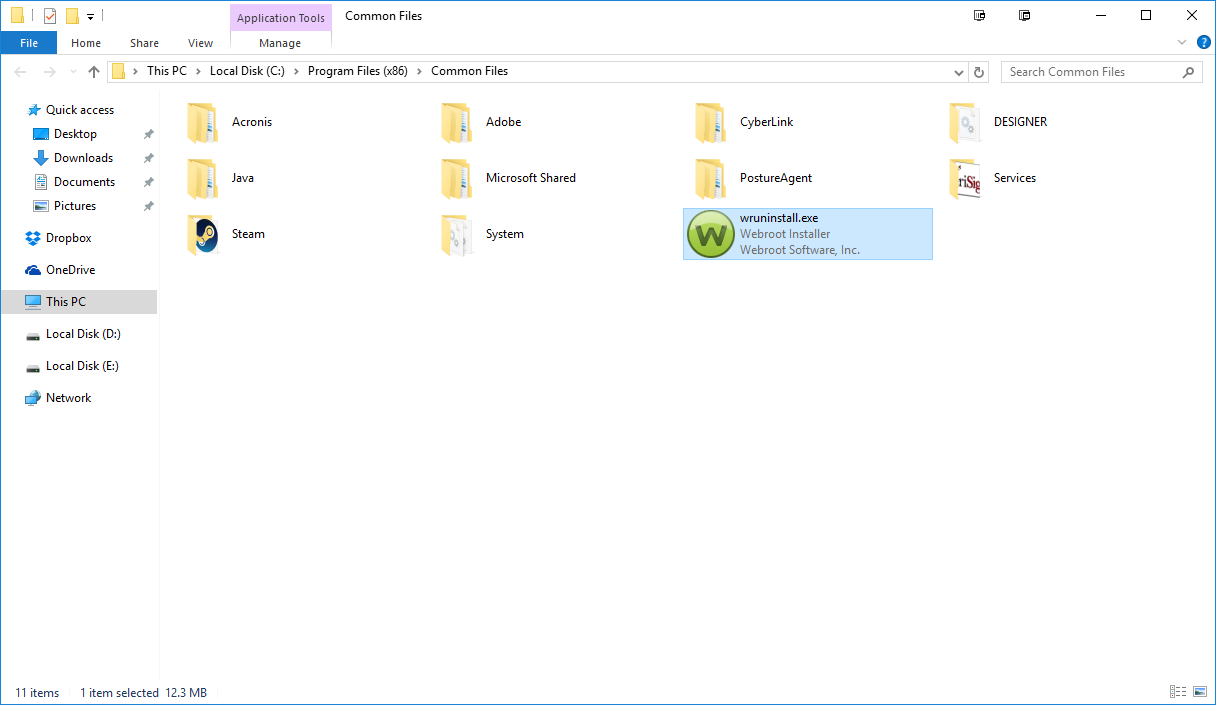
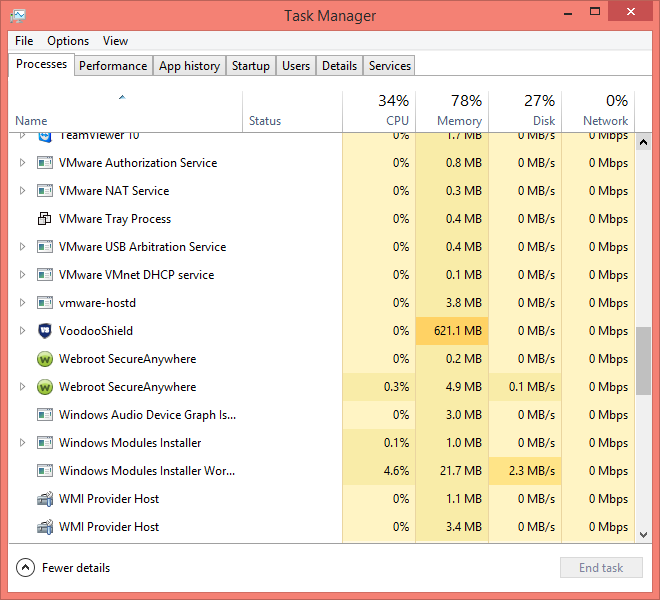
I found more info concerning the two startup files.
Here are the pics... What do you think?
What in the world is LasPass??
Hope youre doing great! I wish things were resolved for me, but they are not. I never received a call from Webroot so I decided to call in, but now instead of one entry in the startup I have two entries after talking with tech support. They said someone would contact me later.
I found more info concerning the two startup files.
Here are the pics... What do you think?
What in the world is LasPass??
- Moderator
- May 27, 2016
IMac 2021 27 in i5 Retina 5, iMac OS Sequoia (15.7.3), Security: iPads, ALIENWARE 15 R6, W11 Microsoft Windows Workstation, x64, Webroot® SecureAnywhere™ Internet Security Complete, Android Samsung Galaxy Ultra Note 23, Webroot Beta Tester
- Gold VIP
- May 27, 2016
Sherry it's under the Start Up Tab! And your VS is gone nuts with Memory???
Login to the community
No account yet? Create an account
Enter your E-mail address. We'll send you an e-mail with instructions to reset your password.
Scanning file for viruses.
Sorry, we're still checking this file's contents to make sure it's safe to download. Please try again in a few minutes.
OKThis file cannot be downloaded
Sorry, our virus scanner detected that this file isn't safe to download.
OK