how to sign out from backup and sync

  • December 17, 2015
  • 5 replies
  • 71 views

Forum|alt.badge.img+3
I wish to log out from the backup and syncwithout signing in as a different use. I am not finding instructions for this. 
 
Thank you.
 

5 replies

Baldrick
Gold VIP
  • Gold VIP
  • December 17, 2015
Hi rjh
 
I am not sure that there is any need to do so...once sinatlled and enabled Backup & Sync is effctively on and if for some reason you wish to stop it backing up and/or syncing then the only option I know of is to click on the Gear/Cog symbol to the right of the Backup & Sync tab and then move the sliders for each feature to the 'Off' Position (you may have to wait between action each slider as the diabling action for one of the features must finish before the one for the toher feature can be actioned).
 
That should do the trick and then if yo wish to restart one or both of these features just slide the relavant slider(s) to the 'On' position again.
 
Give that a try and let us know if you have any further questions.
 
Regards, Baldrick


ProTruckDriver
Moderator
Hello rjh, Welcome to the Webroot Community Forum. :D
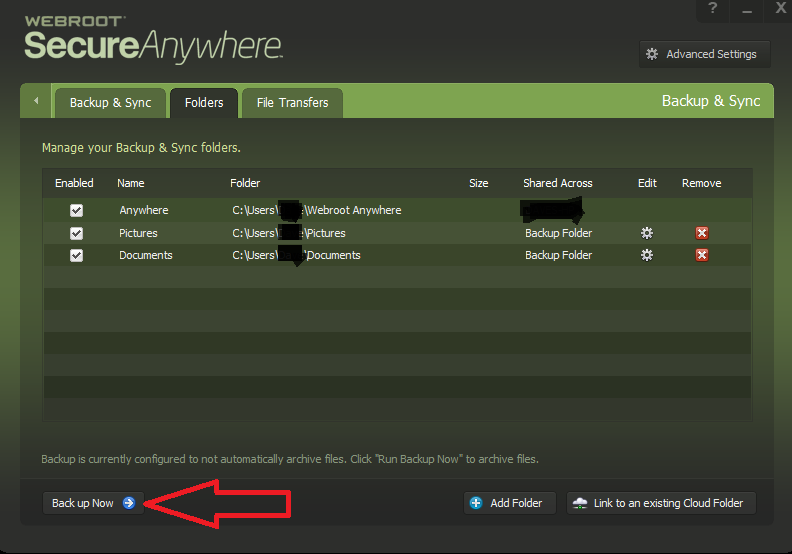
I don't believe there is a way to log out of Backup & Sync once you log in. Maybe someone else could chime in on how to do it. I have my B&S set for manual backup. I like to get all my file sorted before backing up. After sorting the files I hit the "Back Up Now' button. It only takes a few minutes to backup.
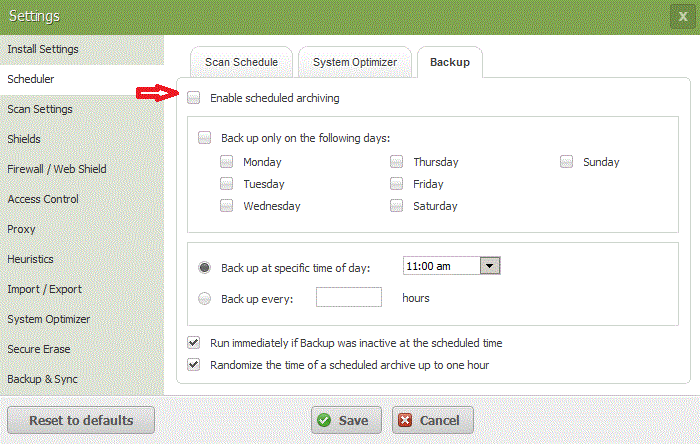
Advanced Setting > Scheduler > Back Up > Untic "Enable Scheduled Archiving" > Save,  will set you up for Manual Backup.


Looks like while I was typing ? was posting. LOL

Baldrick
Gold VIP
  • Gold VIP
  • December 17, 2015
No worries, Dave.
 
A good alternative approach you have provided...nice to be able to provide the OP with options. :D
 
Regards, Baldrick

JamesG
  • Retired Webrooter
  • December 17, 2015
Hello,
 
I had a question I responded to on twitter about this today. Technically there is no real "logout" button. There is no need for it at this time. 

The instructions provided above are viable, or if you want to turn off the feature entirely, you can click the Gear Icon next to Backup and Sync, and then simply toggle both of those settings off if you do not plan on using them.


Regards,

Baldrick
Gold VIP
  • Gold VIP
  • December 18, 2015
Thanks for the confirmation, James. ;)