

When I open my edge browser, the referenced site is in the address bar. I get this message " Webroot has blocked the website you are trying to access for your protection: Detected Spyware/Adware Site
This site might contain software that gathers information and tracks activity without the user’s knowledge or explicit consent, or that shows unsolicited popup advertising." Then it has a button to go back safely. My question is how to I get rid of the referenced site all together.
Solved
http://go.deepteep.com/?D06CAFB9B38B5B582A032FA9FDE6B886=H1xA...
 +3
+3Best answer by TripleHelix
Please do as Sherry said to reset Edge:
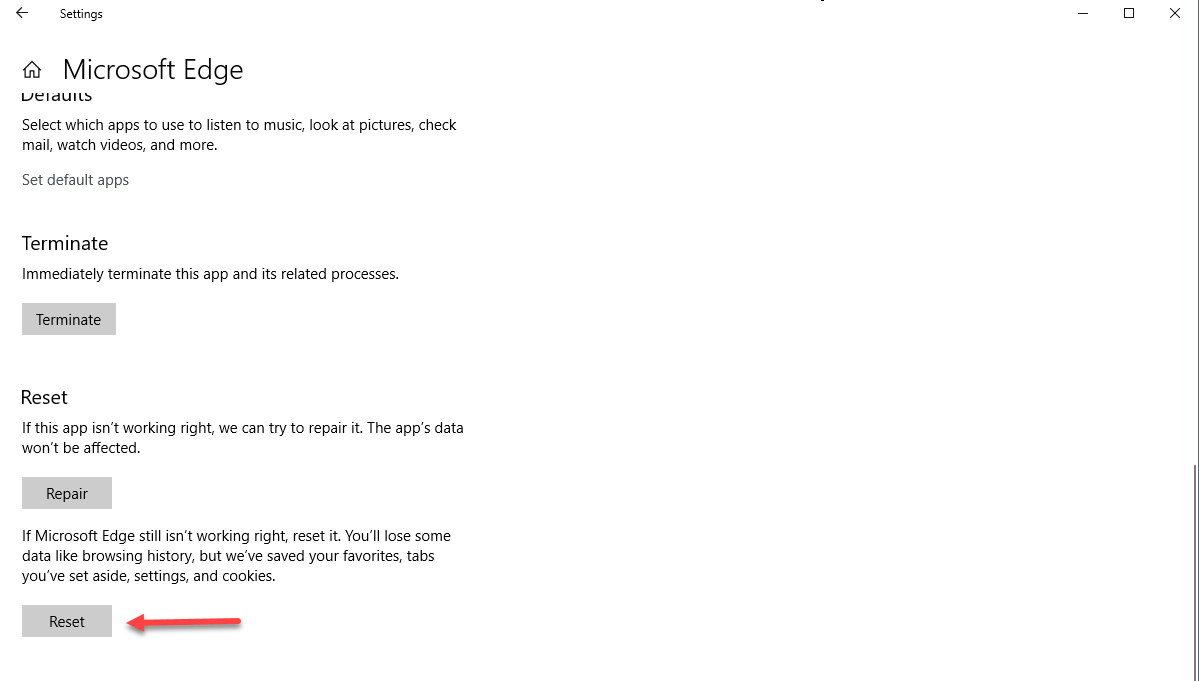
Then go to Windows Settings if you are using Windows 10 you can "Reset" the Edge Browser.
How To Reset Microsoft Edge To Its Default Settings
Then go to Windows Settings if you are using Windows 10 you can "Reset" the Edge Browser.
How To Reset Microsoft Edge To Its Default Settings
- Right-click on the Start button in the lower-left corner and select “Apps and Features“.
- Scroll through the list until you find “Microsoft Edge”, click it, and then click on the “Advanced options” link.
- Next, click on the “Reset” button.

This topic has been closed for replies.




Login to the community
No account yet? Create an account
Enter your E-mail address. We'll send you an e-mail with instructions to reset your password.