I am trying to download firefox and webroot blocks it

  • January 26, 2016
  • 3 replies
  • 32 views

trying to download firefox browser and webroot blocks it

3 replies

tMc9072
Popular Voice
Forum|alt.badge.img+8
  • Popular Voice
  • January 26, 2016
Hi ? and Welcome to the Community,
 
Can you tell me the error message that you are receiving?
 
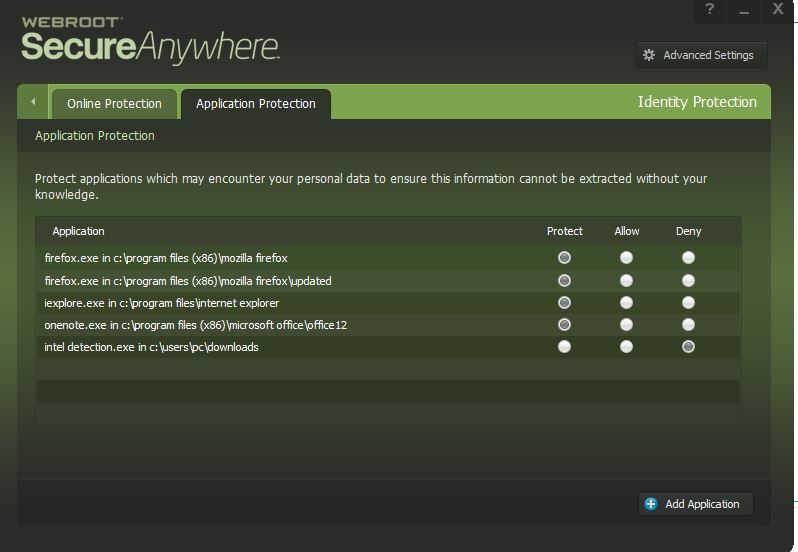
You can also try this: open Webroot, click on the gear beside Identity Protection, click Application Protection and see if Firefox is listed and marked as "deny". If so, change it to "monitor", it may ask you for your password (if you have one set up-which is a good idea and enter the Captcha code that shows (that also is a good idea to activate). Reboot and try to install Firefox again.
 
Please write back either way to let me know how it went.
 
Many thanks, 
Theresa
 

Ssherjj
Moderator
Forum|alt.badge.img+62
  • Moderator
  • January 26, 2016
Hello lrtjs5,
 
Welcome to the Webroot Community.
 
Thank you ? but may I add here?;)
 
Please make sure you are downloading from the Firefox Website by looking here at ? post. https://community.webroot.com/t5/Security-Industry-News/Mozilla-Firefox-43-0-3/m-p/233821
 
Try that and see if you are able to download and install FireFox.
 
You will want Firefox under Protect as shown below.


Hope this helps?


tMc9072
Popular Voice
Forum|alt.badge.img+8
  • Popular Voice
  • January 26, 2016
Thanks so much ? and ?. Nice to be always up to date. ;)
 
Just updated mine and it is now on 43.0.4. Even though it should be updating, I was on 42.0????
 
edit:Firefox just updated to 44.0.
 
T