
Solved
I can't paste a URL into an email without disabling Webroot. How do I fix this?

Using Chrome as a browser and eMailclient as an email client, I can't paste a URL into an email without disabling Webroot.
Best answer by Baldrick
Hi jbauer99
Welcome to the Community Forums.
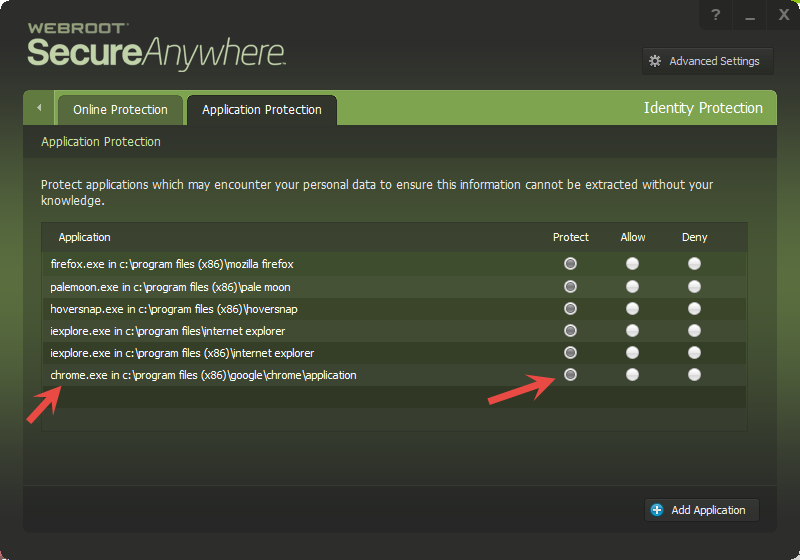
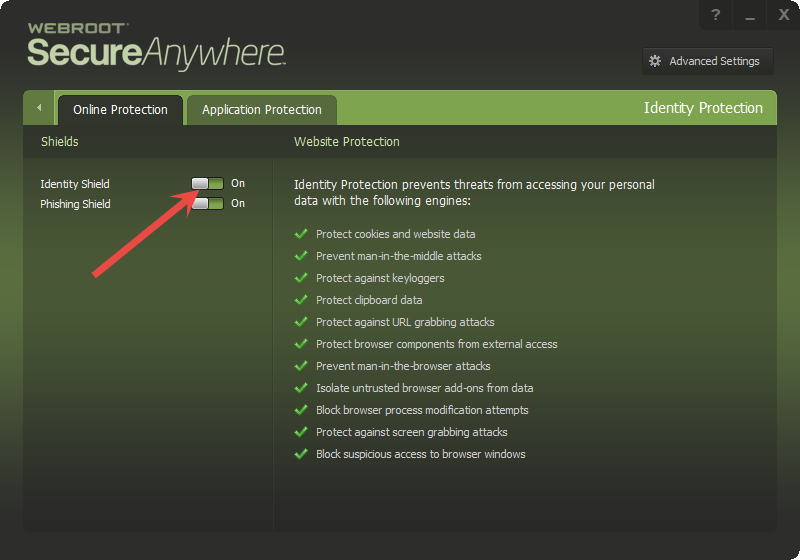
I suspect that what is preventing you from pasting the URL could be the Identity Protection feature. Please click on the cog/gear symbol to the right of the Identity Protection tab, and once the next screen is displayed click on the Application Protection tab. Once the new screen is displayed checkmfor files that have a status of 'Deny' and see if they correspond to the apps that you afe using. If so then consider changing those linked to the apps to 'Allow' if you are sure that the app entry is a legitimate one. That should allow you to achieve the paste if that is the cause of your issue.
For more information on this and other areas within WSA that can block actions, including this one, please review this Knowledge Base article.
Hope that is of some assistance.
Regards, Baldrick
Welcome to the Community Forums.
I suspect that what is preventing you from pasting the URL could be the Identity Protection feature. Please click on the cog/gear symbol to the right of the Identity Protection tab, and once the next screen is displayed click on the Application Protection tab. Once the new screen is displayed checkmfor files that have a status of 'Deny' and see if they correspond to the apps that you afe using. If so then consider changing those linked to the apps to 'Allow' if you are sure that the app entry is a legitimate one. That should allow you to achieve the paste if that is the cause of your issue.
For more information on this and other areas within WSA that can block actions, including this one, please review this Knowledge Base article.
Hope that is of some assistance.
Regards, Baldrick







Login to the community
No account yet? Create an account
Enter your E-mail address. We'll send you an e-mail with instructions to reset your password.