

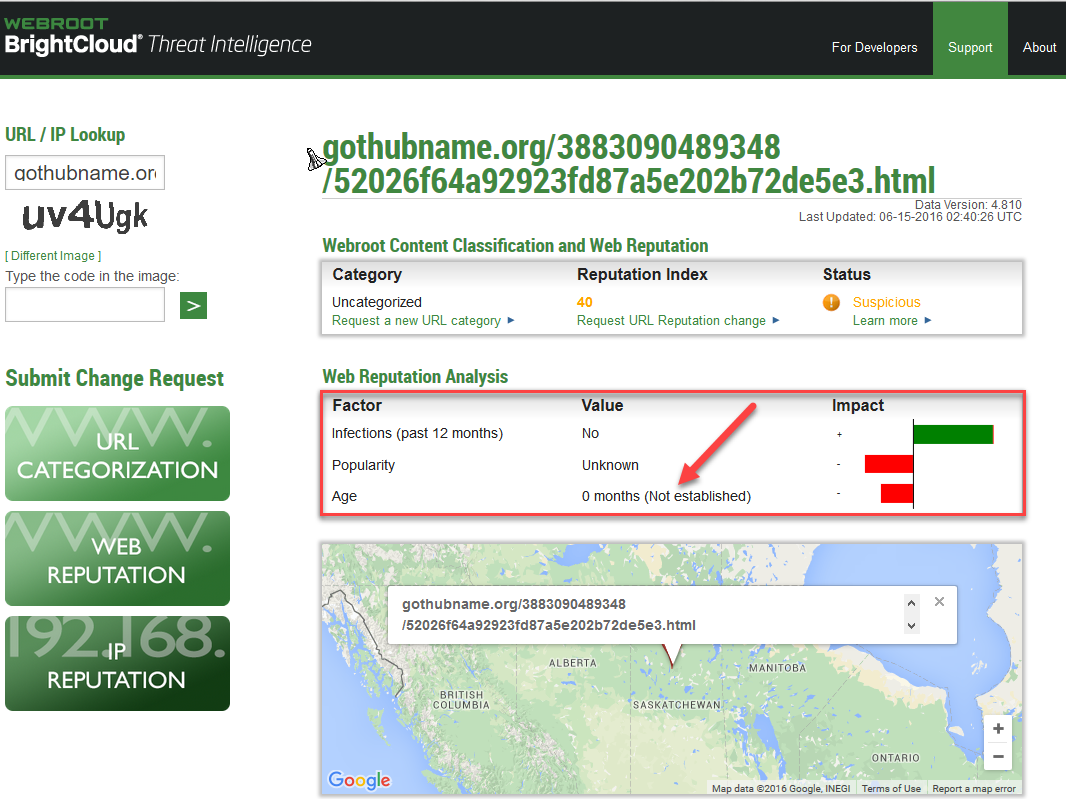
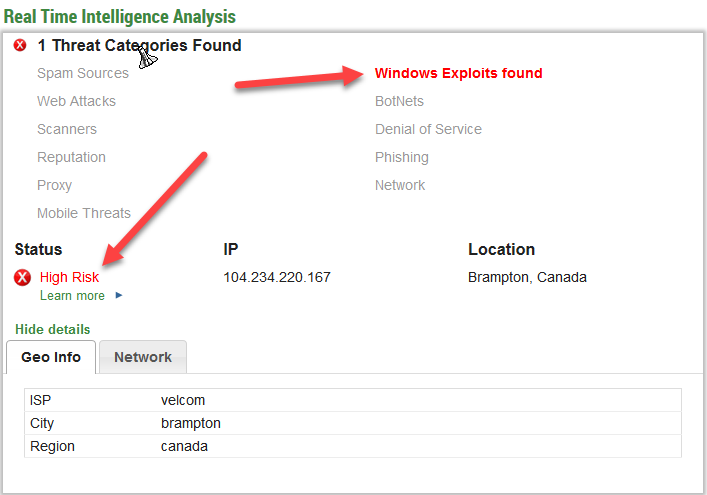
The message shows up in its own window and looks just like a Firefox update window. But it comes from:
https://gothubname.org/3883090489348/52026f64a92923fd87a5e202b72de5e3.html
I don't know if this is real but I am suspecious. BEWARE>>>
Solved
I got a message I THINK MAY BE A SCAM. Firefox is my browser. "Urgent Firefox Update Download Now
Best answer by Baldrick
Hi jmartella
Welcome to the Community Forums.
As such there is no fix other than (i) keeping ones wits about one & being suspicious of such messages, especially popups & (ii) installating a popup blocker to attempt to block these from ever appearing.
In the case of the first point ask youself how do they know that you are in need of a Firefox Update? Usually Firefox itself will advise if there is an update to be had...so unless it is in applicaiton then treat it with suspicion.
In the case of the second point try installing a good Ad/Pop-up Blocker! Below is a number of suggestions as to good ones that many members here use with success:
For Internet Explorer Ad Block Plus: https://adblockplus.org/
For Firefox uBlock: https://addons.mozilla.org/en-US/firefox/addon/ublock-origin/?src=ss or Privacy Badger: https://addons.mozilla.org/en-us/firefox/addon/privacy-badger-firefox/
Google Chrome uBlock: https://chrome.google.com/webstore/detail/ublock-origin/cjpalhdlnbpafiamejdnhcphjbkeiagm?hl=en or Privacy Badger: https://chrome.google.com/webstore/detail/privacy-badger/pkehgijcmpdhfbdbbnkijodmdjhbjlgp
and if you have the latest WIndows 10 Anniversary Update then you can now install AdBlock Plus in Edge, by downloading and installing it direct from the Windows App Store; click on Settings (click '...' in the top right hand corner) & select 'Extensions' and then from the sub menu displayed clcik on 'Get extensions from the Store' to be taken to the place to slect & download.
Hope that helps?
Regards, Baldrick
Welcome to the Community Forums.
As such there is no fix other than (i) keeping ones wits about one & being suspicious of such messages, especially popups & (ii) installating a popup blocker to attempt to block these from ever appearing.
In the case of the first point ask youself how do they know that you are in need of a Firefox Update? Usually Firefox itself will advise if there is an update to be had...so unless it is in applicaiton then treat it with suspicion.
In the case of the second point try installing a good Ad/Pop-up Blocker! Below is a number of suggestions as to good ones that many members here use with success:
For Internet Explorer Ad Block Plus: https://adblockplus.org/
For Firefox uBlock: https://addons.mozilla.org/en-US/firefox/addon/ublock-origin/?src=ss or Privacy Badger: https://addons.mozilla.org/en-us/firefox/addon/privacy-badger-firefox/
Google Chrome uBlock: https://chrome.google.com/webstore/detail/ublock-origin/cjpalhdlnbpafiamejdnhcphjbkeiagm?hl=en or Privacy Badger: https://chrome.google.com/webstore/detail/privacy-badger/pkehgijcmpdhfbdbbnkijodmdjhbjlgp
and if you have the latest WIndows 10 Anniversary Update then you can now install AdBlock Plus in Edge, by downloading and installing it direct from the Windows App Store; click on Settings (click '...' in the top right hand corner) & select 'Extensions' and then from the sub menu displayed clcik on 'Get extensions from the Store' to be taken to the place to slect & download.
Hope that helps?
Regards, Baldrick







Login to the community
No account yet? Create an account
Enter your E-mail address. We'll send you an e-mail with instructions to reset your password.