
Solved

I think this is a false positive on a file that is a part of Steam

  • July 9, 2016
  • 5 replies
  • 62 views

kliebor
Popular Voice
Had a quarentine message pop up while installing a steam update from within Steam.
 
The file was named steamoverlayvulkanlayer64.dll
 
I think that this has been sent in by several others for analysis any update on WR not flagging it as a malicious code bit?

Best answer by RetiredTripleHelix

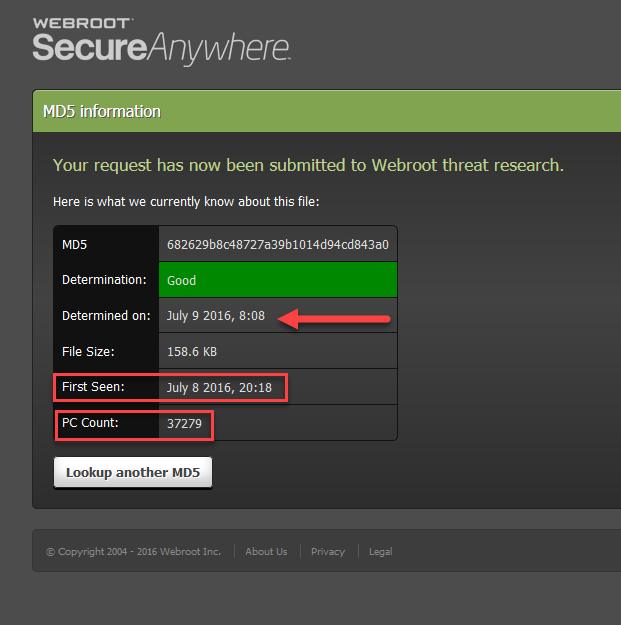
It's marked good in the Webroot BrightCloud database http://www.webroot.com/us/en/business/threat-intelligence And look at the date and time! So you can restore the file from quarantine and then do another scan!  http://www.webroot.com/En_US/SecureAnywhere/PC/WSA_PC_Help.htm#C5_Quarantine/CH5a_ManagingQuarantine.htm
 
To check any other MD5's just go here: http://snup.webrootcloudav.com/SkyStoreFileUploader/upload.aspx
 
Thanks,
 
Daniel ;)


5 replies

RetiredTripleHelix
Gold VIP
Forum|alt.badge.img+56
Hello,
 
Can you post the MD5 Hash from a scan lof of the detection and even the whole line. http://www.webroot.com/En_US/SecureAnywhere/PC/WSA_PC_Help.htm#C11_ReportsandViewers/CH11a_SavingScanLog.htm
 
Example:
[u] d:program files (x86)urnaware premiumaudiograbber.exe [MD5: FEB486E9BEE373556641F199056A7DF5] [Flags: 00081001.3303]
[u] d:program files (x86)urnaware premiumcopyimage.exe [MD5: FE707ADD4803170DA1CC9DE2ACBD560B] [Flags: 00081001.3304]
[u] d:program files (x86)urnaware premiumcopydisc.exe [MD5: 753E48269E31E636DBA447AF8081C57F] [Flags: 00081001.3305]
 
Also you can Submit a Support Ticket and they will corect the detection.
 
Thanks,
 
Daniel 😉

  • Fresh Face
  • July 9, 2016
As requested:
 
Starting Routine> Removing g:steampackage mpsteamoverlayvulkanlayer64.dll_...#(PX5: 2E92BF665034AECE7A830223781D89002E3C271A - MD5: 682629B8C48727A39B1014D94CD843A0)...
Deleting File> g:steampackage mpsteamoverlayvulkanlayer64.dll_
 
I have submitted the file for re-checking, checked with virustotal.com and logged a support ticket. Fingers crossed this gets sorted out ASAP 😉.

RetiredTripleHelix
Gold VIP
Forum|alt.badge.img+56
It's marked good in the Webroot BrightCloud database http://www.webroot.com/us/en/business/threat-intelligence And look at the date and time! So you can restore the file from quarantine and then do another scan!  http://www.webroot.com/En_US/SecureAnywhere/PC/WSA_PC_Help.htm#C5_Quarantine/CH5a_ManagingQuarantine.htm
 
To check any other MD5's just go here: http://snup.webrootcloudav.com/SkyStoreFileUploader/upload.aspx
 
Thanks,
 
Daniel ;)


  • Fresh Face
  • July 9, 2016
They must have just fixed it because now it is scanning as good 🙂.

RetiredTripleHelix
Gold VIP
Forum|alt.badge.img+56
Awesome!
 
Cheers,
 
Daniel 😃



