
Solved

Installed on wrong device

  • August 28, 2015
  • 8 replies
  • 58 views

I think I accidentally installed my webroot on my phone instead of my tablet. Can I switch it or did I mess up?

Best answer by Ssherjj

Hi ?
 
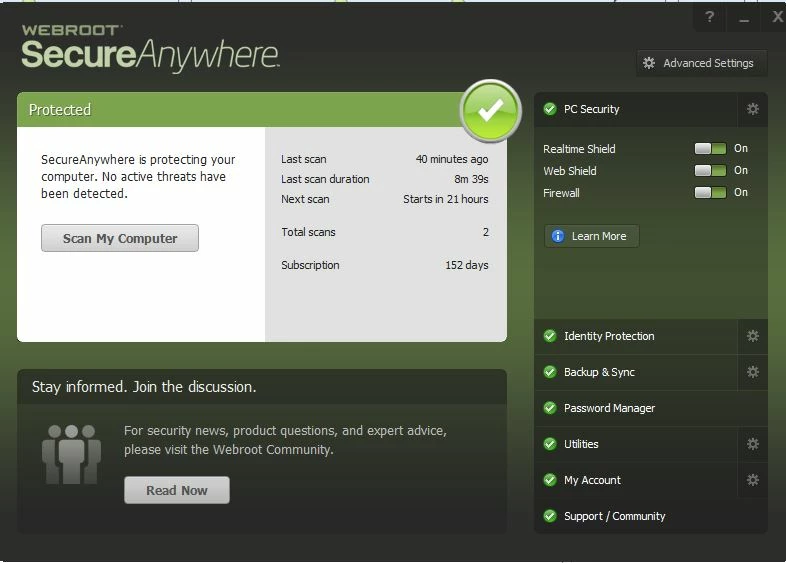
Please open your Webroot by right clicking on the task bar and click View Status and then you will see this.
 
EDIT: Also have a look at this KB article "How do I know Webroot is Working"


Here is the PC User Guide
 
 
Hope this helps?


8 replies

Ssherjj
Moderator
Forum|alt.badge.img+62
  • Moderator
  • August 28, 2015
Hello ?,
 
Welcome to the Webroot Community,
 
Just uninstall on your phone and install Webroot on your tablet. What kind of tablet do you have? Is your tablet an Android?
 
Please look here for instructions to uninstall Webroot from your Android device https://community.webroot.com/t5/Webroot-SecureAnywhere-for/How-to-Uninstall-Webroot-From-an-Android-Mobile-Device/ta-p/140807
 
Edit
Have you set your account up on the Online Portal if not please do so  because you may need to deactivate your cell phone in the Account Console. Once you are on your Console then click remove device.
 
Then you can install Webroot on your tablet.with your keycode.
 
Go here for Installing Webroot for your tablet https://community.webroot.com/t5/Webroot-SecureAnywhere-Antivirus/Installing-Webroot-SecurityAnywhere-Mobile/ta-p/147065
 
 
If you need more help then give us a holler.

  • Author
  • Fresh Face
  • August 28, 2015
Sorry, not sure how but I think I fixed that issue. Now I'll try the rest. Thank you for the help, I'm rally bad at this.

  • Author
  • Fresh Face
  • August 28, 2015
My tablet isn't an Android I think. It's a Microsoft surface, does that count or no?

Ssherjj
Moderator
Forum|alt.badge.img+62
  • Moderator
  • August 28, 2015
Hello ?,
 
I am sorry about that. This is indeed a different installation. Microsoft Surface runs Windows right?
 
Please follow the steps closely!
 
  • Make sure you have a copy of your 20 Character Alphanumeric Keycode! Example: SA69-AAAA-A783-DE78-XXXX
  • KEEP the computer online for install to make sure it works correctly
  • Download a Copy Here (Best Buy Subscription PC users click HERE)
  • Install with the new installer, enter your Keycode
  • Let it finish it's install scan
  • Reboot
Please let us know if that resolves your issue?
 
 
KInd  Regards,


  • Author
  • Fresh Face
  • August 28, 2015
I think it installed correctly. How do I tell?
 

Ssherjj
Moderator
Forum|alt.badge.img+62
  • Moderator
  • Answer
  • August 28, 2015
Hi ?
 
Please open your Webroot by right clicking on the task bar and click View Status and then you will see this.
 
EDIT: Also have a look at this KB article "How do I know Webroot is Working"


Here is the PC User Guide
 
 
Hope this helps?



  • Author
  • Fresh Face
  • August 28, 2015
Thank you so much for the aid! Your directions were very helpful!

Ssherjj
Moderator
Forum|alt.badge.img+62
  • Moderator
  • August 28, 2015
Hi ?,
 
You are quite Welcome! That's why we are here as volunteers to help others. The pleasure was all mine.:D

