Answer

Lingering bit and pieces of download

  • September 15, 2025
  • 17 replies
  • 183 views

After installing the latest version of Webroot in my Windows 10 machine, there are bits and pieces of the download remaining in my Download File and normally I delete these for other programs I’ve downloaded.   But in the case of Webroot, a remaining installation file won’t delete from the download.   Any suggestions?

Best answer by TripleHelix

I tried contacting support but their hours are the same as those when I work.   I need to talk to someone during my lunch break but the phone number gives a ton of options and by  the time I get to tech support for Webroot,  there’s a long wait.


By any chance is there a phone number that takes us directly to the tech support guys?

No that's there number try to Submit a Support Ticket as that is the best way. 


https://www.webrootanywhere.com/servicetalk.asp?


Note: When submitting a Support Ticket, Please wait for a response from Support. Putting in another Support Ticket on this problem before Support responses will put your first Support Ticket at the end of the queue.


17 replies

TripleHelix
Moderator
Forum|alt.badge.img+63
  • Moderator
  • September 15, 2025

Hello ​@GAT 


Reboot the system a try to delete it once again and it should work.


Let us know how it goes.


Thanks!


  • Author
  • New Voice
  • September 15, 2025

Okay, I’ll give it a try and let you know. 


G


  • Author
  • New Voice
  • September 15, 2025

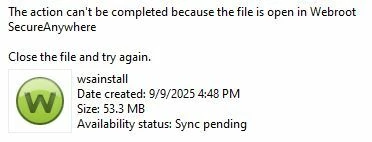
Unfortunately, it didn’t fly.   I get this when attempting to delete :


ProTruckDriver
Moderator

Since that didn’t work, I’d suggest to try to do a Clean Reinstall of Webroot:

Please follow the steps closely!

  • Make sure you have a copy of your 20 Character Alphanumeric Keycode! Example: SA69-AAAA-A783-DE78-XXXX
  • KEEP the computer online for Uninstall and Reinstall to make sure it works correctly
  • Download a Copy Here (Best Buy Geek Squad Subscription PC users click HERE) Let us know if it is the Mac version you need
  • Uninstall WSA and Reboot
  • Go into Safe Mode and Delete these Folders if they are there!
  • C:\Program Files\Webroot Folder
  • C:\ProgramData\WRData Folder (Hidden Folder)
  • C:\ProgramData\WRCore Folder (Hidden Folder)
  • Boot back into normal mode
  • Install with the new installer, enter your Keycode
  • Let it finish it's install scan
  • Reboot once again
  • DO NOT import any old settings as you can set it up as you like once it's done

Info in case you don’t know how to go into Safe Mode: https://support.microsoft.com/en-us/windows/start-your-pc-in-safe-mode-in-windows-10-92c27cff-db89-8644-1ce4-b3e5e56fe234

If the Clean Reinstall doesn’t fix the problem, you will need to contact Webroot Support:

Support: https://www.webroot.com/us/en/about/contact-us

Business Support: https://www.webroot.com/us/en/business/support/contact

Note: When submitting a Support Ticket, Please wait for a response from Support. Putting in another Support Ticket on this problem before Support responses will put your first Support Ticket at the end of the queue.



  • Author
  • New Voice
  • September 15, 2025

Okay,  thanks !


G


TripleHelix
Moderator
Forum|alt.badge.img+63
  • Moderator
  • September 15, 2025

@GAT or you could go into safe mode and you will be able to delete,  it's odd behavior because it's locked and haven't experienced it myself all these years . 


You can try a clean install if all fails and then do as ​@ProTruckDriver said and contact support. 

Thanks !


  • Author
  • New Voice
  • September 16, 2025

I guess I’ll need to contact support.   I first tried simply deleting the file in Safe Mode …  nope.

So I reinstalled the program as per ProTruckDriver.   Nope.   But I couldn’t get anything to come up when I tried opening the folders in safe mode so I don’t know if that was a problem.


I did discover in safe mode that when I try to delete the file it will give me error message:  0x80070780       

I certainly hope this little anomaly with the download file situation isn’t preventing WebRoot from protecting my computer.   Afterall, it is just a bit and piece of the install program that won’t delete…  if its harmless I could just ignore it and go on my merry way. 


ProTruckDriver
Moderator

Sorry none of the suggestions solved the problem. Please let us know what Support has to say about this. Support will definitely fix the problem.


  • Author
  • New Voice
  • September 16, 2025

Thanks for your suggestions.   It may take awhile but I’ll contact support and see if they can fix the problem.


TripleHelix
Moderator
Forum|alt.badge.img+63
  • Moderator
  • September 16, 2025

Hi ​@GAT and ​@ProTruckDriver 


This is very odd behaviour so please ​@GAT let us know what support comes up with this issue because we never seen or heard of this type of issues. We Mods and others Beta test all versions of WSA and like I said we haven’t seen this type of issue unless you have another security app blocking or locking it from being deleted?


Can you list which Windows your using and all of your security programs!


Thanks!


  • Author
  • New Voice
  • September 16, 2025

I’m using Windows 10 Pro.   Cleaning programs include MyCleanPC and Glary once in awhile I’ll use CCleaner.


  • Author
  • New Voice
  • September 17, 2025

Just for the heck of it, I deleted the program and reinstalled it.   As it is installing a warning comes up (I couldn’t copy) that indicated it didn’t have the required authorization to install some functions but would I like to proceed anyway.   I have always indicated yes because otherwise,  I don’t get the program.


It has always gone through the scan and works normally so I never gave the warning a second thought.   The one and only problem is that I can’t delete the install bit and piece from my download file.


TripleHelix
Moderator
Forum|alt.badge.img+63
  • Moderator
  • September 17, 2025

Just for the heck of it, I deleted the program and reinstalled it.   As it is installing a warning comes up (I couldn’t copy) that indicated it didn’t have the required authorization to install some functions but would I like to proceed anyway.   I have always indicated yes because otherwise,  I don’t get the program.


It has always gone through the scan and works normally so I never gave the warning a second thought.   The one and only problem is that I can’t delete the install bit and piece from my download file.

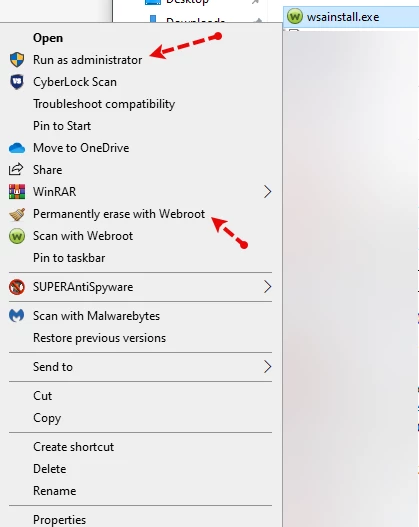
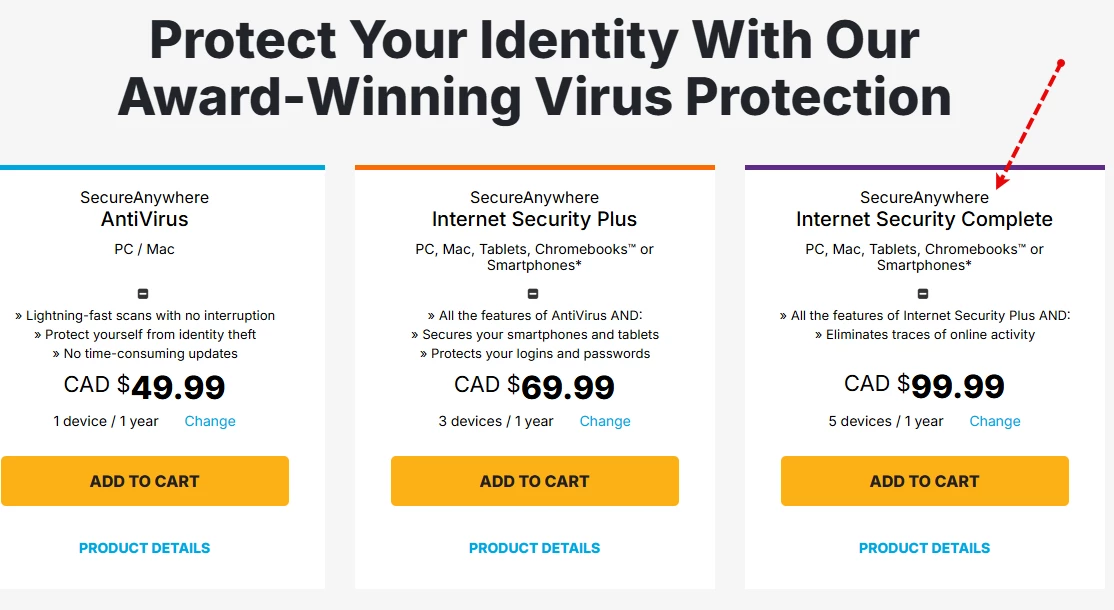
Have you tried to install with Admin Privilege's? Also if you have WSA-Complete you can Right Click on the file and use Permanently erase with Webroot and on Reboot it will be gone.


If nothing works please contact Webroot Support as they have other tools to help you!


How This Helps!


  • Author
  • New Voice
  • September 17, 2025

Unfortunately I don’t have that version of the program.  


TripleHelix
Moderator
Forum|alt.badge.img+63
  • Moderator
  • September 17, 2025

Unfortunately I don’t have that version of the program.  

Then please contact support above where ​@ProTruckDriver posted the links.


Thanks.


  • Author
  • New Voice
  • September 20, 2025

I tried contacting support but their hours are the same as those when I work.   I need to talk to someone during my lunch break but the phone number gives a ton of options and by  the time I get to tech support for Webroot,  there’s a long wait.


By any chance is there a phone number that takes us directly to the tech support guys?


TripleHelix
Moderator
Forum|alt.badge.img+63
  • Moderator
  • Answer
  • September 20, 2025

I tried contacting support but their hours are the same as those when I work.   I need to talk to someone during my lunch break but the phone number gives a ton of options and by  the time I get to tech support for Webroot,  there’s a long wait.


By any chance is there a phone number that takes us directly to the tech support guys?

No that's there number try to Submit a Support Ticket as that is the best way. 


https://www.webrootanywhere.com/servicetalk.asp?


Note: When submitting a Support Ticket, Please wait for a response from Support. Putting in another Support Ticket on this problem before Support responses will put your first Support Ticket at the end of the queue.