
Solved
lock in icon dissapeared

why did the lock in the Webroot icon dissapear?
Best answer by Ssherjj
Hi GNR,
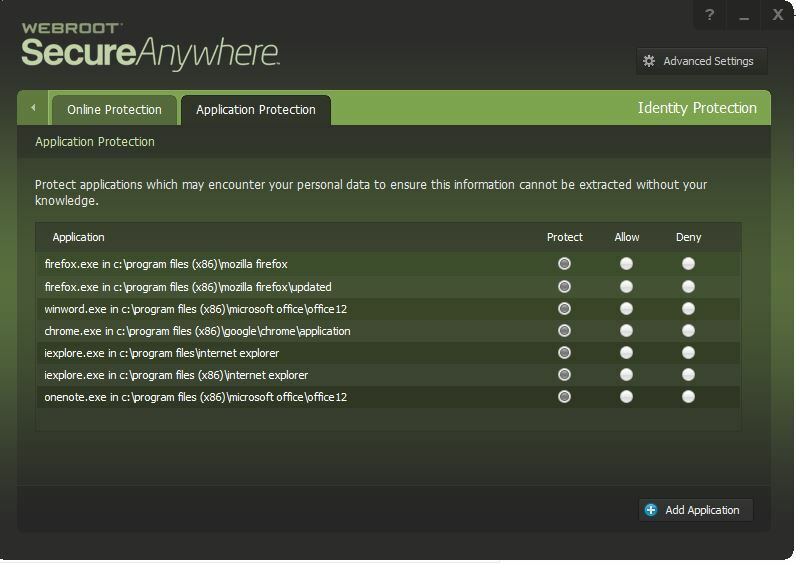
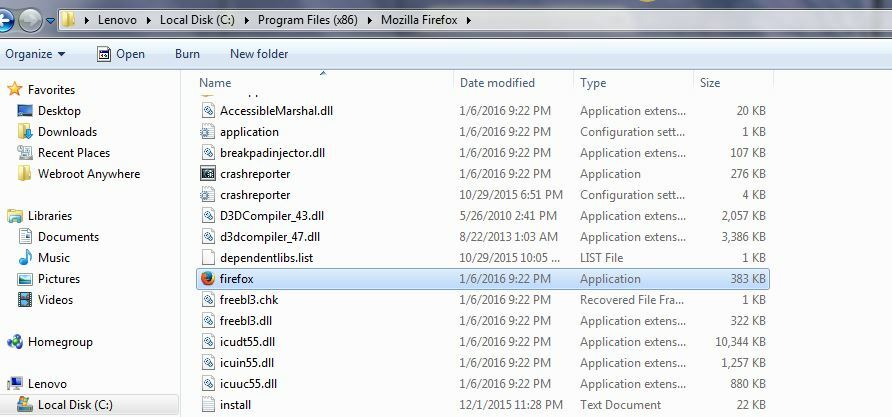
Would you right click Webroot in the system tray to View Status and Webroot opens click on Identity Protection cog.Open Application Protection and at the bottom you will see Add Application. You then go into your C drive and add your browser that you are using . Like I use Firefox..so I open C:/ Program Files (x86) / Mozzilla Firefox/ firefox and click add. This will register your browser to "Protect" Can you try that? My lock icon wasn't showing either until I added Firefox again. You can do this for Internet Explorer or and Chrome.
Would you right click Webroot in the system tray to View Status and Webroot opens click on Identity Protection cog.Open Application Protection and at the bottom you will see Add Application. You then go into your C drive and add your browser that you are using . Like I use Firefox..so I open C:/ Program Files (x86) / Mozzilla Firefox/ firefox and click add. This will register your browser to "Protect" Can you try that? My lock icon wasn't showing either until I added Firefox again. You can do this for Internet Explorer or and Chrome.







Login to the community
No account yet? Create an account
Enter your E-mail address. We'll send you an e-mail with instructions to reset your password.