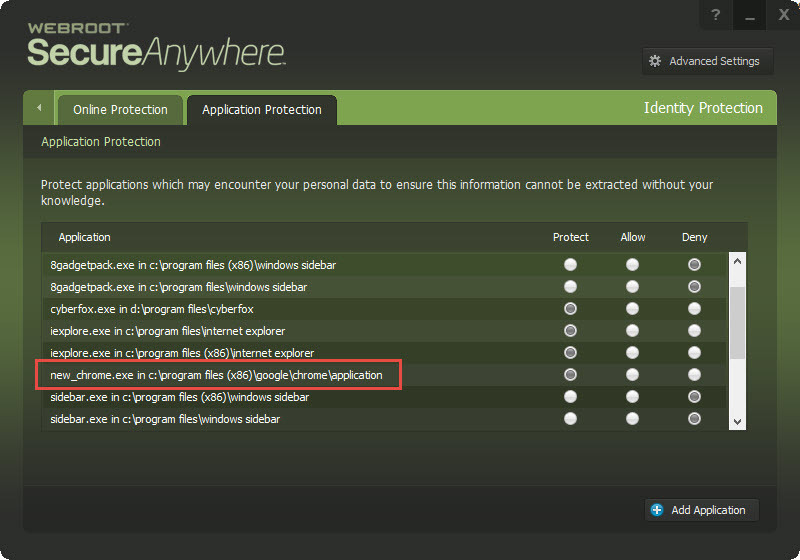
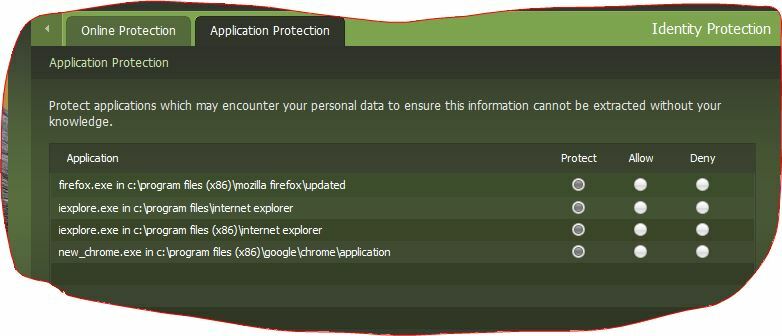
Has anyone experienced this before? Although Chrome is located at C:Program Files (x86)GoogleChromeApplication When it is added to Identity protection it shows up as

Thanks, Theresa


 +8
+8
Best answer by RetiredTripleHelix
There were issues with Keyboards and WSA's ID Shield before but they fixed it so it was my only conclusion as Explorer.exe is the main process of Windows and should not be touched or blocked and in your case not even protected 😃@ wrote:
I did that first. This one is on me. I was logged in as a different user and I had not checked the box to allow non-administrative users to make changes-blah blah. All fixed. Still can't figure out how the heck you knew that protecting explorer would cause Webroot's Captcha to not accept my number pad. How do you do what you do? Are you like super human?:D@ wrote:
Could be because Explorer.exe is under Protect in ID Shield so remove it.@ wrote:
Oh oh, then it said operation completed, then Webroot shut down.@ wrote:
Really??? Should I reboot?@ wrote:
Remove Explorer.exe from the ID Shield and try again!@ wrote:
Ha ha. Its only in Webroot's captcha that it occurs. The numbers work perfectly in every other program.:S@ wrote:
Sounds like the Num Lock on you keyboard has become unset...or possibly the logon/boot up setting which should usually be 'On'...has changed. Have you checked that...said he stating the bleedin' obvious?;)
No account yet? Create an account
Enter your E-mail address. We'll send you an e-mail with instructions to reset your password.