
Solved
Office 2016 and Identity protection


 +19
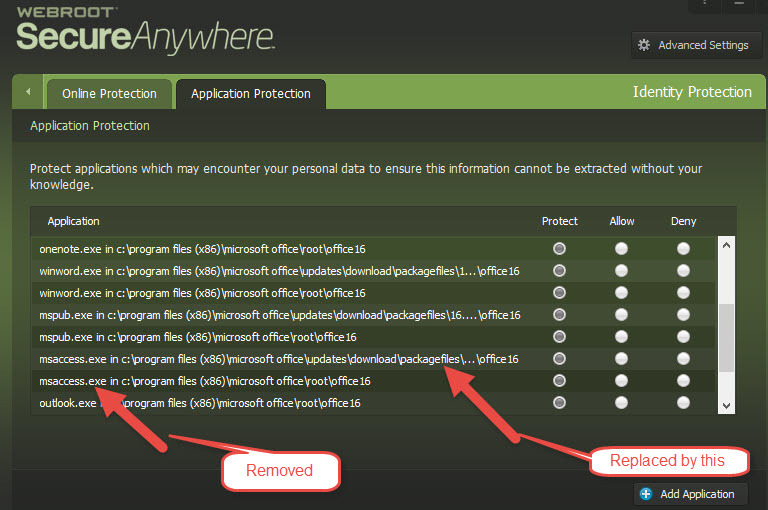
+19Has anyone who uses Office 2016 noticed the following problem, I normally add all the Office executable files to Identity protection in Webroot. I've just noticed that when there has been an Office update these are all removed from Identity protection and replaced with the paths to the Office update folders which means they are no longer protected. I've just to had to add them all back again, the image below shows what has happened, with the correct paths(just added back) and the ones added after the update.
Best answer by DanP
The protection is not based on the path, it is based on a file hash, so the file will be protected no matter what path it is in.@ wrote:
Has anyone who uses Office 2016 noticed the following problem, I normally add all the Office executable files to Identity protection in Webroot. I've just noticed that when there has been an Office update these are all removed from Identity protection and replaced with the paths to the Office update folders which means they are no longer protected. I've just to had to add them all back again, the image below shows what has happened, with the correct paths(just added back) and the ones added after the update.
-Dan





Login to the community
No account yet? Create an account
Enter your E-mail address. We'll send you an e-mail with instructions to reset your password.