
Hi everyone,
Hope someone can help;
I am planning on sending my laptop away to the 'Knowhow' people again to give it a good clean out and to fix a couple of problems etc. but I can't figure out whether there's a way to temporarily disable the saved passwords for all the websites I visit (there's an awfull lot of them) so that if, for some unknown reason, someone other than myself should visit one they won't be able to go any further into my accounts.
As the passwords appear automatically when you go to the site at the moment it's easy for anyone using this laptop to get my info. This looks like 'Autofill' but I've only ever used that for name and address, not passwords - there's none stored in 'Autofil'.
I have to give them my screen password to enable them to use it to do a clean-up/scan/diagnostics etc.so wondering what I can do to make everything more secure. Help.
Linda.
Solved
Password Disable?


 +23
+23Best answer by prince1011
hi Loopylindy,
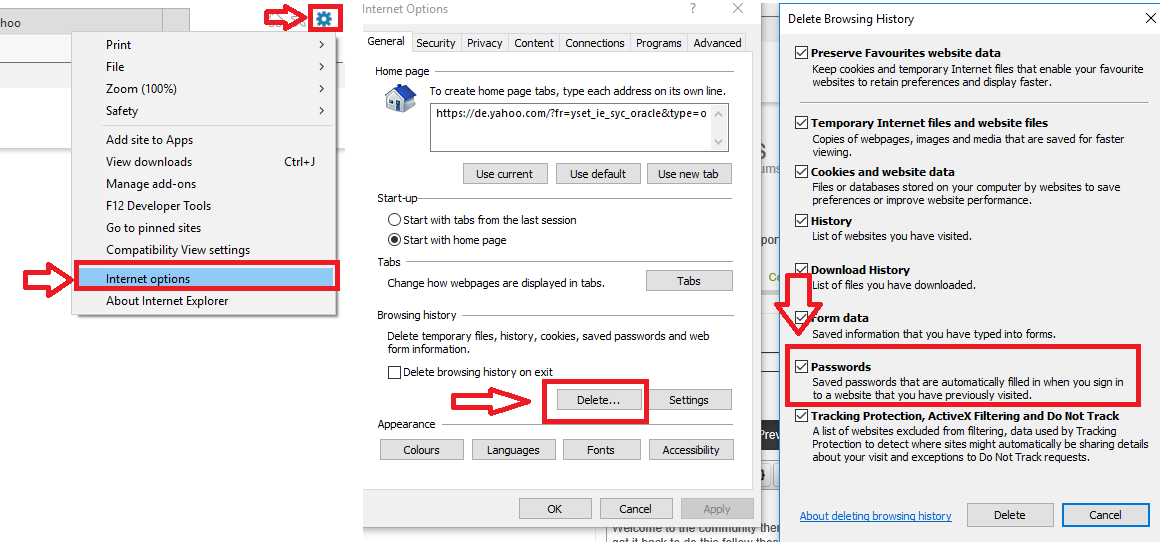
Welcome to the community there is a way of doing this but it means you will have to enter all your passwords again once you get it back to do this follow these steps.
1. click the gear icon on you internet brower located near the cross icon(top right)
2. click on intenet options.
3.click on delete where it says browing history.
4.make sure passwords are ticked and then click delete this will delete all passwords in your brower.
I hope this helps many thanks Adam.
Welcome to the community there is a way of doing this but it means you will have to enter all your passwords again once you get it back to do this follow these steps.
1. click the gear icon on you internet brower located near the cross icon(top right)
2. click on intenet options.
3.click on delete where it says browing history.
4.make sure passwords are ticked and then click delete this will delete all passwords in your brower.
I hope this helps many thanks Adam.





Login to the community
No account yet? Create an account
Enter your E-mail address. We'll send you an e-mail with instructions to reset your password.