Solved

Password Manager Extension not coming up on Chrome

  • December 13, 2015
  • 5 replies
  • 43 views

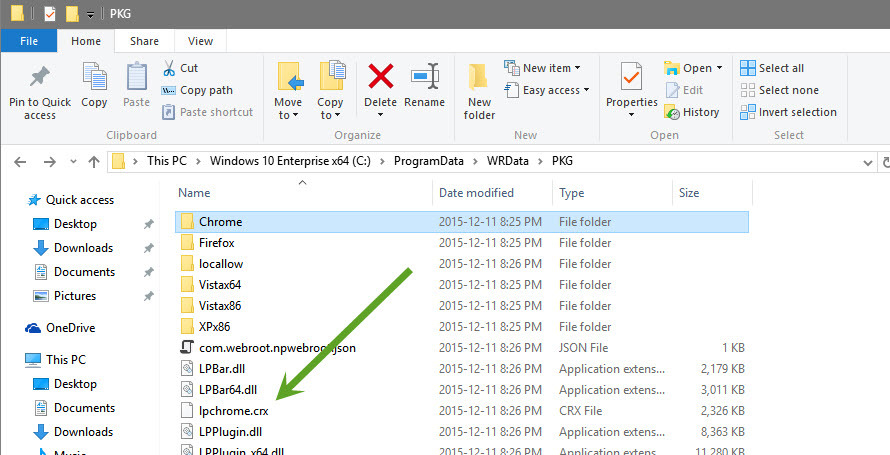
So I just switched to Windows 10 and reinstalled Chrome after having installed Webroot SecureAnywhere Complete. Chrome is finding and loading the Web Filtering extension but not Password Manager. I also cannot find the unpacked extension file in the WRData folder.

Best answer by Baldrick

Hi Aviate
 
The one from the Chrome folder is also need as it is the Webroot Filtering Extension that should also be installed & enable for your browser. You should have BOTH that & the Password Manager toolbar extension if you are using the Complete or Internet Security Plus versions.
 
Regards, Baldrick

5 replies

  • Author
  • Fresh Face
  • December 13, 2015
WOuld also like to add that dragging the Chrome .crx file from ProgramData to the extensions page does not work, and developer mode on Chrome isn't working either

Baldrick
Gold VIP
  • Gold VIP
  • December 13, 2015
Hi Aviate
 
Welcome to the Community Forums.
 
The drag n' drop mechanism does work...I have just tried it again here after reading your posts...but I have to say that some times one needs to do the drop part 'firmly'...by that I mean make sure that you drop onto an unused element of the Extensions page and it often pays to hold the right click & drag in place for a moment where you want to drop the file before you release the right click.
 
Don't ask me why but sometimes it works first time and sometimes it takes up to 4 or 5 attempts...but it definitively does work...one just has to persevere.
 
Regards, Baldrick

RetiredTripleHelix
Gold VIP
Forum|alt.badge.img+56
As Baldrick said it does work and you don't need to be in Developer mode to install it! See here: https://community.webroot.com/t5/Webroot-SecureAnywhere-Complete/Waiting-for-Webroot-Extensions-in-google/m-p/218311#M13810 same with the password manager!
 
Daniel ;)


  • Author
  • Fresh Face
  • December 13, 2015
Oh, I see now. I was using the .crx in the Chrome folder listed in your screenshot instead of the one you pointed to, the lpchrome.crx

Thanks a bunch!

Baldrick
Gold VIP
  • Gold VIP
  • Answer
  • December 13, 2015
Hi Aviate
 
The one from the Chrome folder is also need as it is the Webroot Filtering Extension that should also be installed & enable for your browser. You should have BOTH that & the Password Manager toolbar extension if you are using the Complete or Internet Security Plus versions.
 
Regards, Baldrick