problem after upgrade for Webroot tool bar installed


  • December 11, 2015
  • 10 replies
  • 53 views

urbancrow
New Voice
Forum|alt.badge.img+5
Since the upgrade was completed the open login dialog when browser starts does not function. The item is enabled in the control panel under the advanced tab. any idea whats up  Thank you :8

10 replies

Baldrick
Gold VIP
  • Gold VIP
  • December 11, 2015
Hi urbancow
 
If I am honest I really do not understand what exactly you are reporting. Would you be able to clarify exactly what the problem is.
 
Which browser are you referring to, and what exactly do you mean by "item is enabled in the control panel under the advanced tab"? Is this in WSA or in the browser?
 
Regards, Baldrick

urbancrow
New Voice
Forum|alt.badge.img+5
  • Author
  • New Voice
  • December 11, 2015
Hi, My browser is firefox 42.0 When I start the browser the login dialog for the password manager does not appear as it should when enabled in the control panel under the advanced tab. I have to click on the Webroot Icon in upper right of screen for it to open. Hope this helps

urbancrow
New Voice
Forum|alt.badge.img+5
  • Author
  • New Voice
  • December 11, 2015
The control panel I am reffering to is in WSA The login dialog is where you enter your master password to enable the password manager I apologize for the confusion

Baldrick
Gold VIP
  • Gold VIP
  • December 11, 2015
Hi urbancrow
 
Many thanks for precising...and absolutely no need to apologise.
 
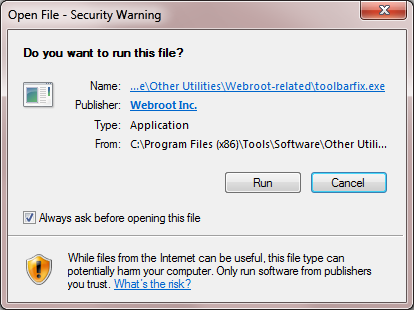
This sometimes does happen and to try to resolve it you can try running the Toolbarfix tool.  You can download it for here. Once downloaded launch it by clicking on the executable, and you should see the following, if then that is fine and you should click on 'Run':


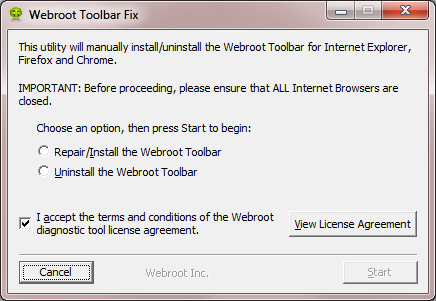
which should then take you to the following dialog:


on which you should choose/check the option 'Repair/Install the Webroot Toolbar' and then press 'Start'.
 
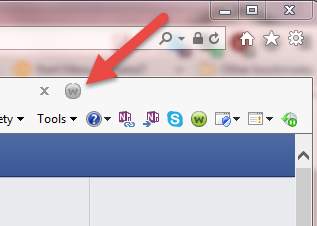
That should initiate the fix process and you just have to wait for it to finish, close the dialog and then check in your browser to see if the Password Manager Toolbar icon is now visible.  If the fix has been successful you should see the following greyed out icon in a toolbar at the top of the (for illustrative purposes IE) browser page:


One then double clicks on that so that the login dialog is presented, etc.
 
Please check the above out and come back if anything is not clear or if it does not help/respond to your query.
 
Regards, Baldrick

urbancrow
New Voice
Forum|alt.badge.img+5
  • Author
  • New Voice
  • December 12, 2015
Hi, it still will not load the login dialog automaticly when firefox starts I have to click on the webroot icon to open it, before the upgrade it loaded when firefox started. Click on the webroot icon in firefox and select preferences, select advanced and check open login dialog when browser starts. I have done this but does not work

Baldrick
Gold VIP
  • Gold VIP
  • December 12, 2015
OK, have tried this in both Firefox and Chrome and in both cases it does not open the dialog when the browser starts. My suggestions is that you had best Open a Support Ticket to seek clarification from the Support Team as to whether this is a bug or there has been a change to how the feature works.
 
Regards, Baldrick

urbancrow
New Voice
Forum|alt.badge.img+5
  • Author
  • New Voice
  • December 12, 2015
Ok, thank you very much for your time and insight,Urbancrow

Baldrick
Gold VIP
  • Gold VIP
  • December 12, 2015
Hi urbancrow
 
Yo are most welcome although I am not sure I helped very much.
 
Please let us know what the SupportTeam detrmne re. this should you decide to open the Support Ticket.
 
Regards, Baldrick

urbancrow
New Voice
Forum|alt.badge.img+5
  • Author
  • New Voice
  • December 14, 2015
Hi, I opened a support ticket as you advised, After speaking with a tech I found out it is a problem they are working to resolve,once resolved there will be another upgrade to fix the problem Thank You

Baldrick
Gold VIP
  • Gold VIP
  • December 14, 2015
Hi urbancrow
 
Many thankd for taking the time to feedback on this one...very useful to know what is going on with Support/Development Team.
 
We will have to keep a look out in the next few betas for a sign of the fix for this issue.
 
Regards, Baldrick