Solved

Re: Web Threat Shield Questions

  • December 1, 2016
  • 10 replies
  • 87 views

rbarrow
Community Guide
Forum|alt.badge.img+17
Hello, akim,
 
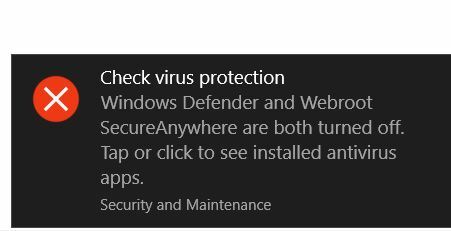
The old Windows 10 Action Center alerts started again on my Home Premium 64 bit PC. Win10 yelled at me about antivirus turned off, so I clicked on the alert and received this pop-up:
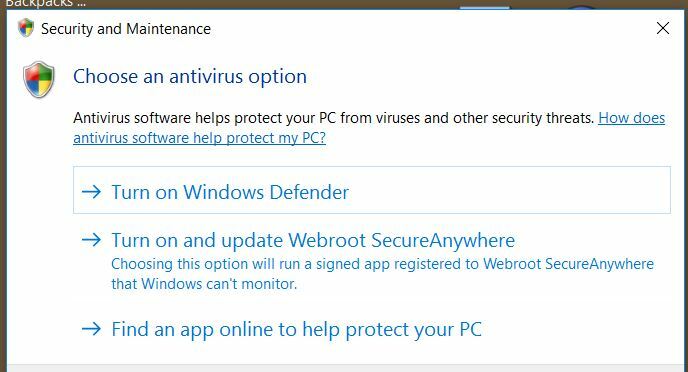


Is this a consequence of your roll-out, Windows Uptates, the way it was meant to work, or something else?
If I posted this in the wrong place, kindly move it.
Thank you very much.
Best answer by rbarrow

Today, Windows installed this update on my Win10 Home Premium 64bit machine:


Not surprisingly, after a restart and a couple of reboots, the Action Center no longer yells that my protection is turned off.
 
Plus, several updates to Microsoft Office 2013, Skype and other stuff that failed (noted in my update history) previous to this update, all successfully installed after it applied itself.
 
I have notified Support about this.


10 replies

RetiredTripleHelix
Gold VIP
Forum|alt.badge.img+56
Hello,
 
Have you tried a reboot to see if it comes up again? Please let us know.
 
Thanks,
 
Daniel

rbarrow
Community Guide
Forum|alt.badge.img+17
  • Author
  • Community Guide
  • December 1, 2016
Hi, Daniel,
 
So I rebooted, and I received the warning almost immediately:


 When I opened the "Action Center" and clicked on the warning, again the pop-up (see my previous post) came up again.
These were the last MS updates:


 I just installed the latest Firefox update and Thunderbird update.
 
Anyway, that's the scoop.
 
Thanks,
 
Rick


RetiredTripleHelix
Gold VIP
Forum|alt.badge.img+56
Thanks for the snapshot maybe Submit a Support Ticket and ask Webroot to look into it and lets see what @ might want from you? Also can you tell us the version of WSA you are using?
 
Consumer Builds: https://www.webroot.com/us/en/support/support-consumer-release-notes
 
Business Builds: https://www.webroot.com/us/en/business/support/release-notes
 
Maybe all you need to do is a Clean Reinstall of WSA.
 
Thanks,
 
Daniel

rbarrow
Community Guide
Forum|alt.badge.img+17
  • Author
  • Community Guide
  • December 2, 2016
Here's what I wrote on my submitted ticket:
================================
Within the last few days my Win10 Home Premium 64 bit machine upon first boot or re-boot immediately issues a "Check Virus Protection" warning. The Action Center launches a popup where one of the three choices is "Turn on and update SecureAnywhere, Choosing this option will run a signed app registered to Webroot SecureAnywhere that Windows can't monitor." The last Windows 10 update was KB3200970 on November 9. My Webroot version is 9.0.13.62. There is a thread about this with my comments, screen shots and a couple of your experts' comments at https://community.webroot.com/t5/Product-Questions/Web-Threat-Shield-Questions/td-p/276954. Thanks.
================================
 
Thanks for hangin' in with me.

rbarrow
Community Guide
Forum|alt.badge.img+17
  • Author
  • Community Guide
  • December 3, 2016
Support folks had me run a program that generated and sent them a log. I notified them the log was emailed. Man, there's lots of stuff in the log that it was a leap of faith sharing with Webroot. Whatever helps the cause...

RetiredTripleHelix
Gold VIP
Forum|alt.badge.img+56
@ wrote:
Support folks had me run a program that generated and sent them a log. I notified them the log was emailed. Man, there's lots of stuff in the log that it was a leap of faith sharing with Webroot. Whatever helps the cause...
Yes wsalogs.exe I have sent them many logs over the years Beta testing WSA! Don't worry as there is no personal information and Webroot respect's ones privacy! https://www.webroot.com/ca/en/company/about/privacy/
 
Please let us know how things go!
 
Thanks,
 
Daniel 😉

rbarrow
Community Guide
Forum|alt.badge.img+17
  • Author
  • Community Guide
  • December 5, 2016
Here is part of the response from Support, minus the naughty bits:
=============================
The Webroot Development team has been notified of this issue and is currently working on a resolution.

We expect to address this issue in an upcoming software version release, which will be downloaded automatically to your computer and installed when it is available.

Please note that Webroot SecureAnywhere is functioning properly and it is protecting your device as expected.
=============================
 
At least the issue wasn't intermittent. I can replicate it every time I boot up. Webroot fixed it once before, and they'll fix it again. I have had several weird problems with Windows 10 Home Premium that were absent in Professional. Since my computer came with Windows 7 Home, I had no choice what flavor Windows 10 I could upgrade to. Some day I might bite the bullet and buy Pro.

rbarrow
Community Guide
Forum|alt.badge.img+17
  • Author
  • Community Guide
  • Answer
  • December 9, 2016
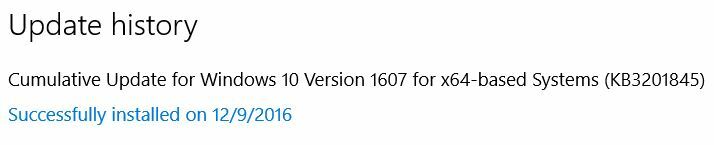
Today, Windows installed this update on my Win10 Home Premium 64bit machine:


Not surprisingly, after a restart and a couple of reboots, the Action Center no longer yells that my protection is turned off.
 
Plus, several updates to Microsoft Office 2013, Skype and other stuff that failed (noted in my update history) previous to this update, all successfully installed after it applied itself.
 
I have notified Support about this.


  • Retired Webrooter
  • December 9, 2016
Very much appreciate reporting the update, @!

RetiredTripleHelix
Gold VIP
Forum|alt.badge.img+56
Hi Rick here is more info on that update and I'm installing it now! https://support.microsoft.com/en-us/kb/3201845