Solved

Scan settings

  • December 28, 2014
  • 4 replies
  • 53 views

My scan only takes 39 seconds and appears to be only scanning malware.  Is this a complete scan?  If not, how do I change the settings to do a complete scan.
 
Thanks


Best answer by Ssherjj

@ wrote:
My scan only takes 39 seconds and appears to be only scanning malware.  Is this a complete scan?  If not, how do I change the settings to do a complete scan.
 
Thanks
 
 
Hello jb767,
 
Welcome to the Community Forum,
 
May I add to this fast scanning with Webroot?
 
The noted speed of scans when using WSA is one of the main things that new users pick up on.
 
The basic reasons are that WSA is only looking for active malware, i.e., the philosophy behind it is that iinactive malware is no threat so there is no need to scan every file or potential infector file/you just need to check what is active & running, etc. Plus the fact that WSA is based on whitelisting ratther than black listing (which more traditional AVs/ISs use) are the main reasons that WSA is so fast.
 
Look here to a previous thread (found  HERE) to suggest to you as a good refrerence if you are interested in reading up a little more on the above in detail.  Check out the 2nd post especially as it gives a good detail description of this.
 
 
Hope this helps explain abit more.
 
Best Regards!


4 replies

RetiredTripleHelix
Gold VIP
Forum|alt.badge.img+56
Hello and Welcome to the Webroot Community!
 
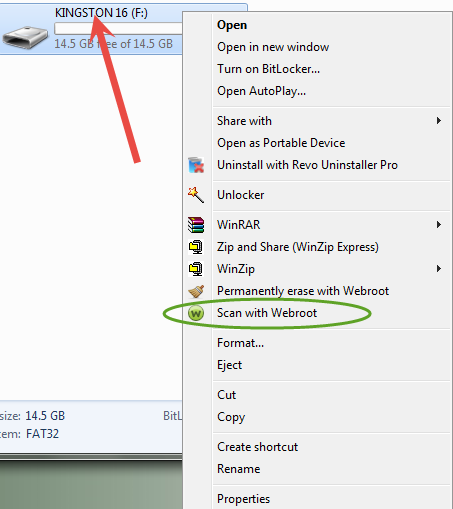
The Default Deep Scan is recommended as WSA's Realtime Shield is always looking for Malicious activity and no need to scan the whole system for files just sitting on your system if it becomes active then WSA will react to it. And you can do other scans with the Right Click Context Menu "Scan with Webroot"! And here to set up Custom Scans again not needed: http://www.webroot.com/En_US/SecureAnywhere/PC/WSA_PC_Help.htm#C2_Scanning/CH2e_Defining_Custom_Scan.htm and if you want to Scan a Whole Drive again use the Right Click Context Menu on the Drive you want to scan!
 
The WIN Cloud at work for you so you can use your PC what it was made for: http://www.brightcloud.com/platform/webroot-intelligence-network.php
 
HTH,
 
Daniel ;)


  • Author
  • Fresh Face
  • December 28, 2014
Thanks Daniel for your reply.  One follow-up question:  I have all five boxes checkmarked under scan settings but did not find your mentioned 'Default Deep Scan'.  Right Click Context Menu worked as expected.


RetiredTripleHelix
Gold VIP
Forum|alt.badge.img+56
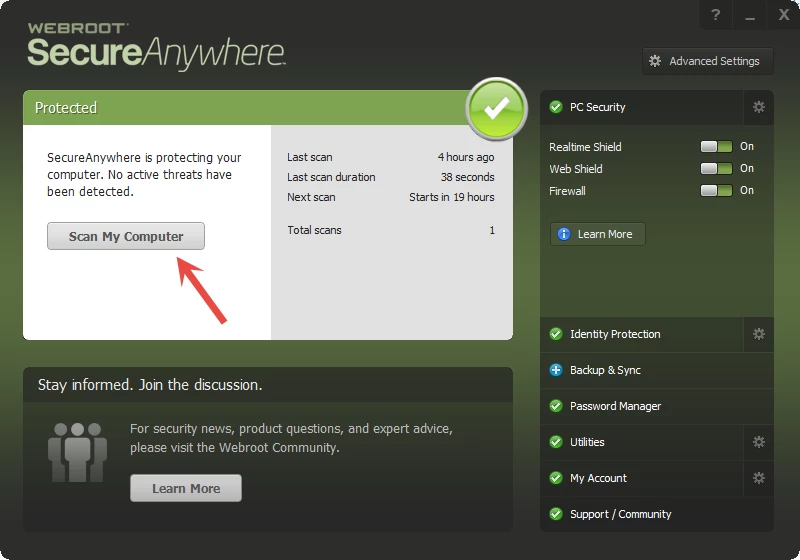
Hello it's says it here: "The default scan is referred to as a deep scan," which checks your entire computer for rootkits, trojans and other threats. During the scan, SecureAnywhere searches all areas where potential threats can hide, including drives, files, and system memory. It looks for items that match our threat definitions, match descriptions in our community database, or exhibit suspicious behavior. If SecureAnywhere detects a threat, it moves the item to quarantine where it is rendered inoperable. In quarantine, it can no longer harm your system or steal personal data."
 
Also it's the Default Deep Scan when you Click Here:


Ssherjj
Moderator
Forum|alt.badge.img+62
  • Moderator
  • Answer
  • December 28, 2014
@ wrote:
My scan only takes 39 seconds and appears to be only scanning malware.  Is this a complete scan?  If not, how do I change the settings to do a complete scan.
 
Thanks
 
 
Hello jb767,
 
Welcome to the Community Forum,
 
May I add to this fast scanning with Webroot?
 
The noted speed of scans when using WSA is one of the main things that new users pick up on.
 
The basic reasons are that WSA is only looking for active malware, i.e., the philosophy behind it is that iinactive malware is no threat so there is no need to scan every file or potential infector file/you just need to check what is active & running, etc. Plus the fact that WSA is based on whitelisting ratther than black listing (which more traditional AVs/ISs use) are the main reasons that WSA is so fast.
 
Look here to a previous thread (found  HERE) to suggest to you as a good refrerence if you are interested in reading up a little more on the above in detail.  Check out the 2nd post especially as it gives a good detail description of this.
 
 
Hope this helps explain abit more.
 
Best Regards!