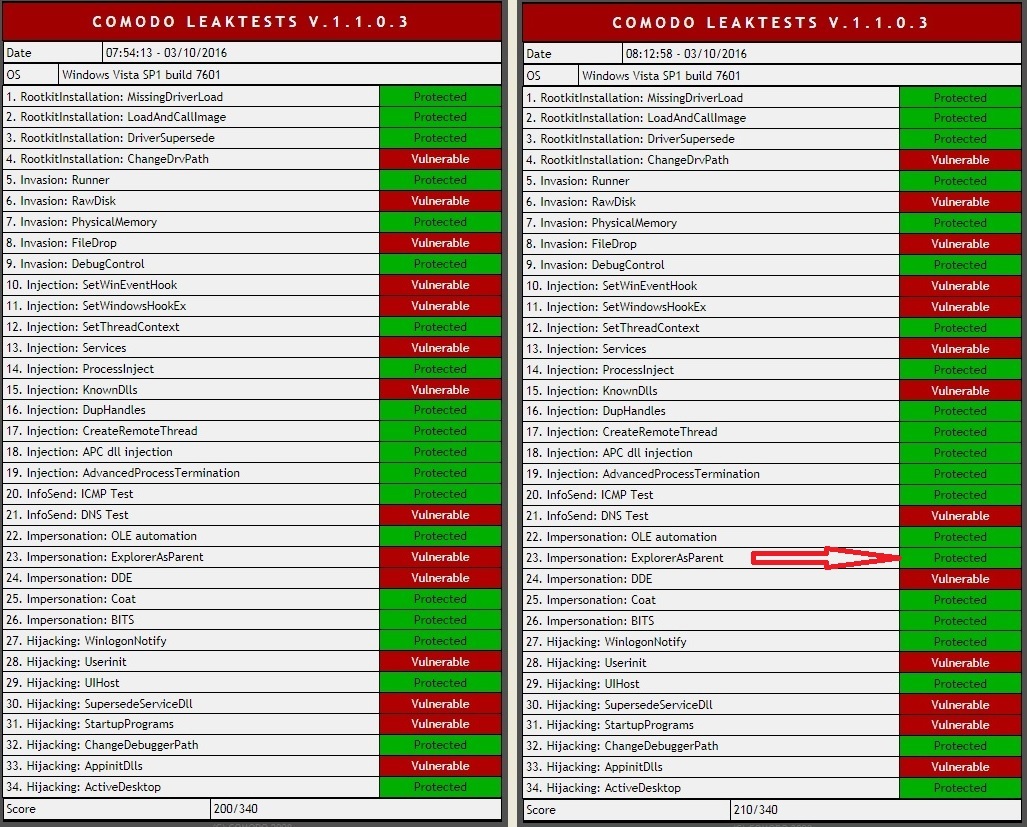
Yeah this program is now like so old it doesn't even see my OS as win7.'Cause back in 2008 that's all it knows. Bless.
Anyways I ran the test and scored 200 then I did it over and got 5% better score.
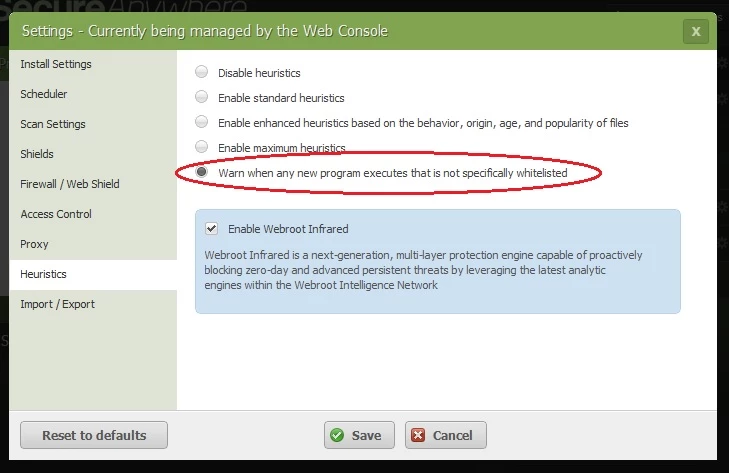
I changed one setting. This one - 'Warn' and not 'Enable max heuristics'.
So here's the point do I now permanently change my default security settings from 'Enable max heuristics' to 'Warn'?
Leaktest score says definitely Yes but as we live in a democracy of fonts I want you to tell me what's really better.
Best answer by RetiredTripleHelix
If that setting above was working correctly it would make WSA very, very noisy to say the least. You would get so many Pop-Ups it would drive you crazy like an Anti-EXE app so no I would not recommend that setting as in most cases all your or anyone's files are not fully Whitelisted and depends if you use not so well known programs as it would take the Webroot Cloud longer to determine such programs Good without contacting support and asking them to Whitelist all your files on every update.
Just to let you know that setting in WSA: "Warn when any new program executes that is not specfically whitelisted" is not working as it should and Webroot is aware of it and a fix will be out in the near future. Also note this does not reduce the protection of WSA in any way as it's just the setting that needs to be fixed.
If that setting above was working correctly it would make WSA very, very noisy to say the least. You would get so many Pop-Ups it would drive you crazy like an Anti-EXE app so no I would not recommend that setting as in most cases all your or anyone's files are not fully Whitelisted and depends if you use not so well known programs as it would take the Webroot Cloud longer to determine such programs Good without contacting support and asking them to Whitelist all your files on every update.
@ wrote:
Just to let you know that setting in WSA: "Warn when any new program executes that is not specfically whitelisted" is not working as it should and Webroot is aware of it and a fix will be out in the near future. Also note this does not reduce the protection of WSA in any way as it's just the setting that needs to be fixed.
Thanks,
Daniel ;)
Progress regarding "setting that needs to be fixed."....?
@ wrote:
Just to let you know that setting in WSA: "Warn when any new program executes that is not specfically whitelisted" is not working as it should and Webroot is aware of it and a fix will be out in the near future. Also note this does not reduce the protection of WSA in any way as it's just the setting that needs to be fixed.
Thanks,
Daniel ;)
Progress regarding "setting that needs to be fixed."....?
Thanks
I'm not sure if it's fixed so I will ask @@@@ to see if it is?
I'm unsure whether "Warn when any..." turns Off any level of Heuristics and changes Heuristics protection into whitelist anti-executable solely based upon user decision.
@ wrote: @ can you check with Lucas @ about this for a comment?
Thanks,
Daniel ;)
Unfortunately, Lucas is not in the Office currently. I've forwarded this thread to our Manager of Product Support to check with his Team and/or the Product Team as well.
@ wrote: @ can you check with Lucas @ about this for a comment?
Thanks,
Daniel ;)
Unfortunately, Lucas is not in the Office currently. I've forwarded this thread to our Manager of Product Support to check with his Team and/or the Product Team as well.
The Product Team has informed me that this issue has been documented and we are actively tracking it. They also said there has been only one report thus far, meaning that it is by no means a high-priority-issue in the backlog.
Also trying to figure out if this affects all OS's or just Win10.
JP wrote:
The Product Team has informed me that this issue has been documented and we are actively tracking it. They also said there has been only one report thus far, meaning that it is by no means a high-priority-issue in the backlog. Also trying to figure out if this affects all OS's or just Win10.
_________________________________________________________________
and by "this issue has been documented" & "only one report" .... means, "Warn when any new program executes [..]" ...button, does not "Warn"..?
FWIW ~ I launched new setup.exe from my desktop (at test) with "Warn when any [..]" checked.
Webroot was silent. IDK, if my test is valid. IDK, if "not specifically whitelisted" means, 'local or global' whitelist.
Thanks
bjm_ wrote: IDK, if "not specifically whitelisted" means, 'local or global' whitelist.Thanks
Whitelisted means Global or the Webroot BrightCloud Database deems it's known and clean.
Okay.
Thanks. I remain unsure regarding.
<< Issues a warning for any program not specifically included in the Webroot database of websites that are known to be okay. >>
< any program not specifically included in the Webroot database of websites >
bjm_ wrote: IDK, if "not specifically whitelisted" means, 'local or global' whitelist.Thanks
Whitelisted means Global or the Webroot BrightCloud Database deems it's known and clean.
Okay.
Thanks. I remain unsure regarding.
<< Issues a warning for any program not specifically included in the Webroot database of websites that are known to be okay. >>
< any program not specifically included in the Webroot database of websites >
program in the database of websites ?
I'm just talking about files that are known good in the Webroot Cloud Database not websites.
[g] Means Known Good so they are whitelisted!
[u] Means Unknown so they are not whitelisted yet or could be bad and Webroot will monitor [u] files just in case it needs to rollback when marked Bad or Good. When Good it will stop monitoring the said [u] files.
TripleHelix wrote: Whitelisted means Global or the Webroot BrightCloud Database deems it's known and clean.
_________________________________________________________
bjm_ wrote: Thanks. I remain unsure regarding.
<< Issues a warning for any program not specifically included in the Webroot database of websites that are known to be okay. >>
< any program not specifically included in the Webroot database of websites >
program in the database of websites ? ___________________________________________________________________
TripleHelix wrote: I'm just talking about files that are known good in the Webroot Cloud Database not websites.
___________________________________________________________________
bjm_ wrote:
@ wrote:
TripleHelix wrote: Whitelisted means Global or the Webroot BrightCloud Database deems it's known and clean.
_________________________________________________________
bjm_ wrote: Thanks. I remain unsure regarding.
<< Issues a warning for any program not specifically included in the Webroot database of websites that are known to be okay. >>
< any program not specifically included in the Webroot database of websites >
program in the database of websites ? ___________________________________________________________________
TripleHelix wrote: I'm just talking about files that are known good in the Webroot Cloud Database not websites.
___________________________________________________________________ @ wrote:
FWIW ~ I run [u] c:program filesovirusthanksexe radar proerpsvc.exe [MD5:C1C9E5C71171E806646FB9E9ADB7E27B].
"Warn when any" is silent. Yes, erpsvc is Monitor (or, I'll move to Allow). Webroot reports erpsvc as Unclassified.
Well lets see what Webroot has to say during the week because if you go to a bad Website it will be blocked so I don't know why that's in there with Heuristics as that is for running process files on that system IMO. None of the other settings say anything about Websites and I run with Max Heuristics which is just fine.
Adjust heuristics using the information in the following table.
OPTIONDESCRIPTION Disable heuristicsTurns off heuristic analysis. Not recommended. Enable standard heuristicsThis setting could lower your level of security. Enable enhanced heuristics based on the behavior, origin, age, and popularity of filesDefault; recommended setting. Enable maximum heuristicsUse with caution; this could cause unexpected behavior, prevent the use of lesser known applications, or prevent the installation of rarely-used programs. Warn when any new program executes that is not specifically whitelistedIssues a warning for any program not specifically included in the Webroot database of websites that are known to be okay. Enable Webroot InfraredFor details, see PC Shields Overview.
Yes, curious why Webroot has local Heuristics > Enable.
quote: << The extra information generated from these actions may result in a Good or Bad determination from the cloud based on cloud heuristics or a heuristic determination from WSA itself - in which case one of the above Good or Bad results occur.>>
Yes, curious why Webroot has local Heuristics > Enable.
quote: << The extra information generated from these actions may result in a Good or Bad determination from the cloud based on cloud heuristics or a heuristic determination from WSA itself - in which case one of the above Good or Bad results occur.>>
With respect & appreciation,
Thanks
> further to my curiosity re local Heuristics,.....found message >
There are two kinds of heuristics - agent heuristics and cloud heuristics. Agent heuristics look at what the file is doing on that particular system, and cloud heuristics look at what a file is doing across the entire userbase. If we have data on what that same file has been doing on all of the other computers in our intelligence network, the cloud heuristics are far better off for it and we can make rules in the cloud to identify and blacklist malware based on what the cloud is seeing about a given file. https://community.webroot.com/t5/Webroot-SecureAnywhere-Antivirus/Evaluating-SecureAnywhere-Antivirus-feedback-and-some-questions/m-p/38796/highlight/true#M1735