Answer

Stop renew popup without paying

  • April 30, 2020
  • 3 replies
  • 1681 views

I don't have the money to renew my subscription right now, and I'd rather not outright uninstall Webroot since I plan to renew later, but even after turning off "show a status notification screen on bootup" in the advanced settings, I  still get a popup regularly telling me to "save now". Is there a way to block these without outright uninstalling?

Best answer by TripleHelix

Hello @lyrander 


Try this via Run Command:


"C:\Program Files\Webroot\WRSA.exe" -uninstall
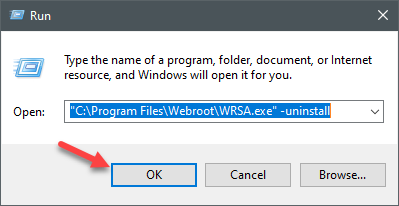


If it doesn’t work try this in Safe Mode with Networking! https://support.microsoft.com/en-us/help/12376/windows-10-start-your-pc-in-safe-mode


Thanks,

3 replies

Forum|alt.badge.img+20
  • Retired Webrooter
  • April 30, 2020

Hey @lyrander ,

I just spoke with support to find out the best answers around this. 

If your Webroot subscription has actually expired, the message you’re receiving is likely originating from Windows. Windows 10 will repeatedly remind you that your security coverage is lacking and for you to renew or uninstall Webroot. 

The suggestion from our support team: you should uninstall, allow Windows to protect you in the interim, and when you renew/purchase a new sub you can just install it again


Hope that helps!

-Keenan


  • Author
  • Fresh Face
  • April 30, 2020

Hey @lyrander ,

I just spoke with support to find out the best answers around this. 

If your Webroot subscription has actually expired, the message you’re receiving is likely originating from Windows. Windows 10 will repeatedly remind you that your security coverage is lacking and for you to renew or uninstall Webroot. 

The suggestion from our support team: you should uninstall, allow Windows to protect you in the interim, and when you renew/purchase a new sub you can just install it again


Hope that helps!

-Keenan

Apparently I CAN'T uninstall webroot because Windows 10 doesn't recognize it as a program.


TripleHelix
Moderator
Forum|alt.badge.img+63
  • Moderator
  • Answer
  • May 1, 2020

Hello @lyrander 


Try this via Run Command:


"C:\Program Files\Webroot\WRSA.exe" -uninstall
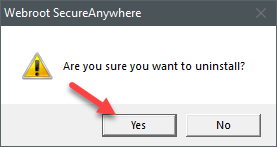


If it doesn’t work try this in Safe Mode with Networking! https://support.microsoft.com/en-us/help/12376/windows-10-start-your-pc-in-safe-mode


Thanks,