The webroot toolbar now longer works in Foxfire or Chrome.

  • August 22, 2015
  • 1 reply
  • 22 views

The webroot toolbar for password manager does not works. Unable to generate passwords on foxfire. Google does not have the webroot toolbar icon anymore.


1 reply

Baldrick
Gold VIP
  • Gold VIP
  • August 22, 2015
Hi Karen
 
Welcome to the Community Forums.
 
If the Password Manager icon has disappeared from Chrome (Google) the please understand that sometimes this does happen and to try to resolve it you can try running the Toolbarfix tool.  
 
In the case of Firefox this is a recently encountered issue more information about which you can read up on in this current thread on the subject.
 
To use the Toolbarfix toll, you can download it for here.  Once downloaded launch it by clicking on the executable, and you should see the following, if then that is fine and you should click on 'Run':


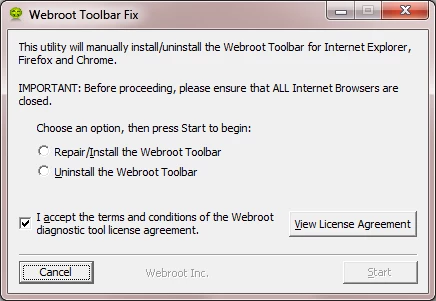
which should then take you to the following dialog:


on which you should choose/check the option 'Repair/Install the Webroot Toolbar' and then press 'Start'.
 
That should initiate the fix process and you just have to wait for it to finish, close the dialog and then check in your browser to see if the Password Manager Toolbar icon is now visible.  If the fix has been successful you should see the following greyed out icon in a toolbar at the top of the IE browser page:


One then double clicks on that so that the login dialog is presented, etc.
 
Please check the above out and come back if anything is not clear or if it does not help/respond to your query.
 
Regards, Baldrick