This is frustrating

  • December 27, 2016
  • 12 replies
  • 59 views

I first posted this in the "Internet Security" forum because I saw some similar issues there but actually have "Complete" installed. "I am attempting to access the "Webroot Console". It keeps telling me to reset my password. I try and it refuses to allow me to change -- simply telling me a pass and connect already exist. I try to contact Webroot Support only to learn they only operate during the day. then it locks me out of any attempt telling me I have tried too many times. What can I do? Install Kaspersky? Thanks in advance for any help. Phil"


12 replies

  • Author
  • Popular Voice
  • December 27, 2016
I am attempting to access the "Webroot Console". It keeps telling me to reset my password. I try and it refuses to allow me to change -- simply telling me a pass and connect already exist. I try to contact Webroot Support only to learn they only operate during the day. then it locks me out of any attempt telling me I have tried too many times. What can I do? Install Kaspersky? Thanks in advance for any help. Phil

Ssherjj
Moderator
Forum|alt.badge.img+62
  • Moderator
  • December 27, 2016
Hi Philip10
 
Sorry to hear you are having these issues. It's very frustrating I'm sure.
 
My best advice is to Submit a Support Ticket and have the Support Team fix this for you. They are open 24/7.
 
Or call during business hours. This is a free service with a Webroot subscription.
 
Mon - Fri 7:00 AM to 8:00 PM (MST)
Tel: https://tel:+18666124268
 
Sorry I coudn't be more help.

Ssherjj
Moderator
Forum|alt.badge.img+62
  • Moderator
  • December 27, 2016
Hi Philip10,
 
Would you restart your computer and try again?
 
May I ask you if you have tried all these options?


  • Click on the "Can't log in?" link in blue next to the Log In button. [img]https://sw.nohold.net/Webroot/Images/wsa_changecredentials4.png[/img]  
  • Select if you would like to reset your Password or Personal Security Code. [img]https://sw.nohold.net/Webroot/Images/wsa_changecredentials5.png[/img]  
  • Enter your email address in the box provided.


  • Author
  • Popular Voice
  • December 27, 2016
Thanks, Sherry. I have submitted a ticket as you suggest and am now just waiting. I have used Webroot for 3 years without much trouble so this kinda surprised me. Again, thanks! Phil

  • Author
  • Popular Voice
  • December 27, 2016
Thanks, again Sherry but regrettably I have tried all that with no luck. That's where the web page basically said, "just stop" 🙂

Ssherjj
Moderator
Forum|alt.badge.img+62
  • Moderator
  • December 27, 2016
Okay Philip10
 
I'm really sorry for any inconviences that this has caused. If you call Support tomorrow they will get you all fixed up.
 
And your most welcome.

  • Author
  • Popular Voice
  • December 27, 2016
Well, Sherry -- I did receive a confirming note from Support saying they did get my support ticket and would reply soon. That was about 2 hours ago. It's now something after midnight here and I still have no reply so I am going to shut down my system. The sad thing is I have no idea if my system is protected or not. That is what is bad about an app that is controlled by others. If there is so much confusion I can't even log in to the Console, how can I believe the app when it claims I am protected. Oh, well. Again, thank you for your attempt to help.

Ssherjj
Moderator
Forum|alt.badge.img+62
  • Moderator
  • December 27, 2016
Hi Philip10,
 
 Please don't worry... because you are still protected even if you cannot sign into the Account Console.
 
Support will probably get back to you by morning.
 
Have a good night...

Baldrick
Gold VIP
  • Gold VIP
  • December 27, 2016
Hi Philip10
 
Welcome to the Community Forums.
 
If I may just add here...the online console does not control WSA on the local client per se. It can be used to if the user wants it too but WSA will operate fine and protect the client...even if the console is not set up...and we have some users who have not set that up.
 
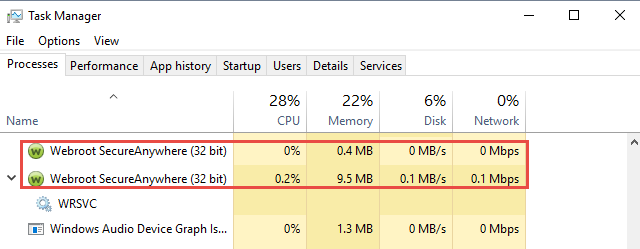
If the WSA notification area icon is present & showing green then WSA is protecting your system. But to be doubly sure you can check in the Task Manager for the following being present (see boxed entries):


If they are present then WSA is running normally and you are protected.
 
Hope that helps further?
 
Regards, Baldrick

  • Author
  • Popular Voice
  • December 27, 2016
Baldrick,
 
Thank you for the additional info and I DO have those two processes in my list so I guess I am good to go. I just got off the phone with support (their on-hold music is EXTREMELY annoying) and they managed to reset my console access with some effort so I guess I am good to go on that, as well. Thank you (and Sherry) for your personal and professional attention to my issue.
 
Phil

Ssherjj
Moderator
Forum|alt.badge.img+62
  • Moderator
  • December 27, 2016
Your are certainly most welcome Phillip,
 
That's great to hear your Online Account Console is functioning correctly now. And Webroot. Being on hold can be taxing. ;) 
 
Thank you for letting us know...
 
Have a nice day! 

Baldrick
Gold VIP
  • Gold VIP
  • December 27, 2016
Hi Philip
 
As Sherry said...you are most welcome. Glad to hear that all is now well in realtion to your issue.
 
Regards, Baldrick