

Solved

Undo a block

  • November 26, 2015
  • 11 replies
  • 148 views

Webroot blocks a file named something like outlook.exe and I can't receive my e-mails through Outlook. How can I allow-unblock it ?

Best answer by RetiredTripleHelix

@ wrote:
At first I would like to thank you for the help!
I'm using Windows 7 Home Premium 32-bit.
In the tab PC Security > Block/Allow files the file outlook.exe is set to 'allow' and in the tab Utilities > System control > Control Active Processes, outlook.exe is also set to 'allow'.
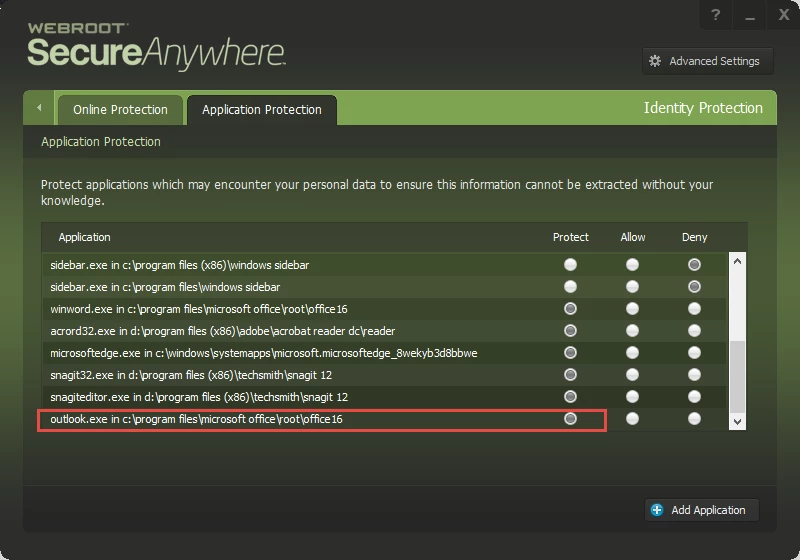
Finally in the tab Identity Protection > Application Protection the file outlook.exe was also set to 'allow' but now I have removed the file from that list and I don't know how and if I should restore it.
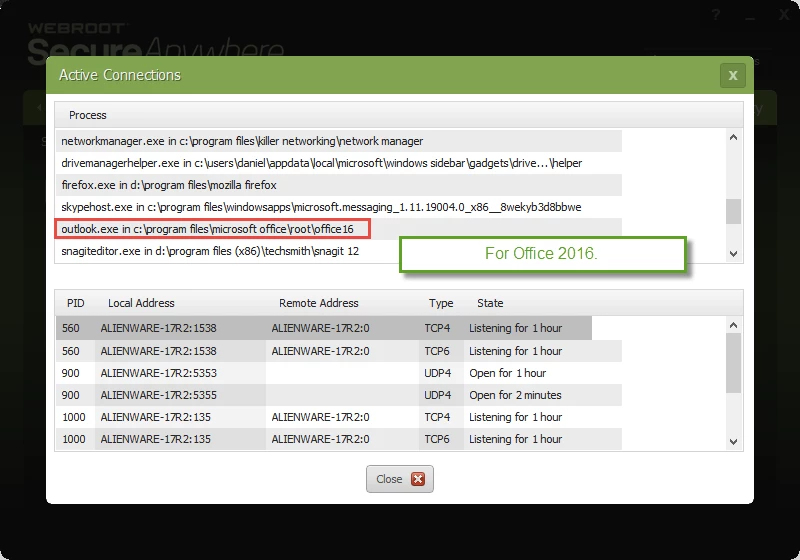
You can add it back but put it under protect: http://www.webroot.com/En_US/SecureAnywhere/PC/WSA_PC_Help.htm#C6_IDProtection/CH6c_ManagingProtectedApps.htm you will have look for outlook.exe to add it back to ID Shield. Now you have Windows 7 and you have access to WSA's Firewall so look in there to make sure it's set to Allow if it's under Block: http://www.webroot.com/En_US/SecureAnywhere/PC/WSA_PC_Help.htm#C4_Firewall/CH4c_ManagingActiveConnections.htm I'm sure that's it as in Windows 8 and 10 WSA does not show the same settings in Windows 7 see here: https://community.webroot.com/t5/Ideas-Exchange/Outbound-connections-fw-control-in-Win-8-Win-8-1/idi-p/60003 and notice what JoeJ said here.
 
PrevxHelp( JoeJ, VP of Development ) wrote:
 
The firewall in Windows 8 is much easier to work with than previous platforms because of the built in OS controls. Every vendor needs to use the same APIs now (the older methods are deprecated), but that's exactly why we aren't doing it currently - no matter what vendor wraps the APIs, it will be exactly the same underlying calls which are built into the OS, and you can use the OS UI to do the same job if you want to customize it.
 
The reason why we have the functionality on Windows 7 and not Windows 8 is because Microsoft doesn't expose the same normalized interfaces on Windows 7 (or require vendors to use the new APIs).
 
Thanks,
 
Daniel ;)
 
From my Win 10 System!


11 replies

  • November 26, 2015
Hello ?
 
Welcome to the Webroot Community.
 
There are essentially 3 key areas where this can happen/a user can override WSA.  These are essentially reached, from the main WSA panel, as follows:
 
  1. PC Security > Block/Allow Files
  2. Identity Protection > Application Protection
  3. Utilities > System Control > Control Active Processes
and once there the user usually has the options to:
 
  1. "Allow"
  2. "Protect/Monitor"
  3. "Block/Deny"
In the case of 1. Block/Allow Files
 
If an item is set to:
 
- "Allow", WSA ignores it during scans and shield actions, meaning if it's a virus that has been allowed, it can continue acting as a virus acts.  Be careful of what you allow in this area and ensure it's something you trust implicitly if you are going to change the status from Block to Allow.
 
- "Monitor", WSA will watch the item to determine if it is legitimate or related to malware.  It is not necessary to add files into this list or set files to monitor manually unless you are changing them from a Block or Allow status.  This might be useful if for example you think Webroot might have had a false positive on something and you want to check again at a later time to see if the determination has changed.  You could set it to Monitor and have Webroot check it again.
 
- "Block", then WSA will treat the items as it would detected malware.  It will not be executed, and it will not be written to your hard drive.  Detected infections are automatically set to a Block status.
 
In the case of 2. Protected Applications
 
In this case:
 
- "Allowed applications" are not secured against information-stealing malware, and also have full access to protected data on the system. Many applications unintentionally access protected screen contents or keyboard data without malicious intent when running in the background. If you trust an application that is currently marked as "Deny," you can change it to "Allow."
 
- "Protected applications" are secured against information-stealing malware, but also have full access to data on the system. By default, web browsers are assigned to the "protected" status. If desired, you might also want to add other software applications to "protected," such as financial management software. When you run a protected application, the Webroot icon in the system tray displays a padlock.
 
- "Denied applications" cannot view or capture protected data on the system, but can otherwise run normally.
 
And finally, in the case of 3. Control Active Processes
 
If a process is set to:
 
- "Allow" it means WSA allows it to run on the system. It's important to note that if an item is already allowed here, that's because Webroot knows already from seeing the file before that it's ok to allow.
 
- "Monitor" status means WSA will journal what that program is doing and keep a very close eye on it for any suspicious activity.  Basically it would treat it as if it wasn't already sure about it one way or the other, and it wants to monitor it closely until it's sure about it.
 
- "Block" means just that...WSA does not allow it to run on the system.  Be very careful about what you block in this area and ensure that anything you decide to block is a non-essential process.  Otherwise, you could be setting yourself up for a lot of grief if you block something critical.
 
Hope this info helps. Please let us know if you still need assistance, we will be happy to help. :)
 
bd

edwin_eekelaers
Popular Voice
Forum|alt.badge.img+6
thanks BD ,for the info..

RetiredTripleHelix
Gold VIP
Forum|alt.badge.img+56
Hello and Welcome to the Webroot Community!
 
Just to add what ? already said.
 
Also in this area:
 
3. Utilities > System Control > Control Active Processes
 
If you set any process to Block WSA will treat it as an infection and remove it so be careful.
 
May I ask what Operating System you are using and if it's 32bit or 64bit?
 
Thanks,
 
Daniel 😉

  • Author
  • Fresh Face
  • November 27, 2015
At first I would like to thank you for the help!
I'm using Windows 7 Home Premium 32-bit.
In the tab PC Security > Block/Allow files the file outlook.exe is set to 'allow' and in the tab Utilities > System control > Control Active Processes, outlook.exe is also set to 'allow'.
Finally in the tab Identity Protection > Application Protection the file outlook.exe was also set to 'allow' but now I have removed the file from that list and I don't know how and if I should restore it.

RetiredTripleHelix
Gold VIP
Forum|alt.badge.img+56
@ wrote:
At first I would like to thank you for the help!
I'm using Windows 7 Home Premium 32-bit.
In the tab PC Security > Block/Allow files the file outlook.exe is set to 'allow' and in the tab Utilities > System control > Control Active Processes, outlook.exe is also set to 'allow'.
Finally in the tab Identity Protection > Application Protection the file outlook.exe was also set to 'allow' but now I have removed the file from that list and I don't know how and if I should restore it.
You can add it back but put it under protect: http://www.webroot.com/En_US/SecureAnywhere/PC/WSA_PC_Help.htm#C6_IDProtection/CH6c_ManagingProtectedApps.htm you will have look for outlook.exe to add it back to ID Shield. Now you have Windows 7 and you have access to WSA's Firewall so look in there to make sure it's set to Allow if it's under Block: http://www.webroot.com/En_US/SecureAnywhere/PC/WSA_PC_Help.htm#C4_Firewall/CH4c_ManagingActiveConnections.htm I'm sure that's it as in Windows 8 and 10 WSA does not show the same settings in Windows 7 see here: https://community.webroot.com/t5/Ideas-Exchange/Outbound-connections-fw-control-in-Win-8-Win-8-1/idi-p/60003 and notice what JoeJ said here.
 
PrevxHelp( JoeJ, VP of Development ) wrote:
 
The firewall in Windows 8 is much easier to work with than previous platforms because of the built in OS controls. Every vendor needs to use the same APIs now (the older methods are deprecated), but that's exactly why we aren't doing it currently - no matter what vendor wraps the APIs, it will be exactly the same underlying calls which are built into the OS, and you can use the OS UI to do the same job if you want to customize it.
 
The reason why we have the functionality on Windows 7 and not Windows 8 is because Microsoft doesn't expose the same normalized interfaces on Windows 7 (or require vendors to use the new APIs).
 
Thanks,
 
Daniel ;)
 
From my Win 10 System!


  • Author
  • Fresh Face
  • November 28, 2015
Thank you a lot! Your information solved my problem. It was in the tab  PC Security > Scan & Shields > View Active Connections where outlook.exe was blocked. I set it to "Allow" and now everything seems to be working fine!
Thanks again!

edwin_eekelaers
Popular Voice
Forum|alt.badge.img+6
Glad to hear your problem's fixed. The experts here are really good .

  • Popular Voice
  • November 28, 2015
Personally I have never had Webroot block outlook but I have to ask why would it have done so for OP ? For the "normal user" it should not really be necessary to manually block/allow ?

Baldrick
Gold VIP
  • Gold VIP
  • November 28, 2015
It could be due to a number of reasons such as a False Positive based on the specific .exe in question...not all user run the same version of an app nor do they all keep them updated, etc. And no AV/IS, even WSA, is completely exempt from FPs or such glitches.
 

RetiredTripleHelix
Gold VIP
Forum|alt.badge.img+56
@ wrote:
Personally I have never had Webroot block outlook but I have to ask why would it have done so for OP ? For the "normal user" it should not really be necessary to manually block/allow ?
@ wrote:
It could be due to a number of reasons such as a False Positive based on the specific .exe in question...not all user run the same version of an app nor do they all keep them updated, etc. And no AV/IS, even WSA, is completely exempt from FPs or such glitches.
 
I have not seen WSA Block Outlook as well, on Windows 7 maybe it popped up and by mistake was blocked instead of allow and who knows if someone on his/her PC was messing with the settings or as Baldrick said a glitch in which I have never seen from WSA and Blocking known Good Programs in the Cloud Database.
 
Daniel 😉

tMc9072
Popular Voice
Forum|alt.badge.img+8
  • Popular Voice
  • November 29, 2015
@ wrote:
Glad to hear your problem's fixed. The experts here are really good .
How very true! How very true! And they are humble, as well. ;)
 
Theresa




