Uninstall

  • January 4, 2016
  • 6 replies
  • 78 views

will webroot clean up all file after uninstalling a program.

6 replies

Baldrick
Gold VIP
  • Gold VIP
  • January 4, 2016
Hi jrp1953
 
Welcome to the Community Forums.
 
In essence the uninstallation of WSA should to all intents and purposes clean all pertinent items off your system. But in practice we have found that there are some residual traces left but as far as I know none of which would or should cause you any issues going forward.
 
This KB Article may shed some further light on this for you, and could arguable act as an initial list to check for remnants once you have uninstalled WSA.
 
Why do you ask, if I may make so bold?
 
Regards, Baldrick

  • Author
  • Fresh Face
  • January 4, 2016
I recently purchased a rebuilt computer and installed a couple of my programs on it. I'm returning it and want to make sure there are no personal files left on the hard drive.
I am new to webroot and not familar with all it features yet but did notice it had a uninstall button.
 
Thanks again for your help
jp-

edwin_eekelaers
Popular Voice
Forum|alt.badge.img+6
?
do you want to completely wipe the disk?? Are you any good with pc's??? If you wipe it no need to worry about any data left on it. 

  • Author
  • Fresh Face
  • January 4, 2016
Naw I can't do that,it had there pre-installed software on it.

Baldrick
Gold VIP
  • Gold VIP
  • January 4, 2016
Hi jrp1953
 
As far as what you are doing is concerned doing the unistall should be sufficent but just to make sure once you have uninstalled WSA you should check for the continued presence of the following:
 
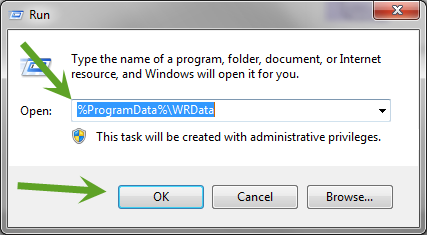
     C:ProgramDataWRData
 
This is a 'hidden' folder (so you may need to 'Allow Hidden Folder' from the Folders Option Control Panel applet to see it) that is sometimes left behind.
 
If yo are sure that you are not going to reinstall WSA you should be safe to delete the 'WRData' folder...but only that folder and NOT 'Programdata' folder.
 
Hope that helps further?
 
Regards, Baldrick

RetiredTripleHelix
Gold VIP
Forum|alt.badge.img+56
@ wrote:
Hi jrp1953
 
As far as what you are doing is concerned doing the unistall should be sufficent but just to make sure once you have uninstalled WSA you should check for the continued presence of the following:
 
     C:ProgramDataWRData
 
This is a 'hidden' folder (so you may need to 'Allow Hidden Folder' from the Folders Option Control Panel applet to see it) that is sometimes left behind.
 
If yo are sure that you are not going to reinstall WSA you should be safe to delete the 'WRData' folder...but only that folder and NOT 'Programdata' folder.
 
Hope that helps further?
 
Regards, Baldrick
To find the WRData Folder easier!