Updating Webroot with CD

  • December 31, 2015
  • 1 reply
  • 23 views

Purchased a copy of Webroot and now trying to install.  I have a older version on PC.  How do I install over the older version
and still keep my files?  Or must I unintsall then reinstall.
 
Thanks

1 reply

Baldrick
Gold VIP
  • Gold VIP
  • December 31, 2015
Hi dktr01
 
Welcome to the Community Forums.
 
Unless your 'older' version of WSA is pre 2011 then there is no need to use the CD or to uninstall the 'older' version and install the 'newer' version.
 
All you need to do is to go into your current version and do the following:
 
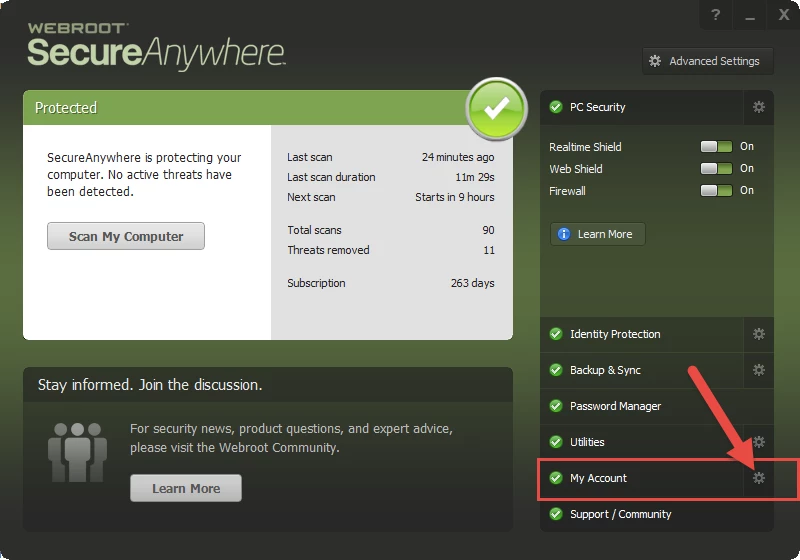
Click on the gear / cog symbol to the right of 'My Account' in the main WSA panel:


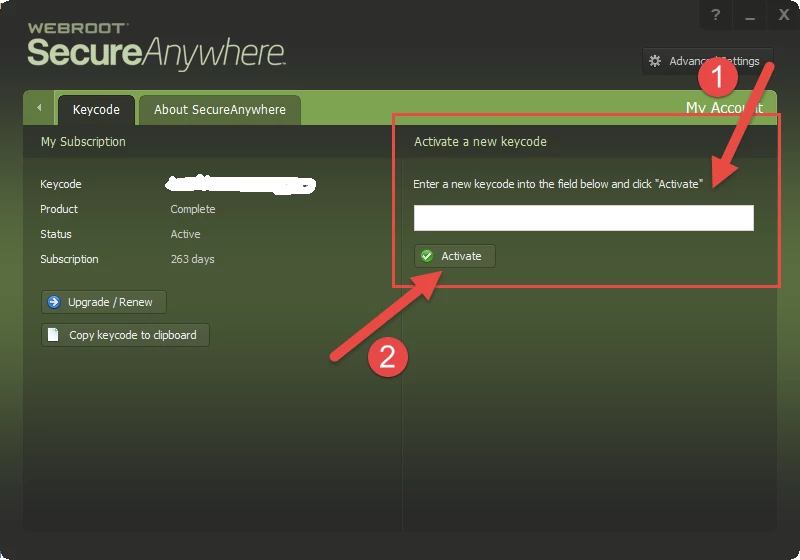
and then eneter the new keycode you have in the space provided before clicking on 'Activate:


And that should do the trick.
 
But please note that if you have any time left on the subscription that you are using with your 'older' version then you will loose it as soon as you activate the new keycode.
 
If you have a significant amount of time on the old keycode, and it is for the same version of WSA as then new keycode, then please let us know and we can advise as to how to proceed to see that you do not use it.
 
Hope that helps?
 
Regards, Baldrick