Solved

Web Console Problems?

  • December 18, 2012
  • 10 replies
  • 132 views

I am having problems getting the web console to add my computers. I have tried installing Webroot many different ways (I have tried 2 different product keycodes also). I install the software, enter my email and key code, the installation finishes OK and shows the subscription time...but the computer never shows up in the web console. I have also tried installing from the web console by "Add a PC".
 
I am currently talking to a rep with a ticket. I have done this before and he was able to add the PCs to my web console list, but I would like to know if I am doing something wrong because I would like to add computers to the web console without having to bother Webroot with such issues. 
 
Thanks!

Best answer by JimM

You probably need to reactivate one of your deactivated computers.  I was able to look you up by your forum registration email address, and I see you have a couple of deactivated computers in your console.  The one you're looking for is probably deactivated.
 
To reactivate, sign into your online console.  Go to PC Security.  In the View area, choose "Deactivated PCs."


 
Click the computer you didn't previously see showing up.  Go to Commands, and click Reactivate.
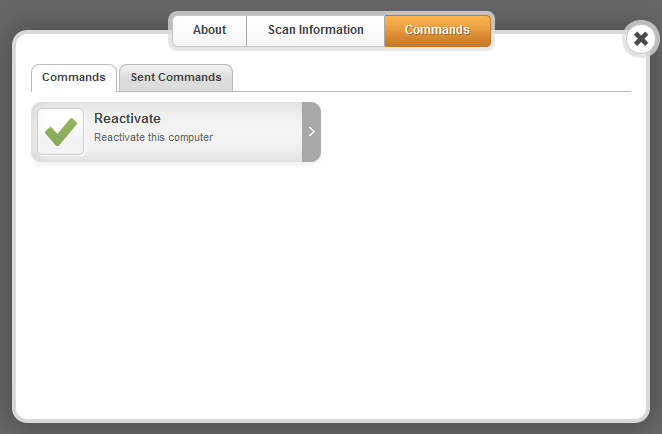

 
It will show back up in your list.

10 replies

  • Author
  • Popular Voice
  • December 18, 2012
Looks like I may be making progress. I added my new keycode into the "Manage Keycodes" section. I guess you have to add keycodes for the console to recognize the new installations. I already see  one computer automatically added. I will wait for the other 2 to show up.

JimM
  • Retired Webrooter
  • December 18, 2012
Thanks for the info! This topic is actually a good candidate for a knowledge-base article, and I will make one out of your posts if you can verify the other computers show up. This information will surely help others. Thank you for helping the Community! 🙂

  • Author
  • Popular Voice
  • December 18, 2012
Five minutes after I entered the key, my computer showed up in the list. The other two PCs were remote and in 'sleep' mode so more than likely, they either ativated themselves automactically when they were turned on (I wasn't there to operate and check them) or tech support added the PCs via my open ticket. Either way, adding a key deffinetly seemed to fix my issue.
 
Thanks!

  • New Voice
  • February 23, 2013
Hi.  I have a similar problem.   I did a Webroot trial on one PC and eventually purchased a 5 unit license which was issued with a new key code.  
 
I then cut / pasted the new key code into the setup on my first PC and now it has yet to show up in the web console.  The other systems I've installed WR on using the purchased key code show up no problem.   The first trial keycodes are now deactivated.
 
I have confirmed that the purchased key code indeed shows up on the WR install on the first pc and the machine has been restarted many times since early January.. so at this point, I do not think it will show up without futher actions.
 
I'd like to get this machine listed in the console but I'd rather not unistall WR b/c I've done a lot of exclusions and customizations for certain applications etc.. which I'd rather not lose.
 
Thoughts?  Thanks!

shorTcircuiT
Gold VIP
  • Gold VIP
  • February 23, 2013
Skywalker, 
 
Have you run a full scan on that one PC that is not showing since entering the new key code?  Often computers will not show up on the console until a scan has been run.  Give it a try, and I hope that helps!

JimM
  • Retired Webrooter
  • Answer
  • February 23, 2013
You probably need to reactivate one of your deactivated computers.  I was able to look you up by your forum registration email address, and I see you have a couple of deactivated computers in your console.  The one you're looking for is probably deactivated.
 
To reactivate, sign into your online console.  Go to PC Security.  In the View area, choose "Deactivated PCs."


Click the computer you didn't previously see showing up.  Go to Commands, and click Reactivate.


It will show back up in your list.

  • New Voice
  • February 23, 2013
JimM - That was the solution.  The missing PC is now re-activated!  Thank You!

JimM
  • Retired Webrooter
  • February 23, 2013
You're welcome skywalker, and welcome to the Community! 🙂

  • September 11, 2017
Hello
I am told that I need to disable my web console control...
How do I do that and how do I get my Key Code?
 
Thanks
Myriam

  • September 11, 2017
Hello Myriam,
 
Welcome to the Webroot Community.
 
First, to find your keycode, do the following:
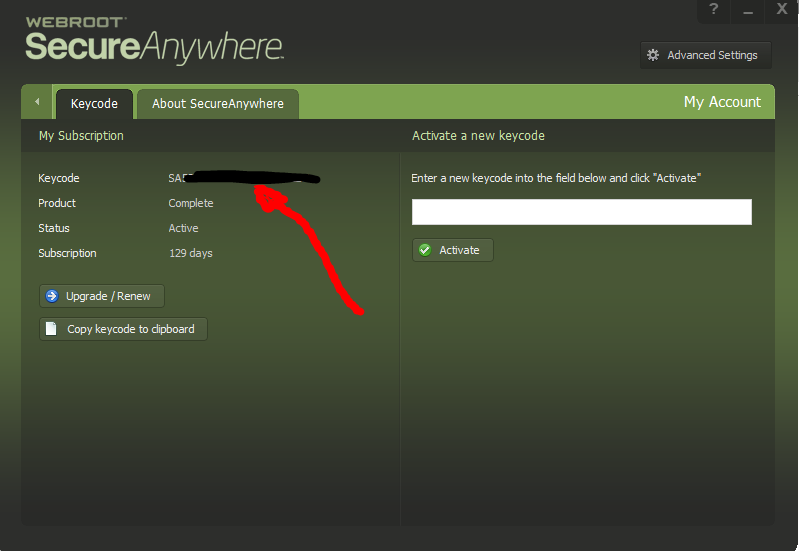
Open Webroot on your PC(click on icon in system tray). The click the gear next to "My Account". You will then find your keycode there.


Then, to disable Web Console control of WSA do the following:
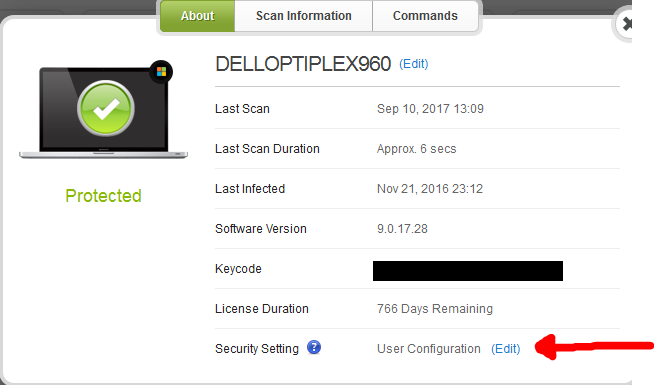
Log into your Web Console and click on "PC Security". Click on the PC in question and click "Edit" next to "Security Setting" and be sure it's set to "User Configuration" and be sure to click the green check mark to save.


 You should now have full control over WSA from your PC.
 
Hope this info helps. If you still have questions or if I have misunderstood your questions, please let us know. We will get you squared away. ;)
 
Cheers,
BD