Webroot as a Stand alone product

  • June 23, 2015
  • 4 replies
  • 122 views

Has anyone used Webroot as a standalone service.  My laptop computer is old and running out of disk space, and I don't want to replace it until Windows 10 comes out since it seems like you're buying an outdated computer.  Has anyone removed Norton antivirus/firewall and used Webroot as a standalone service only?

4 replies

  • June 23, 2015
Good afternoon and welcome to the Webroot Community.
 
As a stand alone service are you actually asking if Webroot can be made portable with perhaps installing it on a USB drive instead?
 
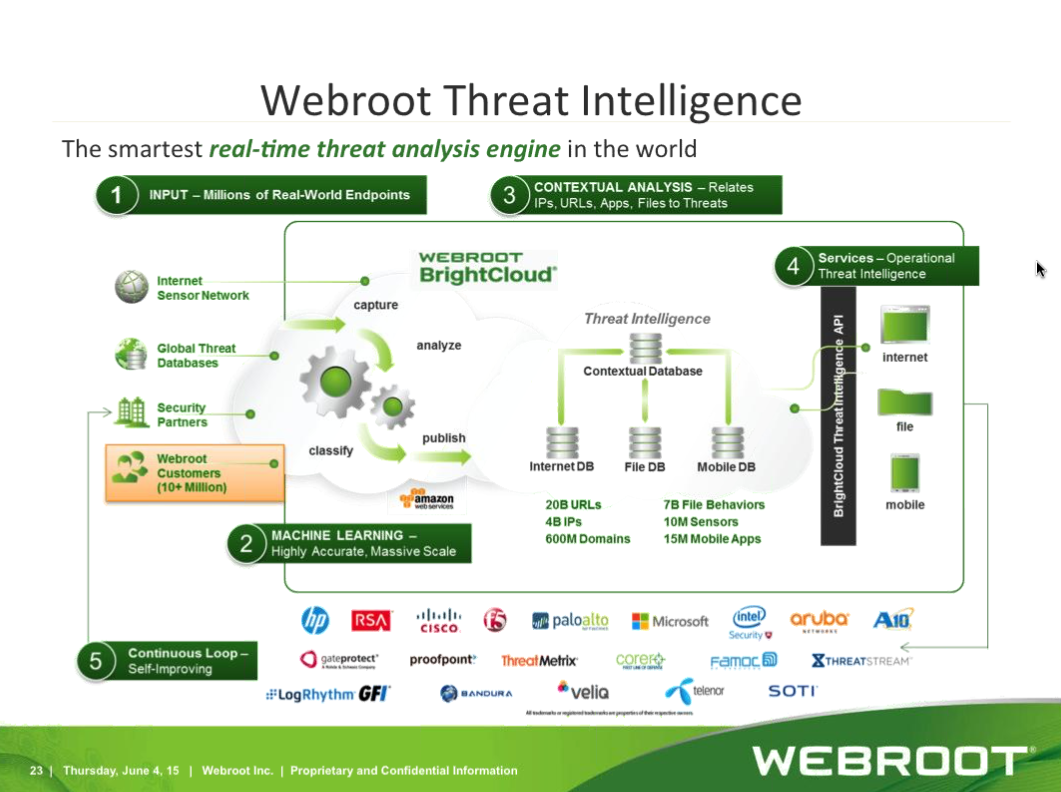
There are several reasons why this would not work as you want it to. First and foremost is the definition file being held in the cloud. By this I mean for Webroot to work correctly it needs to have an active internet connection so it can obtain and use the latest and greatest virus definition file.
 
Webroot uses a running service in the background to Shield all the files on a system. Basically what it does is it keeps a close eye on files and when a file changes or is added it red flags it and does a scan to ensure all is well. Again this is behind the scenes and is for the most part silent.
 
So for the above reasons making Webroot portable is not really even an option. Personally I would just install it and use it like you do any other Antivirus. Keep in mind that Webroot uses very small amount of space because most of its power is in the cloud. Last time I looked it takes maybe 2 mb of space. Compare that to most others that take hundreds of MB.
 
Hope I have been of help to you today.
 

Nemo
Community Leader
Forum|alt.badge.img+34
  • Community Leader
  • June 23, 2015
I may be wrong but I think Lightnin91 is merely asking what he says, that is, can he uninstall Norton AV and simply use WSA on its own.
 
So I will answer that with a big YES. I imagine that most Webroot users uninstalled their previous AV when they started using Webroot - I know I did and I am very happy with the result. Webroot is unusual in that it can be used in conjunction with other AVs but that is clearly unnecessary. For Lightin91 and anyone else running an old computer that is short of disc space, then WSA is ideal -  as, of course, it is for any system!  :D


Ssherjj
Moderator
Forum|alt.badge.img+62
  • Moderator
  • June 23, 2015
Hello @,
 
Welcome to the Webroot Community,
 
I believe @ and @ are correct with their information and I would like to encourage you to use Webroot over
Norton as well. Alot of Norton users end up just using Webroot.
 
In my Opinion I'd remove Norton as WSA will protect you much better  Also you must use Windows Firewall or a Third Party Firewall along with WSA please see here: http://www.webroot.com/En_US/SecureAnywhere/PC/WSA_PC_Help.htm#C4_Firewall/CH4a_ManagingFirewall.htm
 
Might I also add is  that Webroot has a roll back feature . Please look here on What if Webroot Misses a Virus.
 
The WIN Cloud: http://www.brightcloud.com/platform/webroot-intelligence-network.php and all the work and updates are done in the cloud..


Hope this helps and if you have any further questions then please ask.
 
 
KInd Regards,

  • June 23, 2015
If I may be allowed to voice a quick opinion on this, I would strongly suggest AGAINST using both WSA and another Antivirus at the same time. Although it is a documented feature of Webroot that the use of another Antivirus and WSA is problem free I would contend that, as old school always dictated, never use two Antivirus at the same time.
 
The reason is as follows:
It is not that Webroot will have issues with another Antivirus but exactly the opposite. For instance if you have Norton (fill in any Antivirus in this example) installed and you install WSA it is possible (I have encountered this on several occasions) that the other Antivirus will misunderstand the scanning and possible removing/blocking of a suspect file or process.
 
The other reason is because of a much much higher false positive count given. This is a main reason why for years it has never been recommended. If a person wants multiple Antivirus engines and definitions for security then the only viable option is to obtain a multi-engine Antivirus. There are a number of them available and the way they work is that only one engine is active at any given time but all three have scan and removal capabilities. GData and Emsisoft are just two examples of such software.
 
Also just to add to this that once you install WSA it automatically disables the built in Antivirus Windows Defender. This can be re-enabled with no issue so technically you can have two (WSA which is super strong and Windows Defender which is barely worth the effort) engines working without even adding another product.
 
In closing I just wanted to emphasize that as my other colleagues stated already, all you really need is WSA to keep your system clean and safe. Personally I wouldn't bother with any other software because as the old saying goes:
If it ain't broke, don't fix it.