Webroot freezes during installation
  • October 14, 2015
  • 2 replies
  • 370 views

I updated my mac to El Capitan and I bought Webroot, it downloads form the internet fine but after I put in my security cody and enter my password the installation just stop and freezes. Is webroot not compatible with OS El Capitan?
 
thanks to anyone who can help.
 
Blake
 

2 replies

Ssherjj
Moderator
Forum|alt.badge.img+62
  • Moderator
  • October 14, 2015
Hello ?,
 
Welcome to the Webroot Community,
 
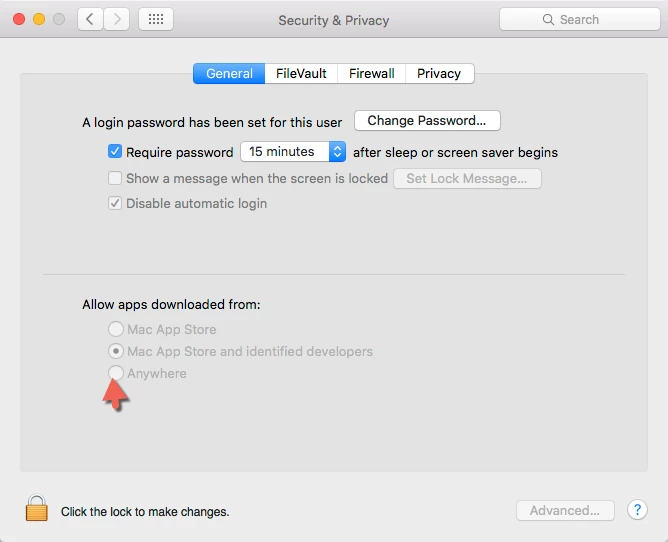
I am running WSA Complete on my iMac with the El Capitan OS. I haven't any issues.  Can you first try a reboot/? Then after you have rebooted see if Webroot will install withput freezing up.. If you want to TRY this and go into System Preferences and open up Security & Privacy and uncheck Mac Apps and Identified Developers and check the Anywhere box. Try to install again. After Webroot installs change your Security & Privacy back to the Mac Apps....


Reboot your system after the install of Webroot.
 
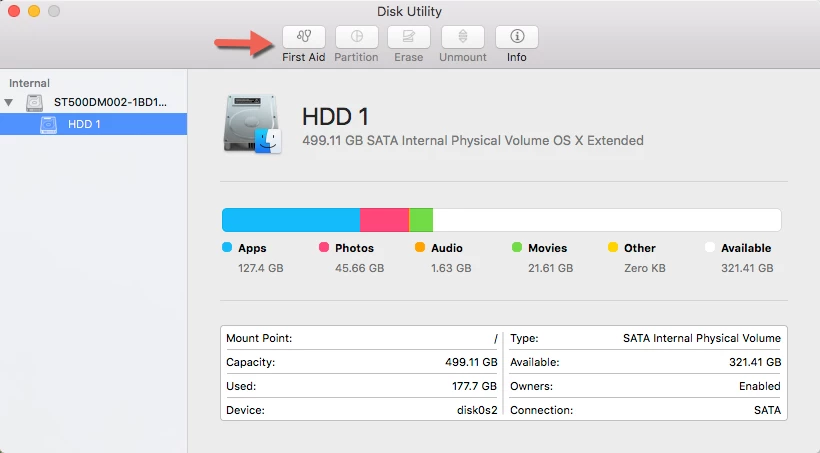
Also you can go into the Launch pad and open Other/Disk Utility/First Aid and run that an see if that helps.OR run the Disk Utility first.


If you continue to have troubles then you can always submit a Support Ticket free of charge with a Webroot Subscription. The Support Team will gladly get Webroot running for you. It usually only takes 24-48 hrs for them to respond back to your email after submitting that ticket.
 
 
Hope this helps?


nic
Forum|alt.badge.img+56
  • Retired Webrooter
  • October 14, 2015
We have heard of some issues with El Capitan - can you call in to support so we can get this documented?
http://www.webroot.com/us/en/support/contact