Webroot has disappeared from all my browsers

  • April 22, 2017
  • 7 replies
  • 204 views

Hi!
A few days ago, I opened Chrome, Firebox, and Internet Explorer and the webroot toolbar was gone. I cannot even open any sites using the webroot password manager. I cannot find any extension in any of the browsers. I went into settings to check the extensions, and the extensions are all gone. When I did a search on Chrome to add it, it didn't appear, either.Webroot Secure Anywhere seems to be working just fine, but I am unable to open up any of my email or school accounts that require a password unless I do it myself. Webroot has completely disappeared from all browsers with no trace of an extension even existing in order for me to enable it. Gone! Poof!  I have Windows 8.
HELP! Thank you!

7 replies

RetiredTripleHelix
Gold VIP
Forum|alt.badge.img+56
Hello,
 
Yes were are hearing this but mostly with Firefox, so can you try a clean reinstall of WSA to see if it brings it back to all your browsers.
 
Please follow the steps closely!
 
  • Make sure you have a copy of your 20 Character Alphanumeric Keycode! Example: SA69-AAAA-A783-DE78-XXXX
  • Be sure you add your Keycode to your Online Console: Webroot SecureAnywhere Online Console
  • KEEP the computer online for Uninstall and Reinstall to make sure it works correctly
  • Download a Copy Here (Best Buy Geek Squad Subscription PC users click HERE) Let us know if it is the Mac version you need
  • Uninstall WSA and Reboot
  • Install with the new installer, enter your Keycode and DO NOT import any old settings as you can set it up as you like once it's done
  • Let it finish it's install scan
  • Reboot once again
Please let us know if that resolves your issue? If it doesn't please Submit a Support Ticket so they can take a look.
 
Thanks,
 
Daniel 😉

RetiredTripleHelix
Gold VIP
Forum|alt.badge.img+56
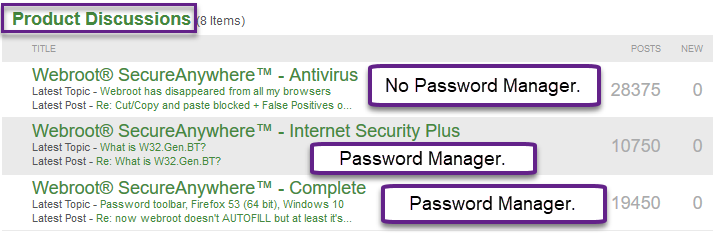
Also note that you posted in AV only forum and this version doesn't have a password manager.
 
https://www.webroot.com/us/en/home/products/compare

  • Author
  • New Voice
  • April 22, 2017
Thank you very much.
I will try it.

  • Author
  • New Voice
  • April 22, 2017
I have Webroot Secure Anywhere! So, I posted in the wrong place?!?

Ssherjj
Moderator
Forum|alt.badge.img+62
  • Moderator
  • April 23, 2017
Hello @
 
It's okay if you posted in here. We just wanted to confirm that you have Webroot Secure Anywhere Internet Security Plus (for 3 devices) or WSA Complete (for 5 devices). These versions have Password Manager. 
 
Please follow @ instructions and see if you can get Password Manager back.
 
If you have issues with Chrome you can install the Password Manager from the Google Play Store here https://chrome.google.com/webstore/detail/webroot-password-manager/ngkhgikojglcgnckopipfdajaifmmnnc
 
Otherwise you have free Webroot Support and they can sort this all out for you.
 
 
Hope this helps further.

RetiredTripleHelix
Gold VIP
Forum|alt.badge.img+56
Right!


  • Retired Webrooter
  • April 24, 2017
@ wrote:
I have Webroot Secure Anywhere! So, I posted in the wrong place?!?
No worries, @, I've moved the thread for you :cathappy:
 
Let us know if the steps Daniel provided work for you. If not, we can get our Support Team involved.