Solved

Webroot is conflicting with Norton.

  • February 2, 2015
  • 34 replies
  • 488 views

Show first post

34 replies

  • Author
  • New Voice
  • February 2, 2015
They are all checked and saved as pictured.
 

  • Author
  • New Voice
  • February 2, 2015
Is a reboot necessary?
 

RetiredTripleHelix
Gold VIP
Forum|alt.badge.img+56
@ wrote:
Is a reboot necessary?
 
No, does it show down buy the Clock now? If not try a Reboot.


  • Author
  • New Voice
  • February 2, 2015
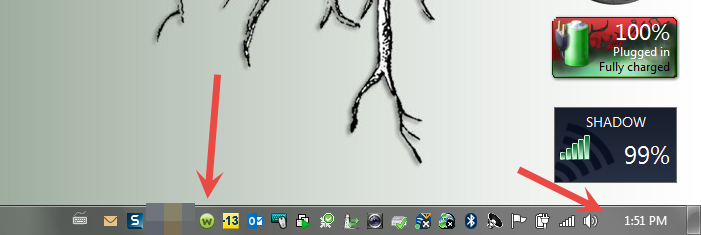
If the circle W is a clock, there is a whie curved arrow about 7:00 position but nothing more.
 

RetiredTripleHelix
Gold VIP
Forum|alt.badge.img+56
Did you try a Reboot? If it doesn't show in the Tray how do you know WSA is Running?


  • Author
  • New Voice
  • February 2, 2015
I rebooted it and disabled the firewall and protections.  That allowed me to go in and make exceptions to Webroot in Norton.  After that, I can engage Norton without a conflict.  Hopefully, that will fix it. Thanks for the help.
 
jim

RetiredTripleHelix
Gold VIP
Forum|alt.badge.img+56
Great and Please let us know how it goes as it could help other users/members with the Combo! Also ignore any message about Norton want's to remove WSA that's probably built into Norton as WSA will play nice with most other AV's and will not tell you to uninstall your other AV.
 
Thanks,
 
Daniel 😉

  • Author
  • New Voice
  • Answer
  • February 2, 2015
One thing I found was if I installed Norton first and then tried to install webroot it would automatically uninstall Webroot.  I had to uninstall Norton, then reinstall Webroot.  This is where I had the problem of Norton not wanting to load (it wanted to uninstall Webroot).  When I disabled the firewall and other protections in Webroot.  I could go into Norton and exclude Webroot and things seem to be okay from there.
 
In summary:
 
Install Webroot first.  Then install Norton.  

RetiredTripleHelix
Gold VIP
Forum|alt.badge.img+56
@ wrote:
One thing I found was if I installed Norton first and then tried to install webroot it would automatically uninstall Webroot.  I had to uninstall Norton, then reinstall Webroot.  This is where I had the problem of Norton not wanting to load (it wanted to uninstall Webroot).  When I disabled the firewall and other protections in Webroot.  I could go into Norton and exclude Webroot and things seem to be okay from there.
 
In summary:
 
Install Webroot first.  Then install Norton.  

Yes that is true always install WSA first sorry I forgot that part and ignore the other that wants to remove WSA..
 
Daniel