Answer

Webroot Subscription

  • November 12, 2014
  • 9 replies
  • 62 views

Why does Webroot on my desktop say I have to activate my subscription?

Best answer by shorTcircuiT

THank you Nic.
 
That is a Best Buy Subscription Software copy, please call 1800-GEEK-SQUAD for assistance with this.  This is what it looks like if the Best Buy Subscription was not corrcectly activated at the store at time of sale.


9 replies

Ssherjj
Moderator
Forum|alt.badge.img+62
  • Moderator
  • November 13, 2014
@ wrote:
Why does Webroot on my desktop say I have to activate my subscription?
Hello Morri2j,
 
Welcome to the Community!
 
Have you ever activated this keycode?
 
Where did you purchase your copy?  
 
Did your purchase from Best Buy and is it a Best Buy Subscription version?  (IF the back of the box, at the lower left corner has a Best Buy Serial Number, you have the Best Buy Subscription Software version.)
 
Can you try this below to activate.your subscription?
 
  • Please log into the Account Console
  • Click your email address at the upper right
  • Select Manage Key Codes on the drop down
On the key code listing, is the key code you are trying to use in your WSA software listed here?
Is it expired or does it show active and valid?
 
If the key code IS indeed listed, and is not expired, lets try to do a copy/paste:
 
  • Select (hilite) and copy the key code.
  • Open WSA
  • Click the gear tool next to My Account
  • Paste the key code into the white box
  • Click Activate
 
If you want these instruction to activate you keycode for your PC.
 
  1. Open SecureAnywhere (see Using the SecureAnywhere interface).  
  2. Click the gear icon next to My Account.  
  3. Enter the new keycode in the box on the right.  [img]https://uploads-us-west-2.insided.com/webroot-en/attachment/17737iEB198CF9BE08DB3E.png[/img]  
  4. Click Activate. Note: your keycode is a string of 20 alphanumeric characters. It is unique and holds the information about your subscription. You may choose to copy and paste your keycode when prompted, to ensure that the characters are entered correctly.
 
Hope I haven't confused you but just the same we are here to help you if you still need help. Please let us know if any of this reply was helpful.
 
Best Regards,
 

  • Author
  • Fresh Face
  • November 20, 2014

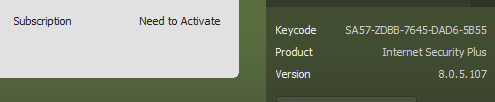
As you can see from the attached the Keycode has been entered but I am still seeing the Need to Activate.

shorTcircuiT
Gold VIP
  • Gold VIP
  • November 20, 2014
Hello there!  
 
First of all, please make sure you do not post anything that shows your key code.  I do not know if the pic you posted does, but if so the Mods will prevent it from going visible so no problems  :)
 
Lets take a quick look at something here:
 
Open WSA
Click the gear tool next to My Account
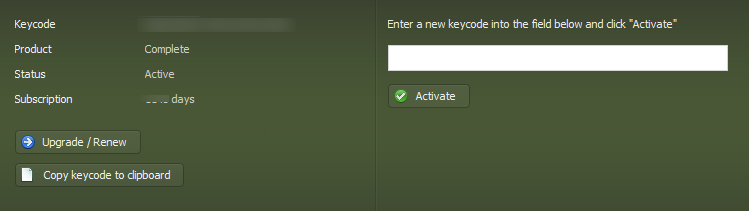
You should see something like this:


What does it show for the Status?
How many days does it show next to Subscription?
 
Thanks!

  • Author
  • Fresh Face
  • November 21, 2014
Thanks for your response.
I followed your instructions and this is what I saw


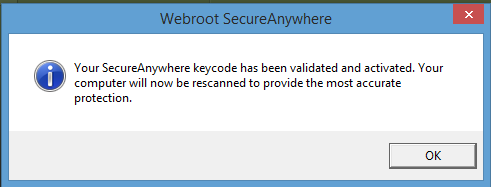
I copied my Keycode into the into the Activate field and activated it.
The following message was returned.


But I still see that I am not activated.

shorTcircuiT
Gold VIP
  • Gold VIP
  • November 21, 2014
I am sorry, but I cannot see your images until a Moderator has reviewed them.  It would help greatly if you would give a written answer, so I can 'see' it that way :)
 
Let me know 🙂

nic
Forum|alt.badge.img+56
  • Retired Webrooter
  • November 21, 2014
I approved the images.  There were some yesterday that I didn't approve because they showed your keycode publicly.

shorTcircuiT
Gold VIP
  • Gold VIP
  • Answer
  • November 21, 2014
THank you Nic.
 
That is a Best Buy Subscription Software copy, please call 1800-GEEK-SQUAD for assistance with this.  This is what it looks like if the Best Buy Subscription was not corrcectly activated at the store at time of sale.



  • Author
  • Fresh Face
  • November 21, 2014
Thank you for your assistance I willget onto the Geek Squad

shorTcircuiT
Gold VIP
  • Gold VIP
  • November 21, 2014
While we can fix a lot of things here on the Community, Geek Squad subscription errors is not among them :(
 
I do hope you drop by any time you have a question or problem though, we are always happy to try to help!