

Answer

webroot wont close and using VERY HIGH cpu

  • July 14, 2020
  • 6 replies
  • 6676 views

I think webroot may be stopping my PC [windows 10] from going to sleep


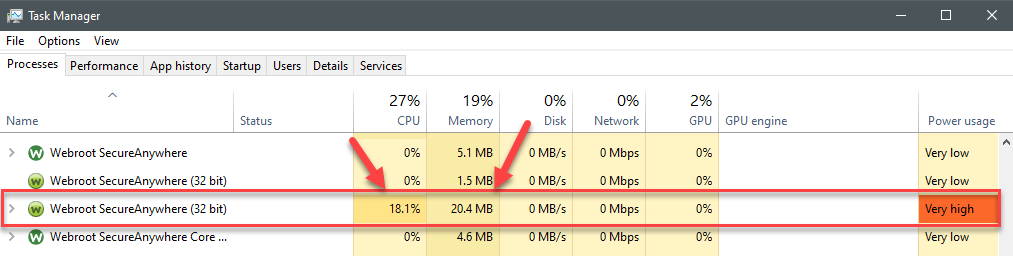
I can’t shut it down and it has very high CPU in task manager


I tried opening it [maybe a new version opened] I then went through advanced settings, and manually closed it - but the ‘version’ in task manager is still open and ‘working’

Is that a virus?

Say webrootsecureanywhere (32bit)


WRSVC

How do I kill that from running

Is it really webroot

Why is it running such high CPU and is it stopping my PC from going to sleep

Thanks for any help
Best answer by TripleHelix

Hello @inkey 


Yes there are some issues so when you see High CPU or Memory it’s best to just Reboot the system until they come out with the next updated version. I have seen it as well at times.


Click on Picture to see full size.


Thanks,

6 replies

TripleHelix
Moderator
Forum|alt.badge.img+63
  • Moderator
  • Answer
  • July 14, 2020

Hello @inkey 


Yes there are some issues so when you see High CPU or Memory it’s best to just Reboot the system until they come out with the next updated version. I have seen it as well at times.


Click on Picture to see full size.


Thanks,


  • Author
  • New Voice
  • July 14, 2020

Thanks for that

I’m just glad it isn’t a virus or something pretending to be webroot

Thanks


TripleHelix
Moderator
Forum|alt.badge.img+63
  • Moderator
  • July 14, 2020

Look at my post again as I added a picture and I see the issue as well at times and Webroot is working on a fix. Also it’s a protected process so you can’t kill it with Task Manager and Malware can’t kill it either.


  • Author
  • New Voice
  • July 14, 2020

Yes 

I suppose - as I opened then closed [another version of Webroot] - maybe I should reopen the other [low usage one] - as maybe the high usage one isn’t actual on/protecting me

I note you have other instances open 


TripleHelix
Moderator
Forum|alt.badge.img+63
  • Moderator
  • July 14, 2020

Yes there should be 4 processes now for most users please see here: https://community.webroot.com/got-a-question-10/wrskyclient-x64-exe-342821 there will be a few more files coming but can’t say when but just 4 processes.


TripleHelix
Moderator
Forum|alt.badge.img+63
  • Moderator
  • July 14, 2020


