Solved

what is a good pop up blocker?

  • October 17, 2015
  • 9 replies
  • 64 views

Forum|alt.badge.img+12
first: how can I tell Which Webroot Security I have? I guess I did not know there were so many.

Best answer by BurnDaddy

You're welcome @

Thanks for your kind words. Come back anytime. There's always someone hanging around who is more than happy to help.

Have a good night,

BD

9 replies

Ssherjj
Moderator
Forum|alt.badge.img+62
  • Moderator
  • October 17, 2015
Hello ?,
 
Welcome to the Welcome to the Community,
 
Good free Ad Blocker like the ones suggested below:
 
For Internet Explorer Ad Block Plus: https://adblockplus.org/
 
For Firefox uBlock: https://addons.mozilla.org/en-US/firefox/addon/ublock-origin/?src=ss or Privacy Badger: https://addons.mozilla.org/en-us/firefox/addon/privacy-badger-firefox/

 
Google Chrome uBlock: https://chrome.google.com/webstore/detail/ublock-origin/cjpalhdlnbpafiamejdnhcphjbkeiagm?hl=en or Privacy Badger: https://chrome.google.com/webstore/detail/privacy-badger/pkehgijcmpdhfbdbbnkijodmdjhbjlgp

  • October 17, 2015
Hello ?,
 
I just wanted to add to the great info that ? posted.
 
To determine which version of Webroot you have please do the following:
 
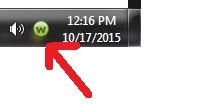
Open the Webroot PC interface by clicking on the Webroot Icon in the lower right corner of your screen.


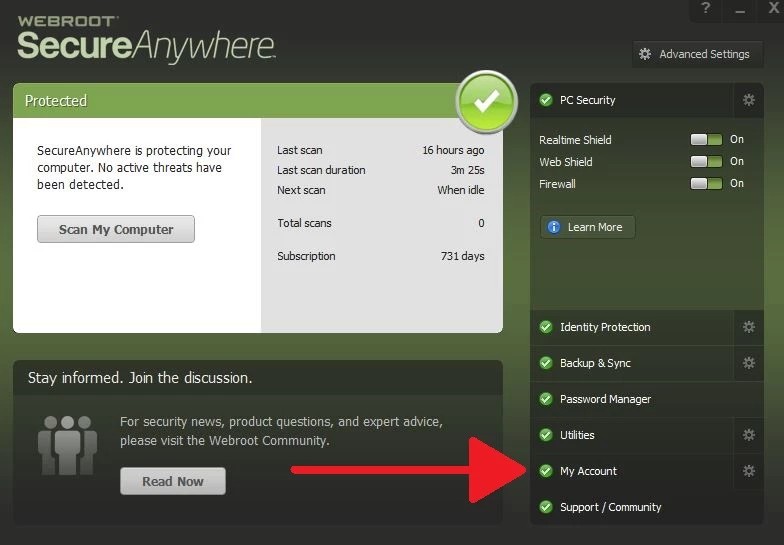
Then on the right side click "My Account".


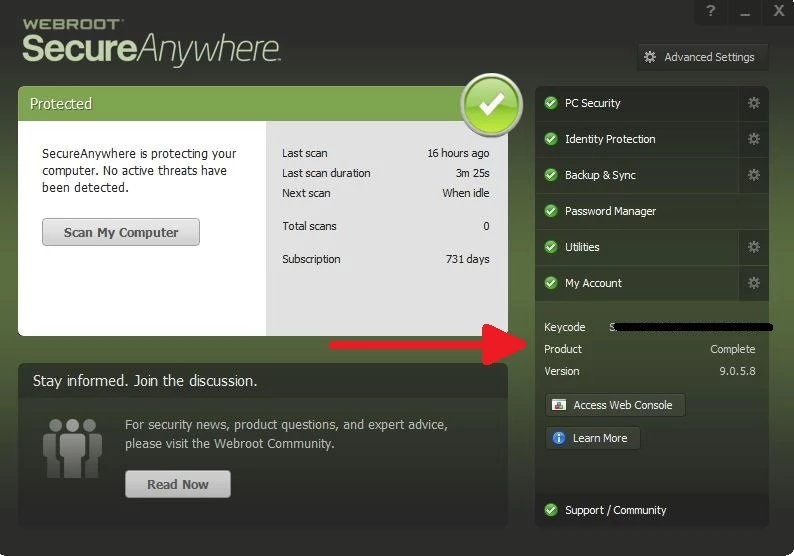
This will open a sub menu which will show your version.


 Hope this helps you in determining which version you have.
 
 
Have a good day,
 
BD
 

Forum|alt.badge.img+12
  • Author
  • New Voice
  • October 18, 2015
Hey! BurnDaddy:
Thanks. It says: COMPLETE.
i assume it means I have "Webroot Secure Anywhere Complete".
Sorry for the late response. Had a real busy day

Forum|alt.badge.img+12
  • Author
  • New Voice
  • October 18, 2015
Sheri
Thanks for the swift info. Sorry for the delay in my response. Been busy all day.
Downloaded your recommendation for IE. Hope it'll work good.
 
and...........plus.........also
 
right now, at the bottom of my screen is a message I keep getting:
"Several add-ons are ready for use                                                  Choose add-ons      Don't enable    x"
how do I get rid of its continuous appearance?
 
Thanks, Sheri,c for any help you can offer.
cpNOTSOmadave


Ssherjj
Moderator
Forum|alt.badge.img+62
  • Moderator
  • October 18, 2015
Hello ?,
 
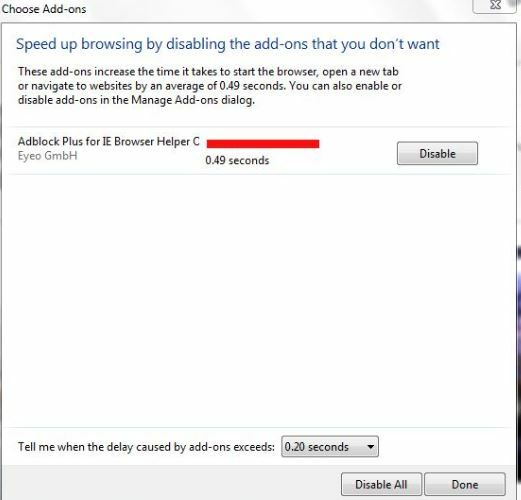
As you can see the popup notification bar also contains 2 buttons "Choose add-ons" and "Ask me later". If you click on "Choose add-ons" button, it shows a list of add-ons which might slow down the browser and provides a "Disable" button to disable one or all of the add-ons. If you click on "Ask me later" button, the advisor will again show the popup notification message after a pre-defined period of time. Is this similiar to your popup?
 
Choose the add-ons button and you will find this popup similiar to mine but maybe listing more add-ons. Just click Done in the right hand corner.


Hope this helps!

  • October 18, 2015
@ wrote:
Hey! BurnDaddy:
Thanks. It says: COMPLETE.
i assume it means I have "Webroot Secure Anywhere Complete".
Sorry for the late response. Had a real busy day
You are welcome @!
 
Yes, you have Webroot Complete. Which is what I have. If you haven't already, be sure to take advantage of the free 25GB of cloud-storage by using the Backup & Sync feature. It is one of the many features that drew me to Webroot. I do backups at home to an external drive. But it's nice to know that should something happen to my computer AND my backups, that my important documents and priceless photos are safely stored in the Webroot cloud.
 
You can see a quick overview of Backup & Sync here.
 
Enjoy your Sunday,
Go Bears! Go Cubs!
 
BD


Forum|alt.badge.img+12
  • Author
  • New Voice
  • October 19, 2015
Sherry & BurnDaddy:
In my 87 years I have never seen this type of help....THANKS!!!!!!!
 

Ssherjj
Moderator
Forum|alt.badge.img+62
  • Moderator
  • October 19, 2015
Hello ?
 
You are most welcome. It's a pleasure to assist you! If you have any questions then please don't hesitate to ask.
 
And Thank you!:D

  • Answer
  • October 19, 2015
You're welcome @

Thanks for your kind words. Come back anytime. There's always someone hanging around who is more than happy to help.

Have a good night,

BD