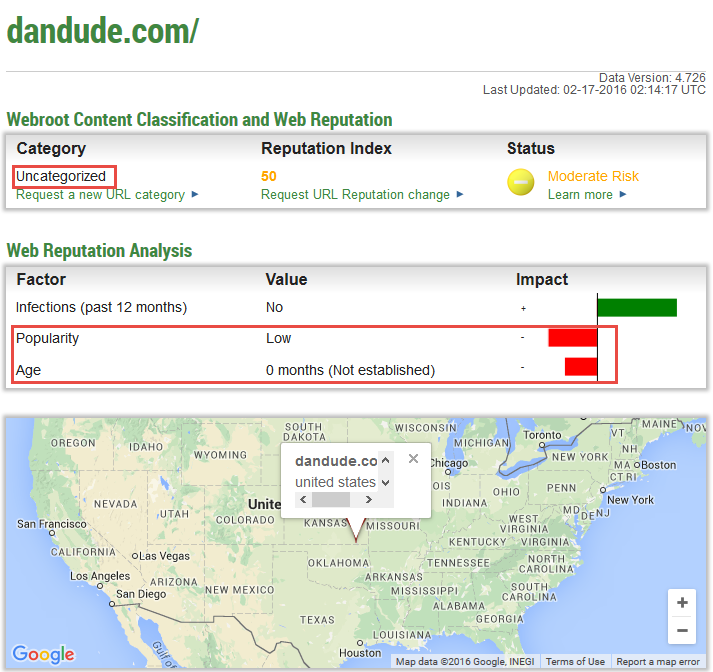
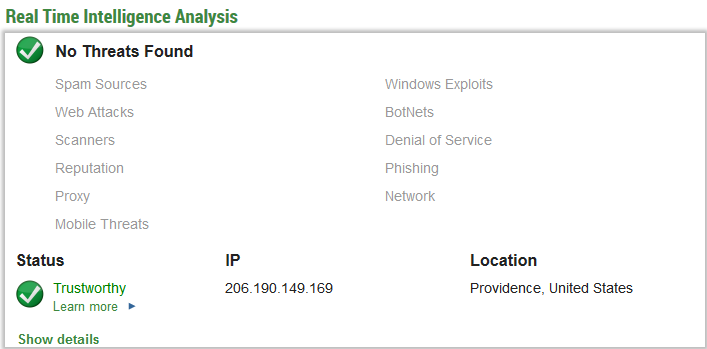
Where do you guys get off listing my Website as linking to malicious content or payloads?

  • February 19, 2016
  • 18 replies
  • 228 views

Where do you guys get off listing my Website as linking to malicious content or payloads? There is nothing on my site (dandude.com) that will Hack,,hijack or in any way hurt your computer and there are no links to any harmful or illegal sofware!

This is the thanks I get for buying your softwsre? You maybe should change the name of your program to Webroot Slander Everywhere. You may not like the content but don't lie about me.

18 replies

acooldozen
Bronze VIP
Forum|alt.badge.img+36
  • Bronze VIP
  • February 19, 2016
Just got back from visiting your site (dandude.com) and my Webroot does not flag your site as malicious, hackable, nor anything else. Where/how did you aquire this misinformation?

RetiredTripleHelix
Gold VIP
Forum|alt.badge.img+56
Just to add it seems your site is not that old and I get no block as well so you can ask for a change in Reputation here: http://www.brightcloud.com/tools/change-request-url-reputation.php?endpoint=dandude.com%2F&repindex=50
 
Thanks,
 
Daniel ;)


RetiredTripleHelix
Gold VIP
Forum|alt.badge.img+56
@ wrote:
Just got back from visiting your site (dandude.com) and my Webroot does not flag your site as malicious, hackable, nor anything else. Where/how did you aquire this misinformation?
He's using the version of the Web Filter is not using the Driver like we Beta Testers are so that could be why IMO? Not sure of the version of Web Filter the others are using maybe we can get some info from @ @ @
 
Daniel 😉

  • Retired Webrooter
  • February 19, 2016
@ wrote:
@ wrote:
Just got back from visiting your site (dandude.com) and my Webroot does not flag your site as malicious, hackable, nor anything else. Where/how did you aquire this misinformation?
He's using the version the Web Filter is not using the Driver like we Beta Testers are so that could be why IMO? Not sure of the version of Web Filter the others are using maybe we can get some info from @ @ @
 
Daniel ;)
Hi Daniel,
in ragards of URL reputation there is no difference between our versions of Web Filtering, they all use the same underlying data.
I also see no blocks for the URL dandude.com.
Best,
foo

  • October 3, 2016
HI I have had a similar issue as this guy.  We at www.healthpost.co.nz are an extremely reputable and long running online store and have had a customer send us a screenshot of a message a customer recieved saying
 
'Warning, www.healthpost.co.nz (contains malicious content)
this website contains a known threat and has been blocked
(close) (allow)
Webroot SecureAnywhere)"
 
Can you please check your database and remove us from your blacklist.
 
If you really think that our site contains malicious content then please supply any details you may have so we can look into this and resolve any potential issues.
 
Many thanks
 

RetiredTripleHelix
Gold VIP
Forum|alt.badge.img+56
Hello and Welcome to the Webroot Community!
 
It's not blocked for us Beta testers and please see why here: https://community.webroot.com/t5/Webroot-SecureAnywhere-Antivirus/Website-is-blocked/m-p/269682#M27768
 
Thanks,
 
Daniel ;)
 
?
 
?

  • October 3, 2016
OK thats good to hear.
 
So any idea why your customers sometimes get incorrect messages from webroot? 
 
Just a corner case one in a million thing?
 
Thanks
L

RetiredTripleHelix
Gold VIP
Forum|alt.badge.img+56
All I can say we continue to test the new feature but there is no timetable as far as I know! It's being worked on.....!
 
Thanks,
 
Daniel 😉

  • October 3, 2016
There's no block on the Release either (same version as Beta at the moment) for healthpost.co.nz.
 
.
 
BD

RetiredTripleHelix
Gold VIP
Forum|alt.badge.img+56
@ wrote:
There's no block on the Release either (same version as Beta at the moment) for healthpost.co.nz.
 
.
 
BD
Without the BETA Keycode?

  • October 3, 2016
TripleHelix wrote
Without the BETA Keycode?
Yes. I run a purchased retail Release of WSA Complete (currently v9.0.12.52) on my main desktop. No block for the healthpost.co.nz website.
 
BD

RetiredTripleHelix
Gold VIP
Forum|alt.badge.img+56
@ wrote:
TripleHelix wrote
Without the BETA Keycode?
Yes. I run a purchased retail Release of WSA Complete (currently v9.0.12.52) on my main desktop. No block for the healthpost.co.nz website.
 
BD
But not using the BETA keycode as that turns on the Web Filter Driver? Just making sure as I can't test as I'm using the BETA Keycode.
 
Thanks,
 
Daniel 😉

RetiredTripleHelix
Gold VIP
Forum|alt.badge.img+56
? can you please confirm that you are not using the BETA keycode?
 
Thanks,
 
Daniel

  • October 4, 2016
@ wrote:
@ can you please confirm that you are not using the BETA keycode?
 
Thanks,
 
Daniel
Hi Daniel,
 
You are correct. I do NOT have the BETA keycode on my desktop PC running WSA Complete. I have the BETA on my laptop.
In my tests, neither version is blocking access in any way to healthpost.co.nz
 
??
 
BD:)

RetiredTripleHelix
Gold VIP
Forum|alt.badge.img+56
Great to hear and thanks for the confirmation buddy!
 
Daniel :D
 
?

ProTruckDriver
Moderator
FYI: Not blocking here on Colleens PC running release version also not blocking on Mac computer running release version. 😃

RetiredTripleHelix
Gold VIP
Forum|alt.badge.img+56
Thanks Dave!
 
Daniel 😉

acooldozen
Bronze VIP
Forum|alt.badge.img+36
  • Bronze VIP
  • October 4, 2016
Not blocking here!