Solved

Where is Allowed Files List - not the manual input one..

  • July 20, 2014
  • 11 replies
  • 98 views

I have a program from Lockheed Martin that I run almost everyday. No issues. Today Webroot asked if I wanted to allow three files. WHY. that program has not had any updates for months. The same thing on another program that I run everyday. About every other week Webroot asks if I want to allow several files. I always enter that I want to ALWAYS allow those files. This seriously erodes my confidence in the ability of the program to protect my system. 
 
When I tick Allow Always why aren't those file listed under Allowed Files in the options area? Why does Webroot ask for permissions to allow files when I have allowed many times in the past?
 

Best answer by boleyd

Big thank you. No further issues....

11 replies

Baldrick
Gold VIP
  • Gold VIP
  • July 20, 2014
Hi boleyd
 
Welcome to the Community Forums.
 
That sometimes happens but there usually is a very good reason for it as far as I am aware.
 
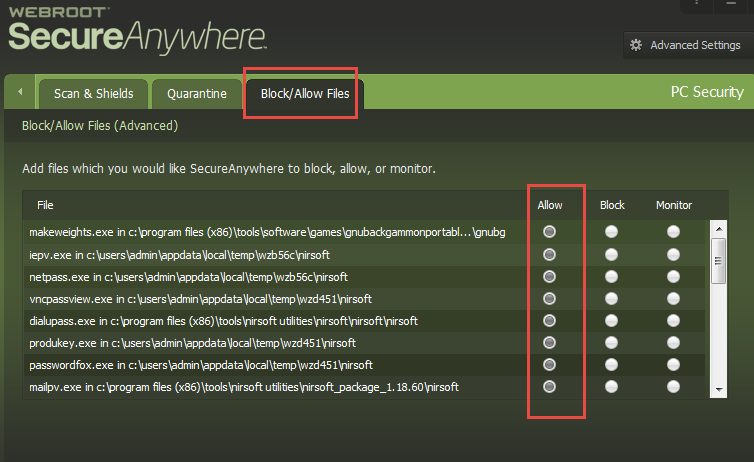
Can I check that you are referring to placing the files concerned to 'Allow' here in WSA:


I assume that is the case but feel it would be wise to check this. ;)
 
As you can see from the screenshot I have a number of Nirsoft files that are manually set yo 'Allow' and periodically, when the files are updated, I have to reset them to 'Allow' as they have been flagged by a scan as 'dangerous'.
 
Has this happened before to you re. the files you mention, and you are now seeking assistance or is this very much the first time?
 
Regards


Baldrick


Baldrick
Gold VIP
  • Gold VIP
  • July 20, 2014
Hi boledy 
 
One more thing for the moment...have just been rereading your initial post and it struck me, from the fact that you mention clicking on "Allow Always", this there may be some small confusion as to exactly what you are responding to when you do...possibly, especially when you ask why they are not listed under 'Allowed Files'?
 
As far as I am aware the "Allow Always" is only a Firewall-related option which suggests that the files you are referring to are attempting to access the internet, rather than just run locally...is that possible (apologies but I do not know the software you are referring to)?
 
Just a further thought for your consideration, and to assist in that please take a look at this Knowledge Base article that covers off the difference between the various tabs in WSA which you can set items to "Allow," "Protect/Monitor," or "Block/Deny?"
 
EDIT: Apologies but link was incorrect...thanks to Sherry for the spot/call out.  All fixed now. :D
 
I hope that helps?
 
Regards
 
 
Solly


  • Author
  • New Voice
  • July 20, 2014
The files that were blocked were  .EXE  files. At the bottom of the screen it offered to Allow Once or Allow Always. I assumed that if I clicked Allow Always I should never wee another warning for that file. Not so. Despite using Allow Always after a few weeks I am again asked what I want to do with one of the files that was allowed. My weak logic thought that Allow Always would display the allowed file(s) in the action list that permits you to specify a file to be allowed. That does not seem to be the case. I have no idea where I can look to see a list of files that were set to allow by Allow Always. I have now manually entered the files to be allowed since the Allowed Always selection is periodically ignored.
 

RetiredTripleHelix
Gold VIP
Forum|alt.badge.img+56
Hello and Welcome to the Webroot Community Forums.
 
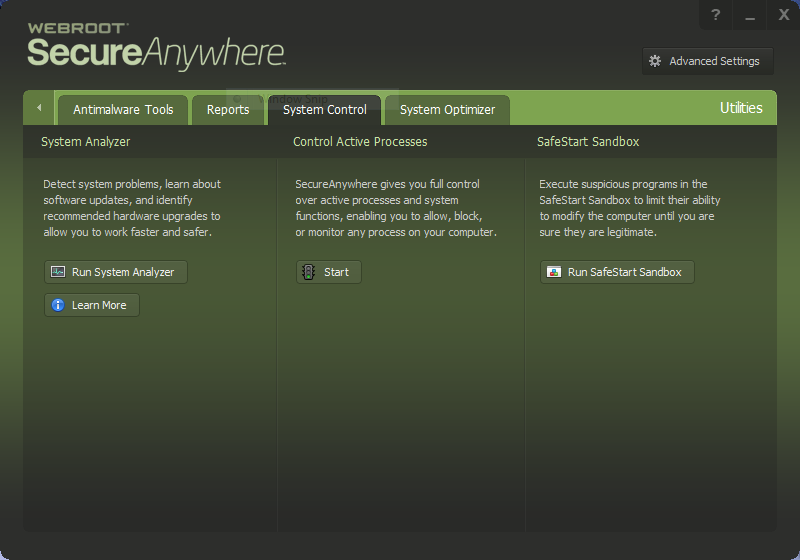
Can you look here and tell me how many or if any processes are under Monitored? Also when the next WSA pop-up can you check to see if it's a Firewall prompt or Program EXE prompt?
 
Thanks,
 
Daniel 😉

Ssherjj
Moderator
Forum|alt.badge.img+62
  • Moderator
  • July 20, 2014
@ wrote:
The files that were blocked were  .EXE  files. At the bottom of the screen it offered to Allow Once or Allow Always. I assumed that if I clicked Allow Always I should never wee another warning for that file. Not so. Despite using Allow Always after a few weeks I am again asked what I want to do with one of the files that was allowed. My weak logic thought that Allow Always would display the allowed file(s) in the action list that permits you to specify a file to be allowed. That does not seem to be the case. I have no idea where I can look to see a list of files that were set to allow by Allow Always. I have now manually entered the files to be allowed since the Allowed Always selection is periodically ignored.
 
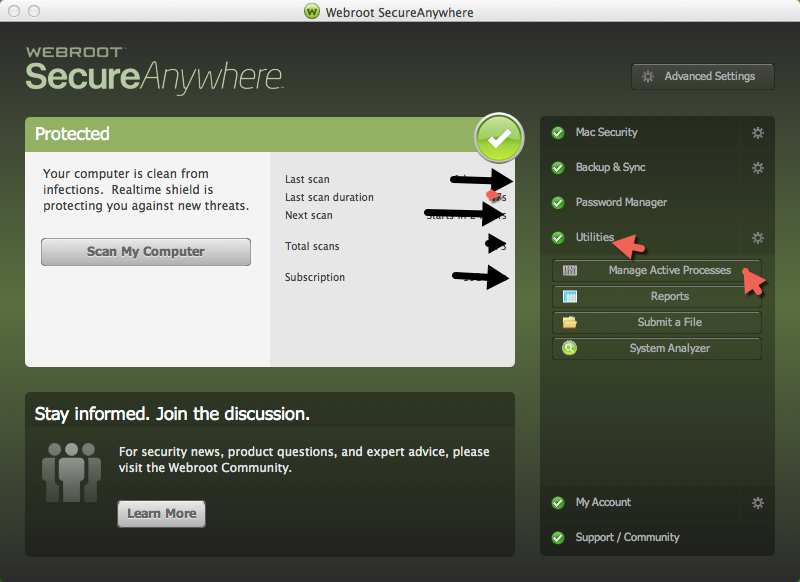
Hello boleyd! May I add to Baldricks information and add this graphic picture of WSA.. Hoping this will help?Sorry this is for a Mac.


Excuse me TripleHelix I didn't know you had already posted theOnline help Files...Thank you!:D
 
EDIT: This is for Windows PC


  • Community Leader
  • July 20, 2014
Hello boleyd , I would like to welcome you to the community!
 
Please come back and let us know how things worked out for you.
 
In addition the the experts who have assisted you here, we also have an excellent tech support team. They will be happy to assist you as well. You can reach them 24/7 by submiting a support ticket.
 
Browse around, there is a wealth of information here in the community!
 
Enjoy,
 
Beth

DanP
Forum|alt.badge.img+35
  • OpenText Employee
  • July 21, 2014
Hello boleyd,
When you allow the files, you are allowing those specific files based off of a file checksum, so when the file changes it is a different file, which would need to be allowed again. I was able to locate your keycode and am in the process of whitelisting the files related to the Lockheed application so you should not need to allow those files again. If you experience issues with the Lockheed Martin application again, please submit a support ticket and we can update our whitelists.
 
Thanks,
 
-Dan

Baldrick
Gold VIP
  • Gold VIP
  • July 21, 2014
Many thanks for the intervention, Dan...and for clarifying things...much appreciated.

RetiredTripleHelix
Gold VIP
Forum|alt.badge.img+56
Great to hear Dan!
 
Daniel 😉

  • Author
  • New Voice
  • July 22, 2014
Thanks - so far no issues but they usually happened sproadically. Hopefully manually entering them into the Allowed Fiales wll solve the problem. I know that does not help resolve the original problem of Allow Always setting but the same file later being flagged.

  • Author
  • New Voice
  • Answer
  • January 9, 2015
Big thank you. No further issues....