Solved

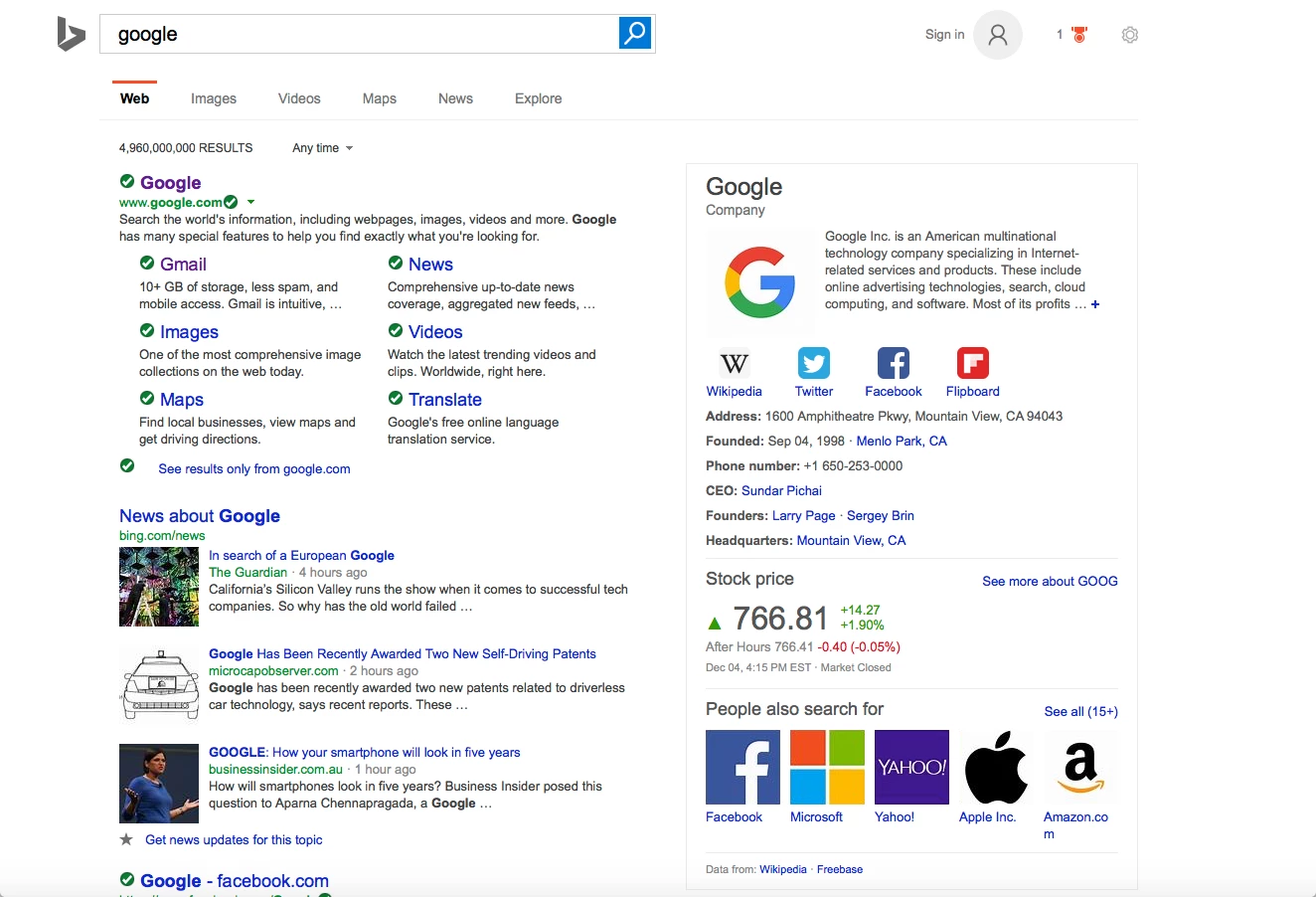
Where's my Search results green check mark?

  • December 6, 2015
  • 14 replies
  • 447 views

Forum|alt.badge.img+7
Problem:  As of today, when I get search engine results via Safari 9.0.1, I get a grey continuously spinning wheel instead of the green check mark in front of every result on the page. How can I correct this?
I had Geek Squad in- home repair 12/5 on macbook pro for Webroot glitch and general computer freeze.
I use standard Google, NOT Google Chrome and don't want to change.
Thanks for any tips.

Best answer by HelenDonnelly

Hi, Sherry
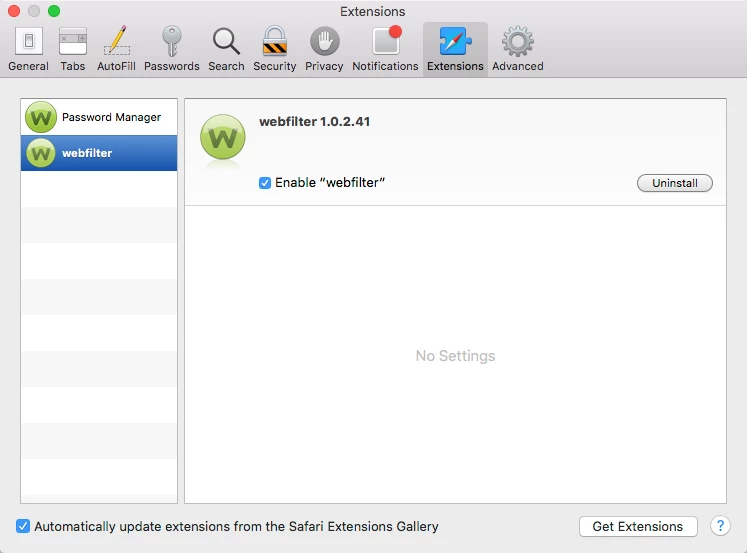
Problem solved! via phone/online, Geek Squad Tech cleared the Safari Preferences- Extensions  (Webroot) Webfilter box.
I have DSL and speed is not the highest but normally sufficient for me. In desperation I reset Safari thinking it might help. Nada. Just lost all my favicons- oh well....!   Webroot working splendidly.
Cordially,
Helen

14 replies

Ssherjj
Moderator
Forum|alt.badge.img+62
  • Moderator
  • December 6, 2015
Hello HelenDonnelly,
 
Welcome to the Webroot Community,
 
Would you please reboot your computer and see if this issue still occurs? I have a Mac running Webroot and I am not finding any issues with the Webfilter and spinning circles.
 
Could you go into Safari on the left upper side and open Preferences/Extensions and see if the Webfilter is still enabled. Let me know if it's not there or enabled.


Are you having any other issues with Webroot? May I ask if Geek Squad reinstalled Webroot and did they say that Webroot was a possible cause of your computer freezing?


Forum|alt.badge.img+7
  • Author
  • New Voice
  • December 7, 2015
Thanks for the prompt help.  I viewed my Safari Preferences - Webfilter is listed and the enable box is checked. Turned off the computer and then back on and still have those grey spinners. Any other suggestions? I am not as computer savvy as I should be, Sorry.
 

Forum|alt.badge.img+7
  • Author
  • New Voice
  • December 7, 2015
The Geek Squad scanned Webroot and fixed whatever glitch there was (computer froze and Webroot wouldn't repond along with every other application on the dock). 

edwin_eekelaers
Popular Voice
Forum|alt.badge.img+6
So it's fixed now..?

Ssherjj
Moderator
Forum|alt.badge.img+62
  • Moderator
  • December 7, 2015
Hello HelenDonnelly,
@ wrote:
Thanks for the prompt help.  I viewed my Safari Preferences - Webfilter is listed and the enable box is checked. Turned off the computer and then back on and still have those grey spinners. Any other suggestions? I am not as computer savvy as I should be, Sorry.
 
That's okay no need to be sorry...That's why we are here to try to help.;)
 
I think it's best to Submit a Support ticket so that they can look at this issue for you. This is a free service with a Webroot subscription. https://www.webrootanywhere.com/servicewelcome.asp 
 
You could also contact the GeekSquad again and tell them that Webroot still isn't working correctly. If you have already paid for their services.
 
For I think an uninstall/reinstall would fix this.
 
I will ping our MacThreat Reseacher @ do you have anything to add here?

Forum|alt.badge.img+7
  • Author
  • New Voice
  • December 7, 2015
Thanks, Sherry
I have a call into my Geek Squad Tech. I expect phone or online help sometime today.
Cordially,
Helen

Ssherjj
Moderator
Forum|alt.badge.img+62
  • Moderator
  • December 7, 2015
Hi Helen! That's super! Would you let us know if you get this resolved or not. Since I've owned a Mac and Webroot for 2 years now. I have never had the spinning circles in Safari. So I would be curious to know what the Geek Squad does for you if you don't mind. Sometimes it's hard to tell with Support because they go so fast.. ;)
 
Thank you, Have a nice day!

Wanderingbug
  • Retired Webrooter
  • December 7, 2015
hello HelenDonnelly,
In order to understand what is happening we will need you to contact our support team, as this could be related to a number of issues.  Geek Squad tech is helpful but this is an issue related to our backend so our support team will need to clarify what is happening.
 

Forum|alt.badge.img+7
  • Author
  • New Voice
  • December 7, 2015
I will definitely let you know, Sherry.
 

Ssherjj
Moderator
Forum|alt.badge.img+62
  • Moderator
  • December 7, 2015
@ wrote:
hello HelenDonnelly,
In order to understand what is happening we will need you to contact our support team, as this could be related to a number of issues.  Geek Squad tech is helpful but this is an issue related to our backend so our support team will need to clarify what is happening.
 
Thank you @ 
 
Do you understand what Wanderingbug has said to you? If this isn't resolved by Geek Squad then please contact the Webroot Support team..ok? 

Forum|alt.badge.img+7
  • Author
  • New Voice
  • December 7, 2015
Hi There!
Problem began Friday after I restarted computer late in the day. Everything froze after the Webroot icon in the dock refused to stop bouncing and the small icon in the status bar disappeared. I could not do anything with it. Hence, I got in-home Geek Squad Saturday. Ran either a  Webroot repair or re-install and scan as well as an apple ant-virus scan. Noticed subsequently that search engine results page displays grey spinning wheel in front of each item. There was usually a green checkmark. Evidently the search keeps running because the wheel never stops spinning. I can click and item and get to the website. Hope this explains it.
Cordially,
Helen

Ssherjj
Moderator
Forum|alt.badge.img+62
  • Moderator
  • December 7, 2015
Helen Thank you for that explanation.
 
If the Geek Squad does not resolve this then the Webroot Support team can help you. Support usually answers back within 24-48 hours and you can send this thread with this link below to Support so that you don't have to explain everything all over again. If you do have to resort to the Webroot Support.
 
https://community.webroot.com/t5/Webroot-SecureAnywhere-Antivirus/Where-s-my-Search-results-green-check-mark/m-p/230777#M21283


Forum|alt.badge.img+7
  • Author
  • New Voice
  • Answer
  • December 7, 2015
Hi, Sherry
Problem solved! via phone/online, Geek Squad Tech cleared the Safari Preferences- Extensions  (Webroot) Webfilter box.
I have DSL and speed is not the highest but normally sufficient for me. In desperation I reset Safari thinking it might help. Nada. Just lost all my favicons- oh well....!   Webroot working splendidly.
Cordially,
Helen

Ssherjj
Moderator
Forum|alt.badge.img+62
  • Moderator
  • December 7, 2015
Great news Helen. ..Thankyou for letting us know.

Have a great rest of your day!