Answer

Why is the download from the console still at the old version?

  • December 3, 2019
  • 3 replies
  • 379 views

10d
Popular Voice
Forum|alt.badge.img+19
  • Popular Voice

https://anywhere.webrootcloudav.com/zerol/wsasme.exe (from the console) still is at version 9.0.26.61 when 9.0.27.49 (Released November 11th, 2019) is mentioned in the release notes? I know automatic roll-out is ‘staged’ , but why stick to this old version for fresh downloads?

Best answer by TripleHelix

https://anywhere.webrootcloudav.com/zerol/wsasme.exe (from the console) still is at version 9.0.26.61 when 9.0.27.49 (Released November 11th, 2019) is mentioned in the release notes? I know automatic roll-out is ‘staged’ , but why stick to this old version for fresh downloads?


IMO I think it’s because v9.0.27.49 is buggy but have not heard anything directly from Webroot. I have this issue: https://community.webroot.com/community-101-2/webroot-keeps-shutting-down-then-rapidly-restarting-itself-dozens-of-times-throughout-the-day-340994#post350481


HTH,

3 replies

TripleHelix
Moderator
Forum|alt.badge.img+63
  • Moderator
  • Answer
  • December 3, 2019

https://anywhere.webrootcloudav.com/zerol/wsasme.exe (from the console) still is at version 9.0.26.61 when 9.0.27.49 (Released November 11th, 2019) is mentioned in the release notes? I know automatic roll-out is ‘staged’ , but why stick to this old version for fresh downloads?


IMO I think it’s because v9.0.27.49 is buggy but have not heard anything directly from Webroot. I have this issue: https://community.webroot.com/community-101-2/webroot-keeps-shutting-down-then-rapidly-restarting-itself-dozens-of-times-throughout-the-day-340994#post350481


HTH,


10d
Popular Voice
Forum|alt.badge.img+19
  • Author
  • Popular Voice
  • December 4, 2019

@TripleHelix Have you tried this (from another 9.0.27 thread):

“Thank you for contacting Webroot Support.

Webroot has received reports of symptoms similar to those that you have reported. We have updated our software version to address these reports and we ask that you follow the steps below to update Webroot.

1. Right-click the Webroot system tray icon. This is typically located next to the clock display.
2. In the context menu that appears, click "Shut down protection".
3. If asked to confirm whether you want to shut down Webroot, click "yes". If prompted, complete the CAPTCHA window and click Enter.
4. To install the update, click the link below to download the latest installer.

http://anywhere.webrootcloudav.com/zerol/wsaupd.exe


TripleHelix
Moderator
Forum|alt.badge.img+63
  • Moderator
  • December 5, 2019

@TripleHelix Have you tried this (from another 9.0.27 thread):

“Thank you for contacting Webroot Support.

Webroot has received reports of symptoms similar to those that you have reported. We have updated our software version to address these reports and we ask that you follow the steps below to update Webroot.

1. Right-click the Webroot system tray icon. This is typically located next to the clock display.
2. In the context menu that appears, click "Shut down protection".
3. If asked to confirm whether you want to shut down Webroot, click "yes". If prompted, complete the CAPTCHA window and click Enter.
4. To install the update, click the link below to download the latest installer.

http://anywhere.webrootcloudav.com/zerol/wsaupd.exe


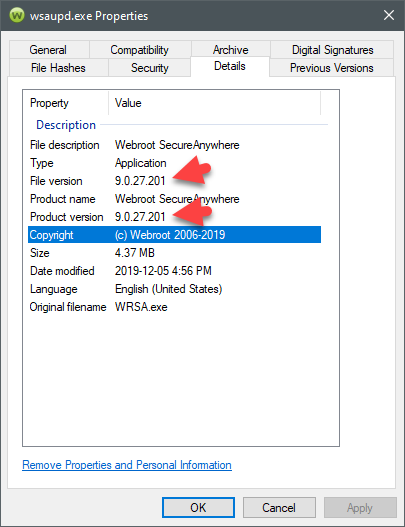
No I have not tried as I find v9.0.27.49 not to troublesome at this time. The new version is v9.0.27.201 but no info is supplied from Webroot? https://www.webroot.com/us/en/support/support-consumer-release-notes


See this post for more info: https://community.webroot.com/webroot-secureanywhere-antivirus-12/windows-10-1909-reporting-webroot-is-off-webroot-is-slowing-computer-341071#post351401