Will Webroot automatically scan all of my drives? If not, can I program it to do that?

  • October 17, 2015
  • 18 replies
  • 252 views

Will Webroot automatically scan all of my drives?  If not, can I program it to do that?

18 replies

Ssherjj
Moderator
Forum|alt.badge.img+62
  • Moderator
  • October 17, 2015
Hello ?
 
Welcome to the Webroot Community,
 
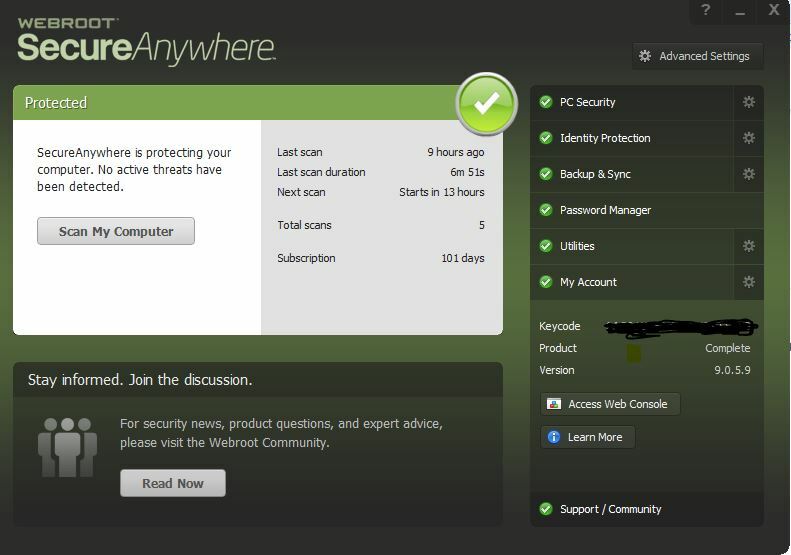
WSA scans the Windows installation drive by default but you can manually carry out a scan of other drives, etc. by doing a custom scan.
 
Open WSA and, in the main interface, click on the gear/cog on the right hand side of the "PC Security" tab. You should be presented with a new panel showing scan statistics and a "Scan my Computer" and "Custom Scan" button on the left hand side.
 
Click on "Custom Scan", and there you can click on "Add File/Folder", and can the select the specific drive you want to scan. After you have done that, just click on "Start Scan", and it will scan the drive selected.
 
EDIT: And as an after thought I might add, unfortunately there is no way at present to make WSA by default scan anynother drive a part from the C: drive/the drive that your OSis installed on.
 
Hope that helps?
 

tMc9072
Popular Voice
Forum|alt.badge.img+8
  • Popular Voice
  • October 17, 2015
That is a handy new addition. I will try to scan my external drives again and see if I get the same results.
 
Thanks Sherry,
 
Theresa
 

Ssherjj
Moderator
Forum|alt.badge.img+62
  • Moderator
  • October 17, 2015
Hi Theresa!
 
Have we introduced the PC User Guide>Here?

tMc9072
Popular Voice
Forum|alt.badge.img+8
  • Popular Voice
  • October 17, 2015
Hi ?,
 
No, first time viewing it. Is it incorporated in the Webroot software?
 
I did the custom scan and received the same results as when you suggested to right click and select Scan with Webroot.
 
One drive took almost 2 hours (but it had over 200,000 files. 😃 The other 3 drives are restricted for TV and Movies taped via WMC and it shuts down rather than scan those drives.
 
Its a nice feature though.
 
Thanks for showing it.
 
Best,
Theresa

tMc9072
Popular Voice
Forum|alt.badge.img+8
  • Popular Voice
  • October 17, 2015
How can I save that Help menu? Can't seem to find it in Webroot.

Ssherjj
Moderator
Forum|alt.badge.img+62
  • Moderator
  • October 17, 2015
Hello Theresa,
 
You can find the help section I believe in the Online Account Console and here is a great place as well with for help and guides. When you sign into the online Account Console ..look to the upper right corner where your emil is and click the drop down box and there will be a Help listed.

tMc9072
Popular Voice
Forum|alt.badge.img+8
  • Popular Voice
  • October 17, 2015
Hi Sherry,
 
Many thanks. I will definitely gather much knowledge about the product there. Got to run. Have a nice evening.
 
Theresa

Ssherjj
Moderator
Forum|alt.badge.img+62
  • Moderator
  • October 17, 2015
You are most welcme Theresa!:D
 
Have a gerat rest of your weekend!!

Ssherjj
Moderator
Forum|alt.badge.img+62
  • Moderator
  • October 18, 2015
Hi Again ?,
 
I realized I missed the Learn more when you View Webroot from the system tray!


I knew it was somewhere! 😃

tMc9072
Popular Voice
Forum|alt.badge.img+8
  • Popular Voice
  • October 18, 2015
HI ?,
 
I was searching for "help". Knew you'd find it. You're like me, relentless!!:catlol:
 
Happy Sunday,
Theresa
 
PS almost time to elninate DST. This makes Winter in NE dreary and dangerous. They say we are in for a record snowfall, etc. Last year, we had a blizzard every other day, I don't see how it can be worse than that. Time will tell. I'm praying.


tMc9072
Popular Voice
Forum|alt.badge.img+8
  • Popular Voice
  • October 18, 2015
Mine sends me here http://www.webroot.com/us/en/support/how-to-updates
 
It's not the same "help" topics.
 
Does it matter than you are on version.9 and I am still on .8?

Ssherjj
Moderator
Forum|alt.badge.img+62
  • Moderator
  • October 18, 2015
Hi ?,
 
No it doesn't matter that I know of, if you have a different version of Webroot. I just gave you links to all the help sites. So the one I gave you is okay. It's just a different way of helping Webrooters. More video I believe in explaining Webroot.


tMc9072
Popular Voice
Forum|alt.badge.img+8
  • Popular Voice
  • October 18, 2015
I was hoping to  bookmark the Help page so I can search, if necessary. The link that I am sent to has no search capabilities.
Lately, everything is getting more confusing and this stupid computer has been slower since I installed a new keyboard and mouse. I want to change my default browser from IE but they have all of my email, contacts, calendar under Outlook.com which is web based.

tMc9072
Popular Voice
Forum|alt.badge.img+8
  • Popular Voice
  • October 18, 2015
OK, I used Chrome and saved the page. When I was in IE, it did not even show the address bar fro your link, yet Chrome does. Weird browser.

Ssherjj
Moderator
Forum|alt.badge.img+62
  • Moderator
  • October 18, 2015

tMc9072
Popular Voice
Forum|alt.badge.img+8
  • Popular Voice
  • October 18, 2015
managed to save the link as a bookmark here it is: (I hope)  http://www.webroot.com/En_US/SecureAnywhere/PC/WSA_PC_Help.htm#OpeningPage.htm
 
Thanks very much Sherry. Another complicated way to get to a simple address. AARG

tMc9072
Popular Voice
Forum|alt.badge.img+8
  • Popular Voice
  • October 18, 2015
@ wrote:
Hi Theresa,
 
Have you svaed this link here? http://www.webroot.com/En_US/SecureAnywhere/PC/WSA_PC_Help.htm#OpeningPage.htm
TOO FUNNY We're on the same page!!!!

tMc9072
Popular Voice
Forum|alt.badge.img+8
  • Popular Voice
  • October 19, 2015
@ wrote:
Hello Theresa,
 
You can find the help section I believe in the Online Account Console and here is a great place as well with for help and guides. When you sign into the online Account Console ..look to the upper right corner where your emil is and click the drop down box and there will be a Help listed.
@I accessed the console for the first time in a long time as I never saw anything of interest. Well, the password manager was greyed out and it said something like "call Webroot Support" as the password had problems with the latest install. Not knowing if I bypassed something by retrieving the latest version rather than waiting (who likes to wait?). Well, I'll be darned but A real, live person came to the phone! I can't tell you what a pleasurable experience it was. Never have I contacted any "support" and was made to feel like a complete idiot. This young man answered all of my questions and even a few that I didn't ask politely, calmly and efficiently. I tried the Cloud and realized it was slowing down my PC in downloading (I copied about 300 music CD's along with other stuff and hit 24mg. Then, I thought, I don't need the Cloud. Well, the icon lists along with all of my other drives and there is no way to remove it. Ugh. Anyway, he was extremely helpful and didn't hang up until he was sure all of my issues had been addressed. I wish I could give him kudos. There is a link in the email generated to take a survey (which I will do later). It is definitely a handy tool for passwords. Wanted to pass along the Good News to the folks @ Webroot who troubleshoot. Many, many thanks. You are the best!!!
 
Theresa