Windows 10 Update 1511 Removed Right Click to Scan File Feature

  • November 20, 2015
  • 1 reply
  • 37 views

Forum|alt.badge.img+3
When I right click on a filename, San With Winder Defender... option now replaces the Scan With Webroot option.  And, Windows Defender is disabled when Webroot is installed.  How can I restore the option to use Webroot?
 
Webroot reinstall does not fix the problem.

1 reply

Baldrick
Gold VIP
  • Gold VIP
  • November 20, 2015
Hi thewamp
 
Apologies but we seem to have overlooked your post. Lets see if we can help now.
 
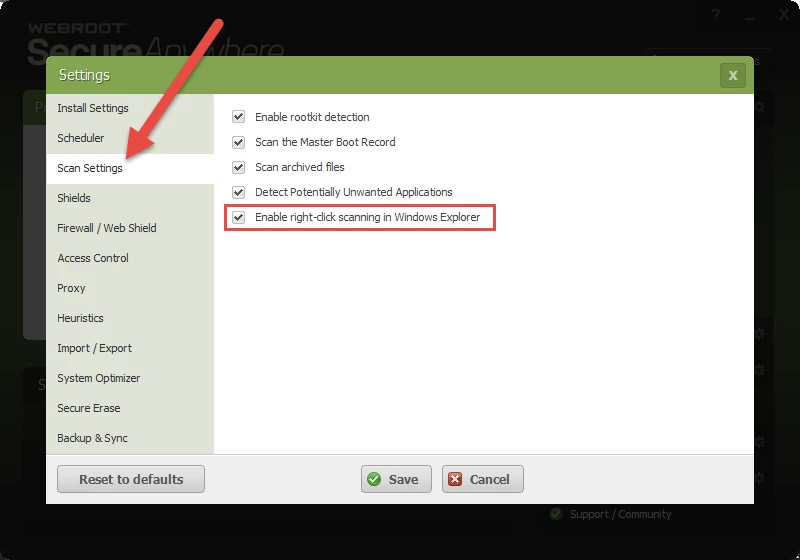
Would you check under 'Advanced Settngs' (top right hand corner of the main app panel > Scan settings)m then as per the screenshot below:


If the option is not checked then please check it and click on 'Save', enter the CAPTCHA characters required and then check to see if the option is now avaialble in the right click menu.
 
If the option is checked then please UNCHECK it, and click on 'Save', entering the CAPTCHA characters required, then immediately CHECK the option and click on 'Save' (there should be no need for the CAPTCHA characters this time), and then check to see if the option is now avaialble in the right click menu.
 
Let us know if either of these options resolves the issue and if not then we will look to help further.
 
Regards, Baldrick