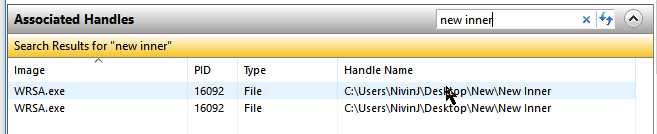
I'm having an issue with WRSA.exe locking files inside newly created subfolders.
Steps to reproduce:
1. Create a folder on the desktop
2. Create a subfolder within the the new folder
3. Create a blank text file within the subfolder
4. Try to delete the original folder and (after granting UAC permission) Windows will report that I need permission from myself to delete the folder. If I look in Resource Manager I can see WRSA.exe has open handles to the subfolder which is what is preventing the delete. I have to then restart the whole machine so that the handles are released before I can delete the folder.
Versions: WRSA.exe 9.0.18.34
Windows: Windows 10 Enterprise 1709 build 16299.192
Best answer by TripleHelix
@wrote:
I can reproduce this. I have to sign out and in to get the folders released so they can be deleted.
My problem was resolved by running this file, as suggested in other reply. http://anywhere.webrootcloudav.com/zerol/wsainstall.exe
After update I have
WRSA.exe Version 9.0.19.43.
and that is working. I can delete the nested folders and files created on desktop.
@wrote:
My problem was resolved by running this file, as suggested in other reply. http://anywhere.webrootcloudav.com/zerol/wsainstall.exe
After update I have
WRSA.exe Version 9.0.19.43.
and that is working. I can delete the nested folders and files created on desktop.
It was pushed by sysadmin, I didn't think I had permission to update it since I don't have permission to exit it or disable any of the functions. It says it is managed from Web Console, which I don't have access to.
Where is the "update now" button in the console? most of the apps I use automatically check and notify when an update is available. Why doesn't webroot do that?
@wrote:
It was pushed by sysadmin, I didn't think I had permission to update it since I don't have permission to exit it or disable any of the functions. It says it is managed from Web Console, which I don't have access to.
Where is the "update now" button in the console? most of the apps I use automatically check and notify when an update is available. Why doesn't webroot do that?