Solved

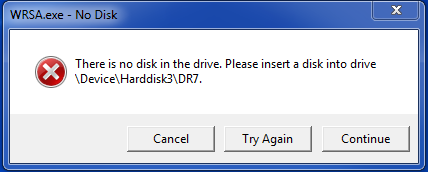
WRSA.exe - No Disk. There is no disk in the drive. Please insert...

  • December 27, 2015
  • 3 replies
  • 104 views

Hi,
I just started getting multiple errors during scans. (See image below.) It pops up several times in a row. This never happened before. I'm running Webroot Secure Anywhere on a 64-bit system running Windows 7.
Thanks for your help,
 

Best answer by Baldrick

Hi DMB
 
Welcome to the Community Forums.
 
Have you just installed WSA and then this has started or have you had WSA installed for some time?
 
Either way I would recommend that you uninstall WSA and then undertake a clean reinstall to see if that will resolve the issue for you. Please follow these instruction carefully:
 
  • Make sure you have a copy of your Keycode
  • KEEP the computer online for Uninstall and Reinstall to make sure it works correctly
  • Download a Copy Here (Best Buy Subscription PC users click HERE)
  • Uninstall WSA and Reboot
  • Install with the new installer, enter your Keycode and do NOT import any settings if offered by the installer; you can set it up as you like once it's done
  • Let it finish it's install scan
  • Reboot once again
 
If this fails to resolve the problem, you may need to contact Support for assistance.
 
If your subscription is directly through Webroot, you will need to contact Webroot Support.  You can do so by submitting a Support Ticket if you have not already done so, or by phone during business hours.  (The online Ticketing system is manned 24/7)
 
If your subscription is through Best Buy Subscription Software services, you may need to call them at 1-800-GEEK-SQUAD.
 
Regards, Baldrick

3 replies

Baldrick
Gold VIP
  • Gold VIP
  • Answer
  • December 27, 2015
Hi DMB
 
Welcome to the Community Forums.
 
Have you just installed WSA and then this has started or have you had WSA installed for some time?
 
Either way I would recommend that you uninstall WSA and then undertake a clean reinstall to see if that will resolve the issue for you. Please follow these instruction carefully:
 
  • Make sure you have a copy of your Keycode
  • KEEP the computer online for Uninstall and Reinstall to make sure it works correctly
  • Download a Copy Here (Best Buy Subscription PC users click HERE)
  • Uninstall WSA and Reboot
  • Install with the new installer, enter your Keycode and do NOT import any settings if offered by the installer; you can set it up as you like once it's done
  • Let it finish it's install scan
  • Reboot once again
 
If this fails to resolve the problem, you may need to contact Support for assistance.
 
If your subscription is directly through Webroot, you will need to contact Webroot Support.  You can do so by submitting a Support Ticket if you have not already done so, or by phone during business hours.  (The online Ticketing system is manned 24/7)
 
If your subscription is through Best Buy Subscription Software services, you may need to call them at 1-800-GEEK-SQUAD.
 
Regards, Baldrick

  • Author
  • Fresh Face
  • December 27, 2015
Hi Baldrick,
 
That worked! Thank you so much for your help!

Baldrick
Gold VIP
  • Gold VIP
  • December 27, 2015
Hi DMB
 
You are most welcome. Glad to hear that the issue is sorted for you. :D
 
Regards, Baldrick