

I'm confused about the settings for Identity Shield. There are 3 different sections.
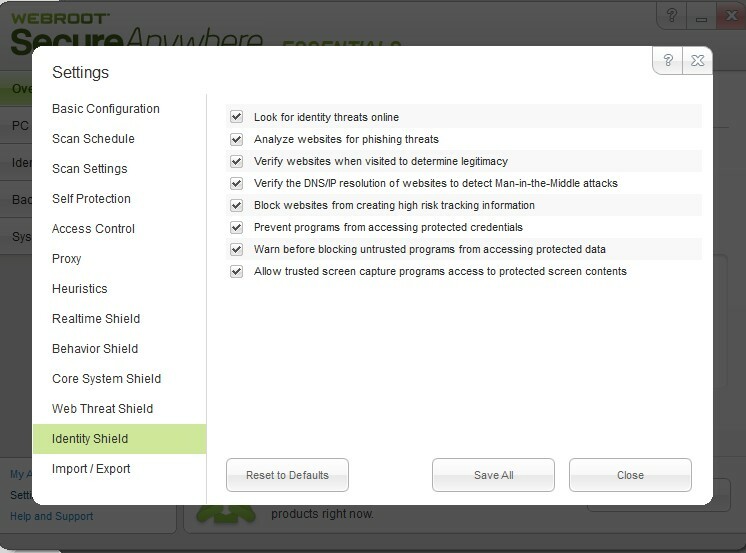
There is the Identity Shield settings tab (DNS, screen capture, man-in-middle, etc)
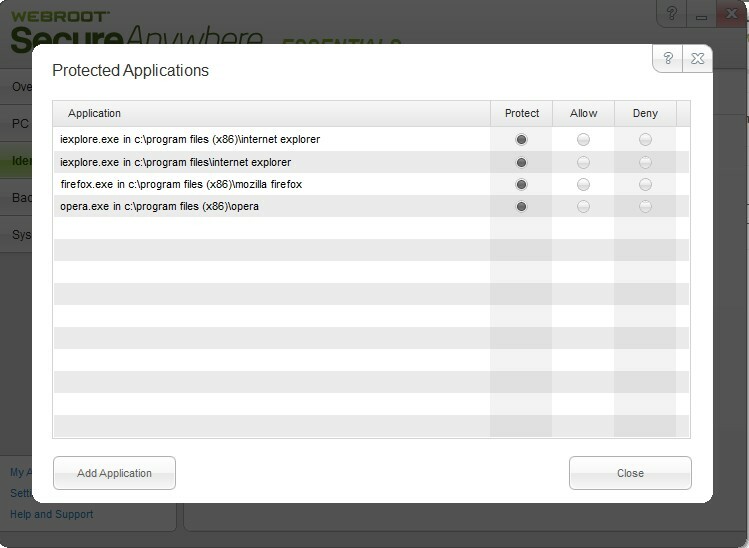
There is the Protected Application list
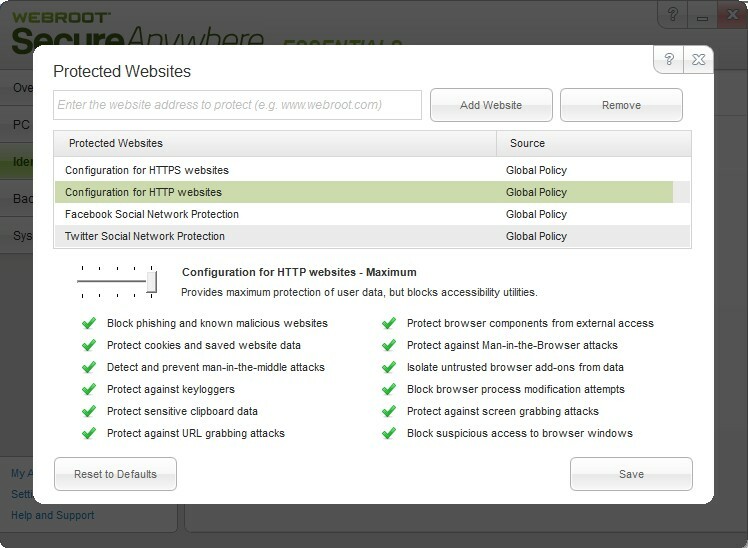
There is the Protected Websites list
So, my questions are:
1) If an application is not listed in the Protected Apps list, do any of the settings from the Shield tab or the Protected Websites apply when using that app?
2) Are the Protected Website settings active when using *any* browser? If not, which browsers are supported? Must they appear in the Protected Apps list to have this protection?
3) In the Shield Tab settings one option is "prevent programs from accessing protected credentials". What are protected credentials and where/how are they determined?
4) Similar question to #3 but for the "Allow trusted screen capture programs access to protected screen contents". Where is the list of trusted screen capture programs and how is it determined what is protected screen contents?
5) The Shields Setting tab and the Protected Website section have some of the same settings. For example, for phishing and for man-in-the-middle. Which takes precedence?
Solved
Confused by Identity Shield settings
Best answer by JimM
Hi ft33,
1) If an application is not on the protected applications list, it is not protected. Websites are determined based on what we can see from an active application.
2) Supported browsers are IE, Firefox, Chrome, and Opera. Those are listed here in the help file as well.
3) It prevents untrusted applications from accessing a particular area in the system where credentials are stored. It is discrete from antikeylogging.
4) If it's trusted, that means it has been marked good in our database. "Protected" means it is a protected website/application in the foreground.
5) The option under Settings will control it globally but you can control it on a specific type of domain under Protected Websites. The main use case would be to allow a set of URLs past the phishing protection but not past the antimalware protection.
If you have any other quesions, please let us know. 🙂
1) If an application is not on the protected applications list, it is not protected. Websites are determined based on what we can see from an active application.
2) Supported browsers are IE, Firefox, Chrome, and Opera. Those are listed here in the help file as well.
3) It prevents untrusted applications from accessing a particular area in the system where credentials are stored. It is discrete from antikeylogging.
4) If it's trusted, that means it has been marked good in our database. "Protected" means it is a protected website/application in the foreground.
5) The option under Settings will control it globally but you can control it on a specific type of domain under Protected Websites. The main use case would be to allow a set of URLs past the phishing protection but not past the antimalware protection.
If you have any other quesions, please let us know. 🙂






Login to the community
No account yet? Create an account
Enter your E-mail address. We'll send you an e-mail with instructions to reset your password.