
Solved
How do I initialize password manager in chrome?

I've imported my passwords on line but don't have a webroot toolbar in Chrome. I can seem to find how to install it. Any suggestions?
Best answer by Ssherjj
Hello RexHavock
Welcome to the Webroot Community,
This sometimes does happen and to try to resolve it you can try running the Toolbarfix tool. You can download it for here.
Once downloaded launch it by clicking on the executable, and you should see the following, if then that is fine and you should click on 'Run':
which should then take you to the following dialog:
on which you should choose/check the option 'Repair/Install the Webroot Toolbar' and then press 'Start'.
That should initiate the fix process and you just have to wait for it to finish, close the dialog and then check in your browser to see if the Password Manager Toolbar icon is now visible. If the fix has been successful you should see the following greyed out icon in a toolbar at the top of the IE browser page:
One then double clicks on that so that the login dialog is presented, etc.
Have a look at the PC User Guide. in using Password Manager. http://www.webroot.com/En_US/SecureAnywhere/PC/WSA_PC_Help.htm#C7_PasswordManagement/CH7_PasswordMan...
And here:
https://community.webroot.com/t5/Webroot-SecureAnywhere-Internet/Transferring-LastPass-passwords-to-the-Webroot-password-manager/ta-p/37694
Welcome to the Webroot Community,
This sometimes does happen and to try to resolve it you can try running the Toolbarfix tool. You can download it for here.
Once downloaded launch it by clicking on the executable, and you should see the following, if then that is fine and you should click on 'Run':
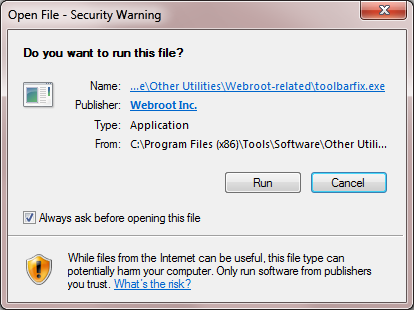
which should then take you to the following dialog:
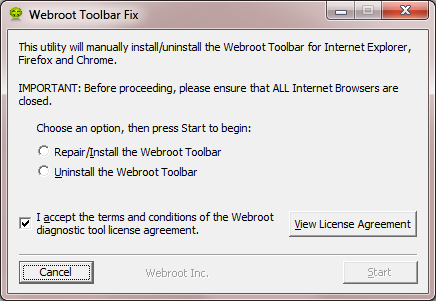
on which you should choose/check the option 'Repair/Install the Webroot Toolbar' and then press 'Start'.
That should initiate the fix process and you just have to wait for it to finish, close the dialog and then check in your browser to see if the Password Manager Toolbar icon is now visible. If the fix has been successful you should see the following greyed out icon in a toolbar at the top of the IE browser page:
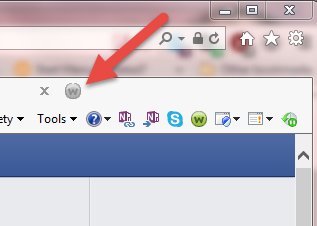
One then double clicks on that so that the login dialog is presented, etc.
Have a look at the PC User Guide. in using Password Manager. http://www.webroot.com/En_US/SecureAnywhere/PC/WSA_PC_Help.htm#C7_PasswordManagement/CH7_PasswordMan...
And here:
https://community.webroot.com/t5/Webroot-SecureAnywhere-Internet/Transferring-LastPass-passwords-to-the-Webroot-password-manager/ta-p/37694



Login to the community
No account yet? Create an account
Enter your E-mail address. We'll send you an e-mail with instructions to reset your password.