How do you reset the Firewall Shield? My husband somehow has blocked FireFox.

  • January 12, 2016
  • 3 replies
  • 56 views

My husband clicked on a warning without reading and has blocked FireFox.  If I turn the Webroot Firewall Off I can get in FireFox.  Otherwise I am blocked.   I don't have any issue with Internet Explorer, just Firefox so I know he must have added Firefox to the Firewall block options but I can't find where to remove it??


3 replies

RetiredTripleHelix
Gold VIP
Forum|alt.badge.img+56
Hello and Welcome to the Webroot Community!
 
Can you tell me what version of Windows you have like is it Windows 7 or Windows 10?
 
Thanks,
 
Daniel ;)
 
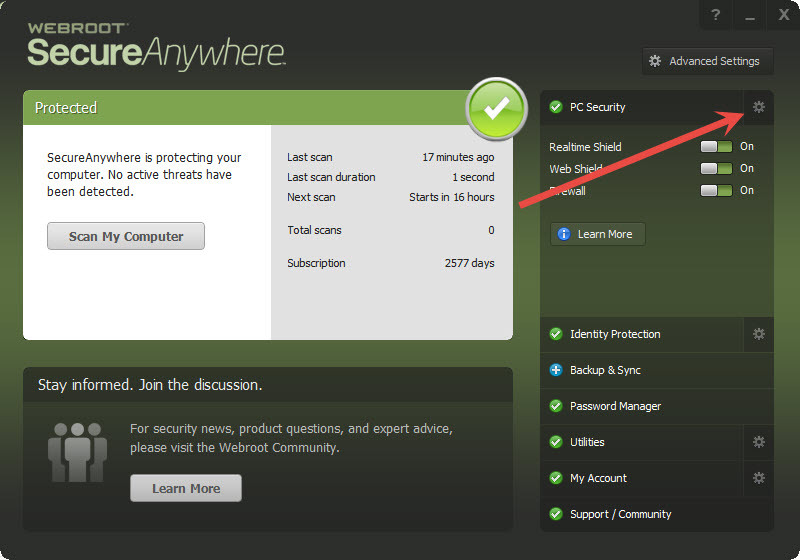
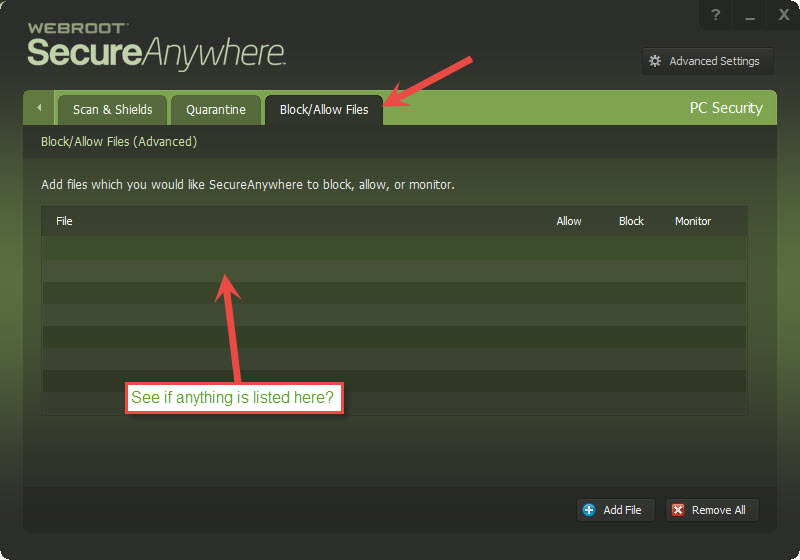
Can you check here:


RetiredTripleHelix
Gold VIP
Forum|alt.badge.img+56
Also if you have Windows 7 and older look here and unblock: http://www.webroot.com/En_US/SecureAnywhere/PC/WSA_PC_Help.htm#C4_Firewall/CH4c_ManagingActiveConnections.htm but if you have Windows 8 or Windows 10 you will have to do a clean reinstall.
 
Please follow the steps closely!
 
  • Make sure you have a copy of your 20 Character Alphanumeric Keycode! Example: SA69-AAAA-A783-DE78-XXXX
  • KEEP the computer online for Uninstall and Reinstall to make sure it works correctly
  • Download a Copy Here (Best Buy Subscription PC users click HERE)
  • Uninstall WSA and Reboot
  • Install with the new installer, enter your Keycode and don't import any settings if asked to as you can set it up as you like once it's done
  • Let it finish it's install scan
  • Reboot once again
Please let us know if that resolves your issue?
 
Thanks,
 
Daniel


RetiredTripleHelix
Gold VIP
Forum|alt.badge.img+56
May I ask what version of Firefox you have as I wonder why you would get a message and accidentally block Firefox as i never seen a message about Firefox on my system so you may need to Submit a Support Ticket to see if it was an infection that was blocked?
 
See here for the latest Firefox version: https://community.webroot.com/t5/Security-Industry-News/Firefox-43-0-4/td-p/235012 and you should only get it from here!
 
Thanks as I will be going offline for the night!
 
Daniel 😉