
Hi All
Have just noticed that the automated transfer of previous 'Essentials' users to full 'Complete' functionality has occurred for me...and so I now have the Passwrod Management fucntionality showing up as available in my broswer(s).
Have been 'playing' with it and am yet to decide if I plan to keep it enabled.
However, one thing is bugging me...namely the fact that despite having ticked the 'Remember my Password' check box on the sign in dialog, every time I reload my browser (IE9 mainly) I have to re-enter my password to enable the Password Management functionality...which somewhat defeats the object of the 'Remember my Password' option....IMHO.
Is anyone else coming across this? Is this a known issue? Does anyone have a solution?
Many thanks in anticipation of a response.
Regards
Baldrick
Answer
Password Management & Browser Login!


Best answer by RetiredTripleHelix
To Quote https:///t5/user/viewprofilepage/user-id/212.
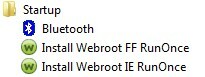
I've found the answer to this: these shortcuts are required. They're part of the WSA branded Lastpass to ensure it can load into each user account on startup, otherwise you may not be able to use it in each browser for each user.
This looks to be a fairly recent change as I have them on my system as well, but the intent is to make the user switching process more reliable so that it always works in each browser.
Hope that helps! :)
TH
I've found the answer to this: these shortcuts are required. They're part of the WSA branded Lastpass to ensure it can load into each user account on startup, otherwise you may not be able to use it in each browser for each user.
This looks to be a fairly recent change as I have them on my system as well, but the intent is to make the user switching process more reliable so that it always works in each browser.
Hope that helps! :)
TH
Webroot SecureAnywhere Complete Beta Tester v9.0.24.49, imaged by Macrium Reflect v7.2







Login to the community
No account yet? Create an account
Enter your E-mail address. We'll send you an e-mail with instructions to reset your password.