
Solved
Unable to save some passwords

I have windows 7 and IE. I have been able to save all my mail passwords to webroot plus one financial and one shopper. However, I have been unable to save my passwords to Webroot for one bank and one drug store chain. I am always singned into Webroot when I attempt to save the passwords. I have tried over many days and hours but I NEVER EVER get the prompt at the top or bottom of the screen that asks me if I want to save the password or after I have entered the site the message that the information as been captured and do I want to save the password. I have run the totural many times to check what I may have done wrong and no help there. I even turned off the 'popup' in case that was the problem but no difference - still no prompts to save the passwords. I have tried manual site entry but that does not work. As I inncidated above I have 4 email accounts that saved passwords without a problem. One fiancial site and one shopper site that saved without problems. The other financial (bank) site and drugstore login in passwords will not work for me. Any suggestions?
Best answer by Baldrick
Hi KenG
No worries...here is what you do.
Note: This will not work in Microsoft Edge. Webroot is currently working on a fix for this. Here is a KB article about this HERE.
You can download the Toolbarfix utility for here. Once downloaded launch it by clicking on the executable, and you should see the following, if then that is fine and you should click on 'Run':
which should then take you to the following dialog:
on which you should choose/check the option 'Repair/Install the Webroot Toolbar' and then press 'Start'.
That should initiate the fix process and you just have to wait for it to finish, close the dialog and then check in your browser to see if the Password Manager Toolbar icon is now visible. If the fix has been successful you should see the following greyed out icon in a toolbar at the top of the IE browser page:
One then double clicks on that so that the login dialog is presented, etc.
Please check the above out and come back if anything is not clear or if it does not help/respond to your query.
Regards, Baldrick
No worries...here is what you do.
Note: This will not work in Microsoft Edge. Webroot is currently working on a fix for this. Here is a KB article about this HERE.
You can download the Toolbarfix utility for here. Once downloaded launch it by clicking on the executable, and you should see the following, if then that is fine and you should click on 'Run':
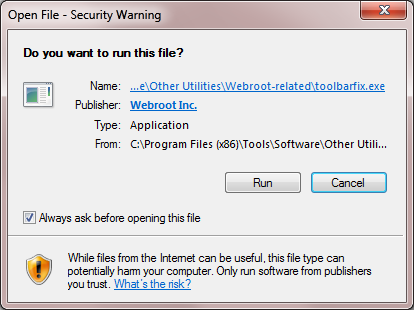
which should then take you to the following dialog:
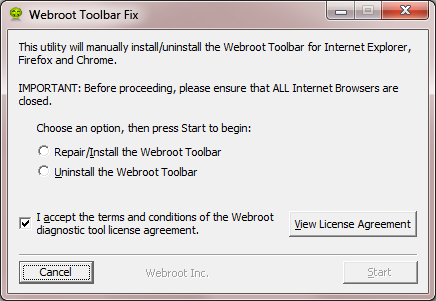
on which you should choose/check the option 'Repair/Install the Webroot Toolbar' and then press 'Start'.
That should initiate the fix process and you just have to wait for it to finish, close the dialog and then check in your browser to see if the Password Manager Toolbar icon is now visible. If the fix has been successful you should see the following greyed out icon in a toolbar at the top of the IE browser page:
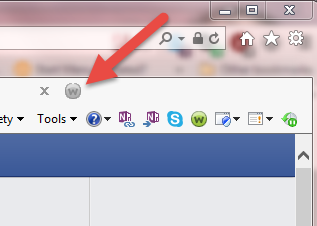
One then double clicks on that so that the login dialog is presented, etc.
Please check the above out and come back if anything is not clear or if it does not help/respond to your query.
Regards, Baldrick


Login to the community
No account yet? Create an account
Enter your E-mail address. We'll send you an e-mail with instructions to reset your password.